33
Partition & Security
This feature allows you to create a secure password-protected area on the T.sonic for your personal files. You
can adjust the size of Public and Private areas, and add a password to protect the Private area. Data stored in
the Private area will be kept secure and can only be accessed with your password.
¾ Partition & Security is only supported in Windows
®
Me, 2000, XP and Vista
¾
The PC-Lock function is not supported in the Mac™ or Linux™ Operating Systems.
¾
To use Partition & Security, you must log in to the Windows OS with Administrator rights.
Partitioning the T.sonic into Public and Private Areas
WARNING! Adjusting the partition size will erase all data on T.sonic.
Please back up your data before using this feature.
1. Start the T.sonic Utility (
->
Programs -> T.sonic Utility)
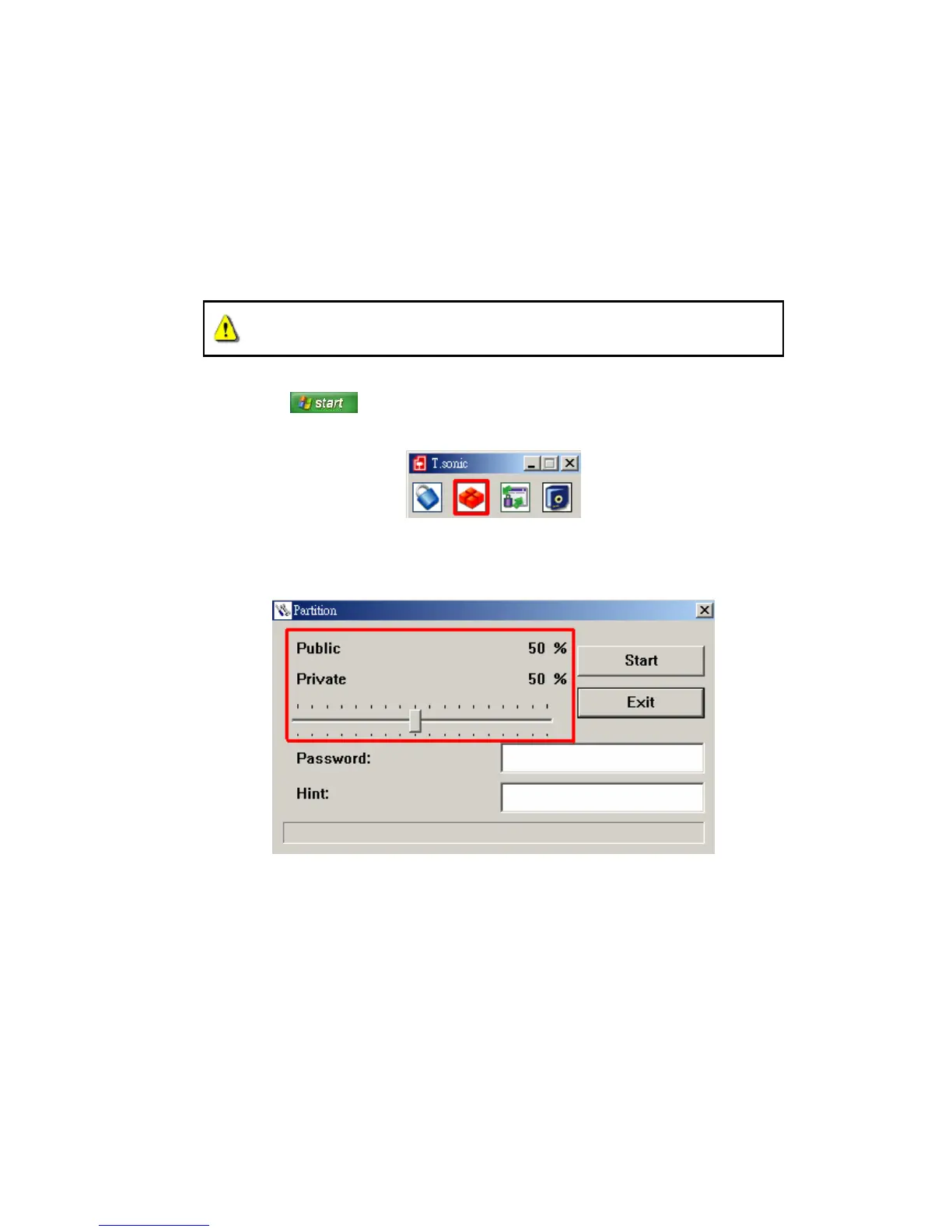
2. Click on the “Partition” button in the T.sonic Utility window.
Figure 22: T.sonic Utility – Partition
3. The Partition window will appear. Move the slider left and right to adjust the size of the Public and Private
areas on your T.sonic.
Figure 23: Create a Partition
4. To protect the Private area, choose a password and a “Hint” (in case you forget your password)
5. Click the “Start” button to complete the Partition & Security setup.















 To Next Page