5
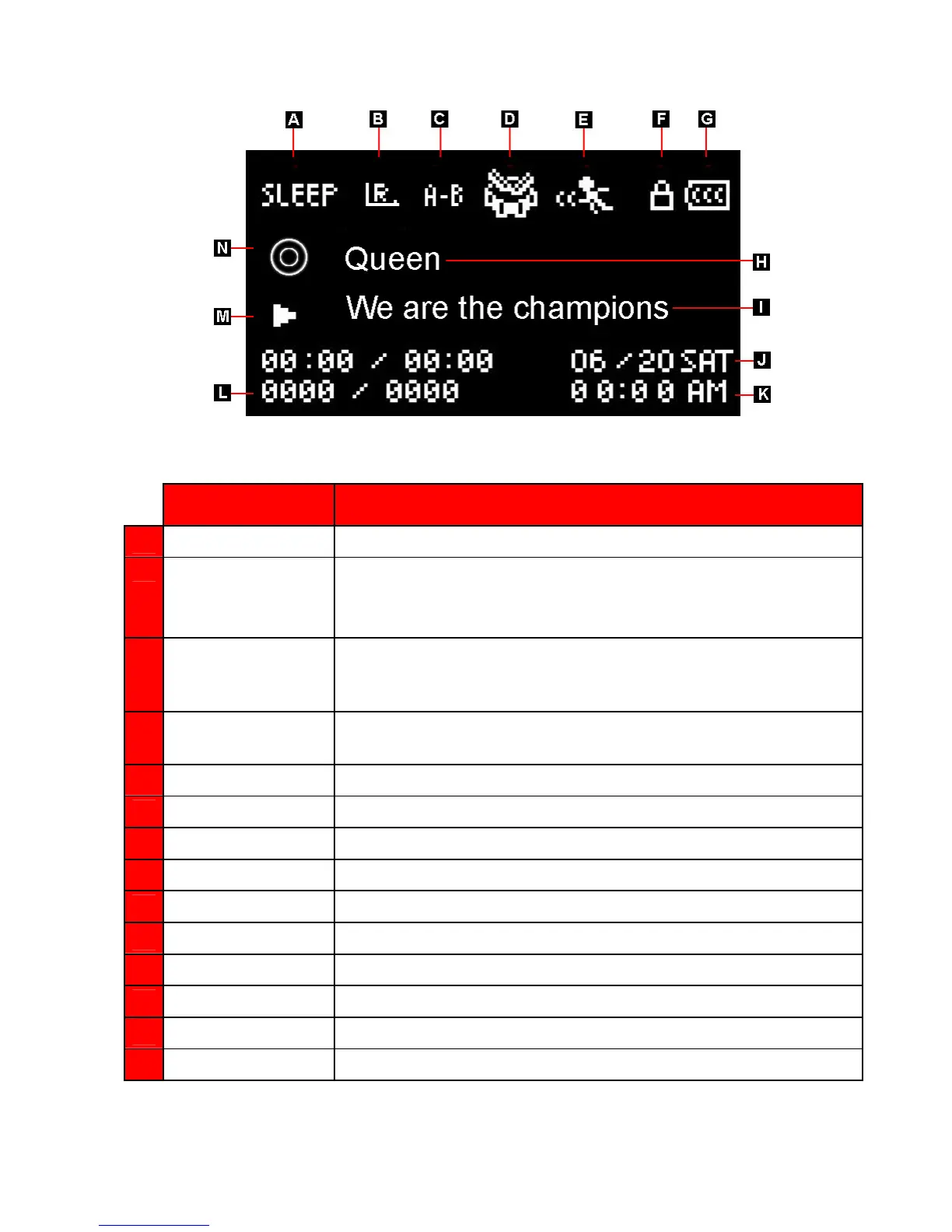
OLED Display
Figure 2: OLED Display
ICON INDICATION
A
Sleep Mode Indicates the T.sonic is set to auto Power OFF
B
Repeat/Shuffle
Modes
Indicates the Repeat/Shuffle modes: Normal, Repeat One, Repeat All,
Shuffle and Repeat Folder
C A-B Repeat Indicates the A-B Repeat mode
D EQ Mode
Indicates the Equalizer (EQ) mode: Normal, Classical, Rock, POP,
Jazz, Bass and USER EQ
E
Play Speed Indicates the playback speed
F
Hold Indicates when the Hold switch is enabled
G
Battery Life
Indicates the battery power level
H
Album/Artist/Lyrics Displays album title, artist name, or lyrics
I
Song Title Displays song title or file name
J
Date Today’s date and day
K
Time Displays the current time (RTC)
L
Track Info Indicates current track number and playtime statistics
M
Play Status Indicates Play, Pause, Fast-Forward or Rewind status
N
Text Display Mode Indicates whether album title, artist name, or lyrics is shown















 To Next Page