16
Repeat Mode
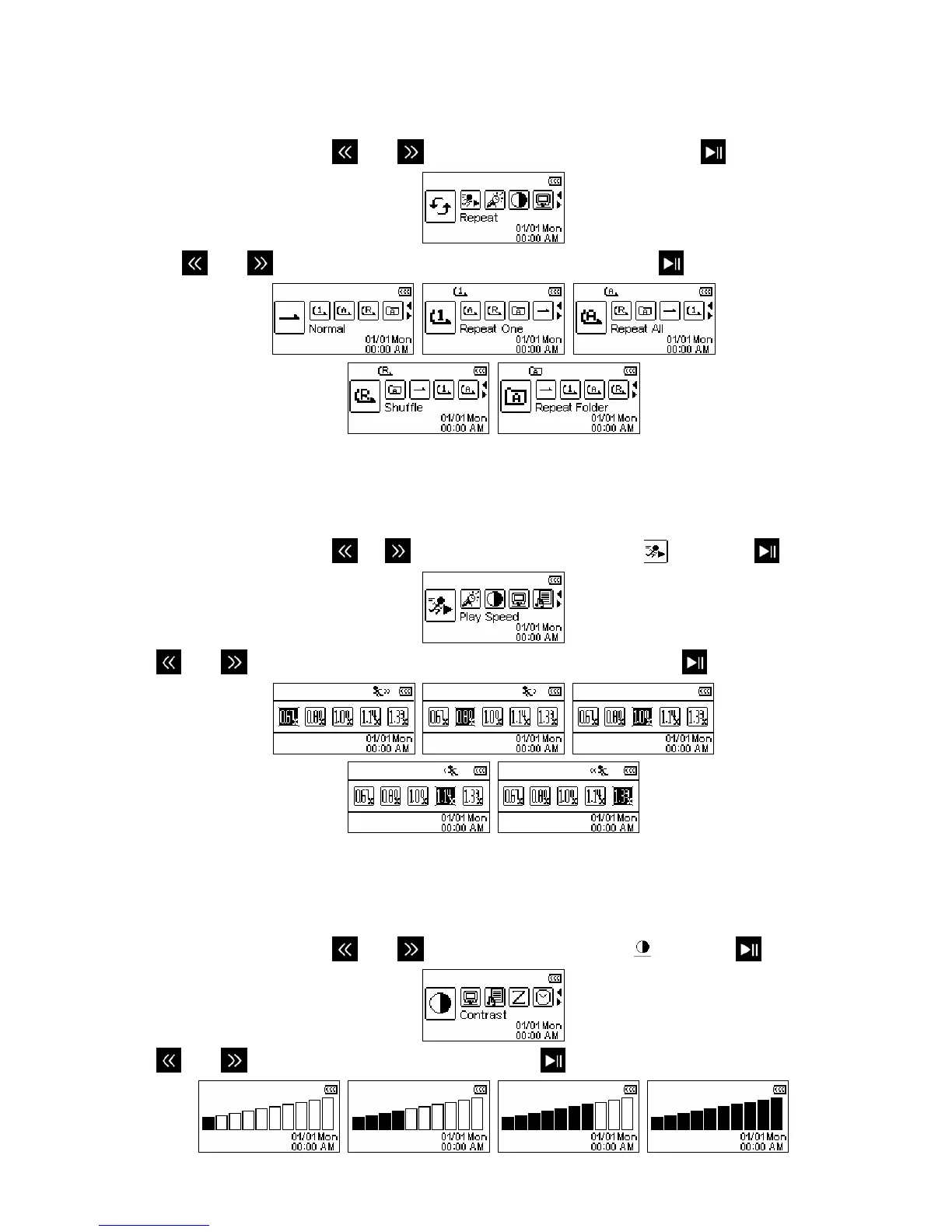
There are five repeat modes to choose from:
Normal, Repeat One, Repeat All, Shuffle and Repeat Folder
1. In the SETTINGS menu, use
and to select the “Repeat” icon and press
.
2. Use the
and buttons to select the desired repeat mode and press
to confirm.
Play Speed
The speed at which an audio file is played can be increased or decreased. Playback speeds can be set to 0.67x
(very slow), 0.8x (slow), 1.0x (normal), 1.14x (fast) and 1.33x (very fast).
1. In the SETTINGS menu, use
or to select the “Play Speed” icon
and press
.
2. Use
and to switch between the 5 playback speed settings and press to confirm.
Contrast
The contrast of the OLED display can be adjusted for brighter or darker text. Higher contrast levels will drain the
battery faster, while lowering the contrast level will provide better battery life.
1. In the SETTINGS menu, use
and to select the “Contrast” icon and press .
2. Use
and to increase or decrease contrast. Press to confirm the new contrast level.


 To Next Page