TRENDnet User’s Guide
TEW-820AP
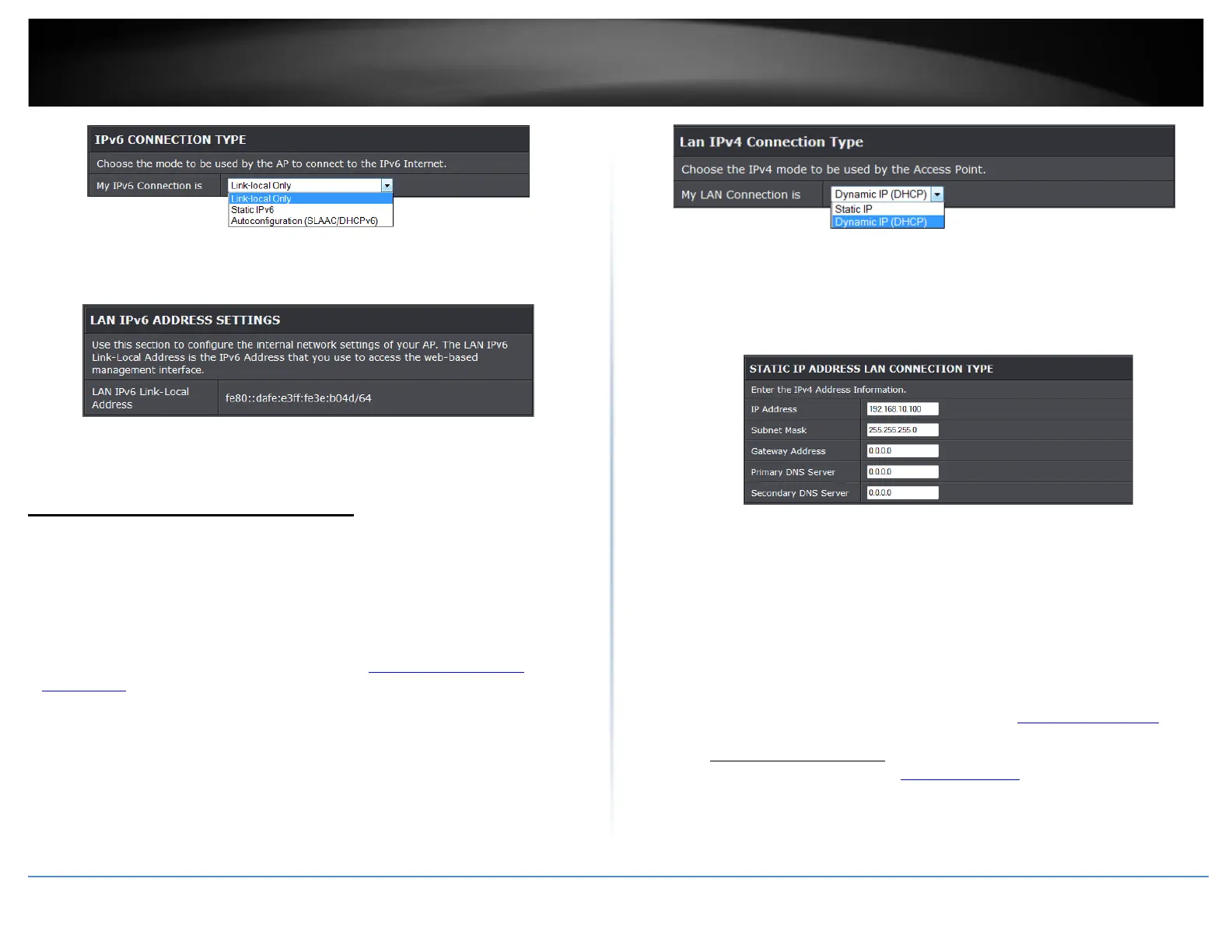
• Link-Local Only
• Auto-configuration (SLAAC/DHCPv6)
• Static IPv6
• LAN IPv6 Link-Local Address: Current IPv6 address applied to your access point.
Change your access point IP address
Main > Network Settings
Typically, the access point IP address settings only needs to be changed when
connecting the access point to your network and configuring to the device to be in the
same IP network as your existing network.
Default Access Point IP Address Settings: 192.168.10.100 / 255.255.255.0
1. Log into your access point management page (see “
Access your access point
management page” on page 8).
2. Click on Main, and click on Network Settings.
3. Under Connection Type, click the drop-down list to select the access point IP address
settings.
• Dynamic IP (DHCP): Choose the option to set the access point to automatically
obtain IP address settings from a DHCP server
Note: Typically, your network router has a built-in DHCP server.
• Static IP: Choose this option to manually configure the IP address settings of the
access point.
• IP Address: Enter the new access point IP address. (e.g. 192.168.0.100)
• Subnet Mask: Enter the new access point subnet mask. (e.g. 255.255.255.0)
• Gateway Address: Enter the default gateway address of your network. This
parameter is required for the access point to access Internet for functions such as e-
mail notifications.
Note: Typically, your network router IP address is used as the default gateway
address to access the Internet e.g. 192.168.10.1)
4. To save changes, click Apply.
Note: You will need to access your access point management page using your new
access point IP address. (e.g. Instead of using the default http://192.168.10.100
your
new access point IP address will use the following format using your new IP
address
http://(new.ipaddress.here) to access your access point management page.
You can also use the default login URL http://tew-820AP
Your access point can be used as a DHCP (Dynamic Host Configuration Protocol) server
to automatically assign an IP address to each wireless device connected. The DHCP
© Copyright 2014 TRENDnet. All Rights Reserved.
32










 To Next Page