TRENDnet User’s Guide
TEW-820AP
View your access point log
Status > Log
Your access point statistics can provide a quick over view of the access point’s status.
1. Log into your access point management page (see “
Access your access point
management page” on page 8).
2. Click on Status, and click on Log.
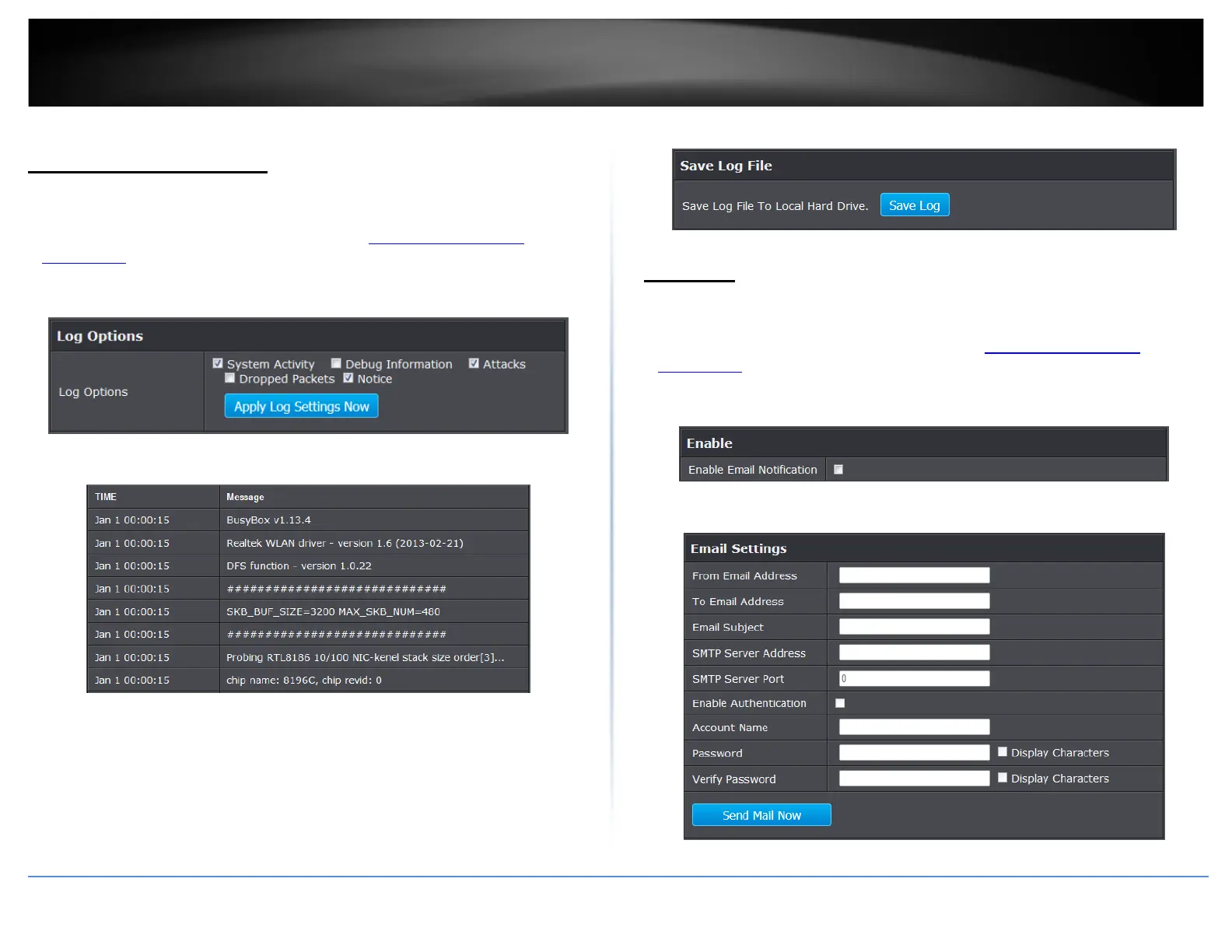
3. Under Log Options section, select the log types you would like to be displayed.
4. Click Apply Log Settings Now to save settings.
• First Page: Click to advance to the first log page
• Last Page: Click to advance to the last log page
• Previous Page: Click to view the previous log page
• Next Page: Click to view the next log page
• Clear Log: Click to clear all log entries
• Refresh: Click to refresh log entries
5. To save log entries click Save Log button.
Email logs
Tools > Email settings
Your access point can email you log entries.
1. Log into your access point management page (see “
Access your access point
management page” on page 8).
2. Click on Tools, and click on Email Settings.
3. Under Enable section, select the option to enable email logging.
4. Review the Email setting section and click Save Settings to Apply.
• From Email Address: Enter the recipient email address to use
© Copyright 2014 TRENDnet. All Rights Reserved.
37








 To Next Page