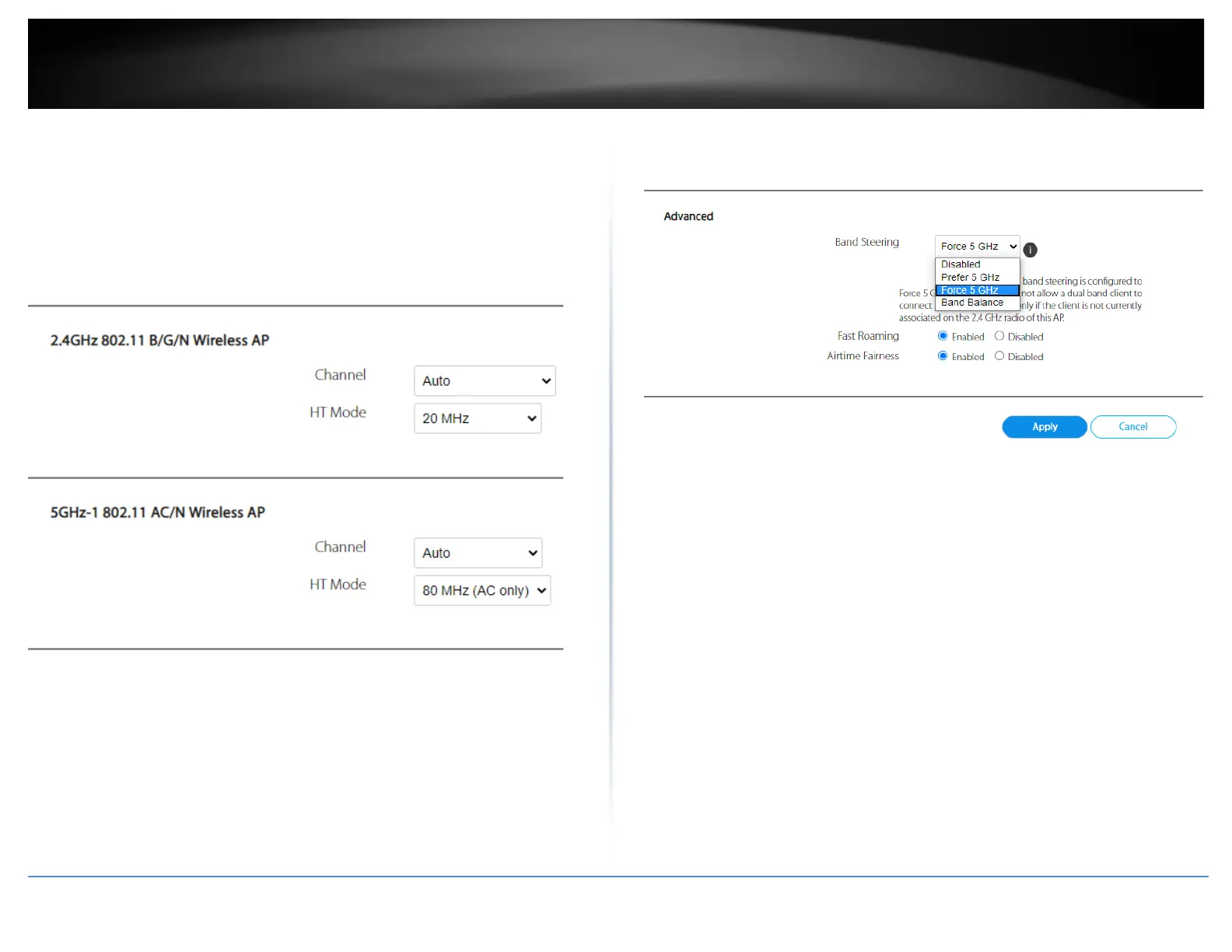
o 20/40MHz, 40MHz (2.4GHz) or 40MHz, 80MHz (5GHz) – When this
setting is active, this mode is capable of providing higher performance
only if the wireless devices support the channel width settings.
Enabling 20/40MHz , 40MHz (2.4GHz) or 40MHz, 80MHz typically
results in substantial performance increases when connecting an
802.11ac/n wireless client.
• Advanced > Band Steering: This setting controls how wireless clients are distributed
between bands.
o Disabled – Disables the band steering feature.
o Prefer 5GHz – Selecting this option will automatically move 5GHz
capable wireless clients if wireless clients initially connect to the
2.4GHz band. This option will still allow dual band (2.4GHz/5GHz)
wireless clients to connect the 2.4GHz band.
o Force 5GHz (Default) – Selecting this option will automatically move
5GHz capable wireless clients if wireless clients initially connect to the
2.4GHz band. This option will not allow dual band (2.4GHz/5GHz)
wireless clients to connect the 2.4GHz band, only the 5GHz band.
o Band Balance – Selecting this option will automatically distribute
wireless clients across 2.4GHz and 5GHz bands depending on
connections per band and bandwidth usage.















 To Next Page