9D01-060en202008 Manual nanoFlu
UseCalibration
Malfunction &
Maintenance
Commis-
sioning
General
Information
FAQ Technical DataWarranty
Customer
Service
Contact
Keyword
Index
Accessories Introduction
nanoFlu // Introduction
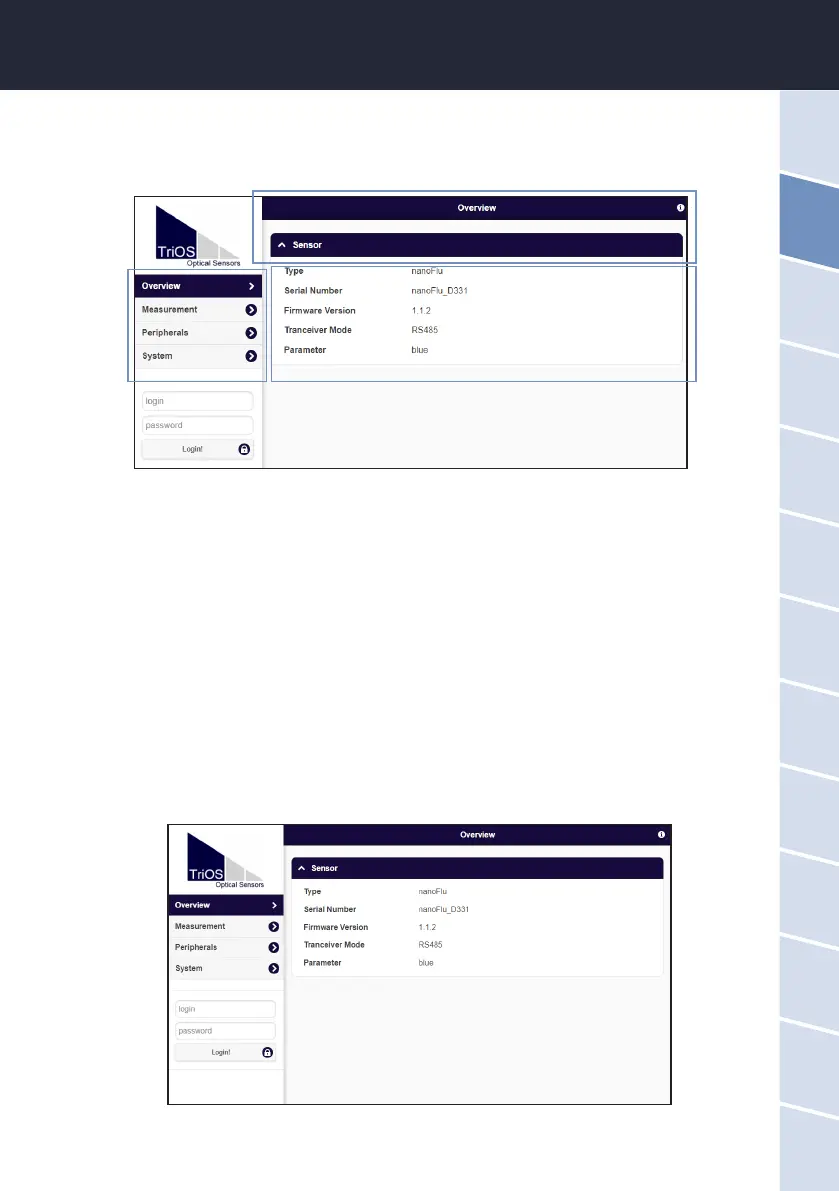
The web interface is divided into three areas (see gure):
Title, menu and contents.
In the menu on the left, the subpoints are listed. There is a “Help” link on the right side that will take you to the
TriOS Mess- und Datentechnik GmbH website. An active Internet connection is required to access the website.
The menu is used to navigate the web interface. Each line is a link to another page with dierent setting options.
The link that refers to the page currently displayed is always highlighted in the menu. Special, selected contents
and functions are exclusively reserved for the employees of TriOS Mess- und Datentechnik GmbH Customer
Service. Authentication is needed for this content.
The “Contents” area displays the relevant information and setting options. Contents that require authentication
are deactivated (“grayed out”).
Menu
Title
Contents
Overview
As shown in the following illustration, basic information about the sensor is summarized on the “Overview”
page. This includes the device type and serial number of the sensor as well as the version number of the in-
stalled rmware, interface and parameters.



 To Next Page