11D01-060en202008 Manual nanoFlu
UseCalibration
Malfunction &
Maintenance
Commis-
sioning
General
Information
FAQ Technical DataWarranty
Customer
Service
Contact
Keyword
Index
Accessories Introduction
nanoFlu // Introduction
In order to make changes, the "Edit" button must rst be pressed in the corresponding area.
The parameter can be calculated automatically with a scaling factor and an oset for specic parameters. The
scaling factor always depends on the application and must be determined by the user, with the exception of the
parameters predened by the manufacturer. The values are entered in the corresponding “Scaling” and “Oset”
elds. More information on the scalable parameters can be found in chapter 5.2 - Customer Calibration.
The time interval for automatic measurements is entered in the eld for “Interval”. This interval should be un-
derstood as a minimum value. If the previous measurement has not yet been completed after the interval has
elapsed (e.g. because the nanoFlu simply needs more time to calculate the average), this previous measure-
ment will be waited out before the next one is started.
The factory-set measurement interval recommended by TriOS Mess- und Datentechnik GmbH is 3 seconds.
If several individual measurements are to be averaged for one measurement, the number of measurements
can be set via the controller.
System
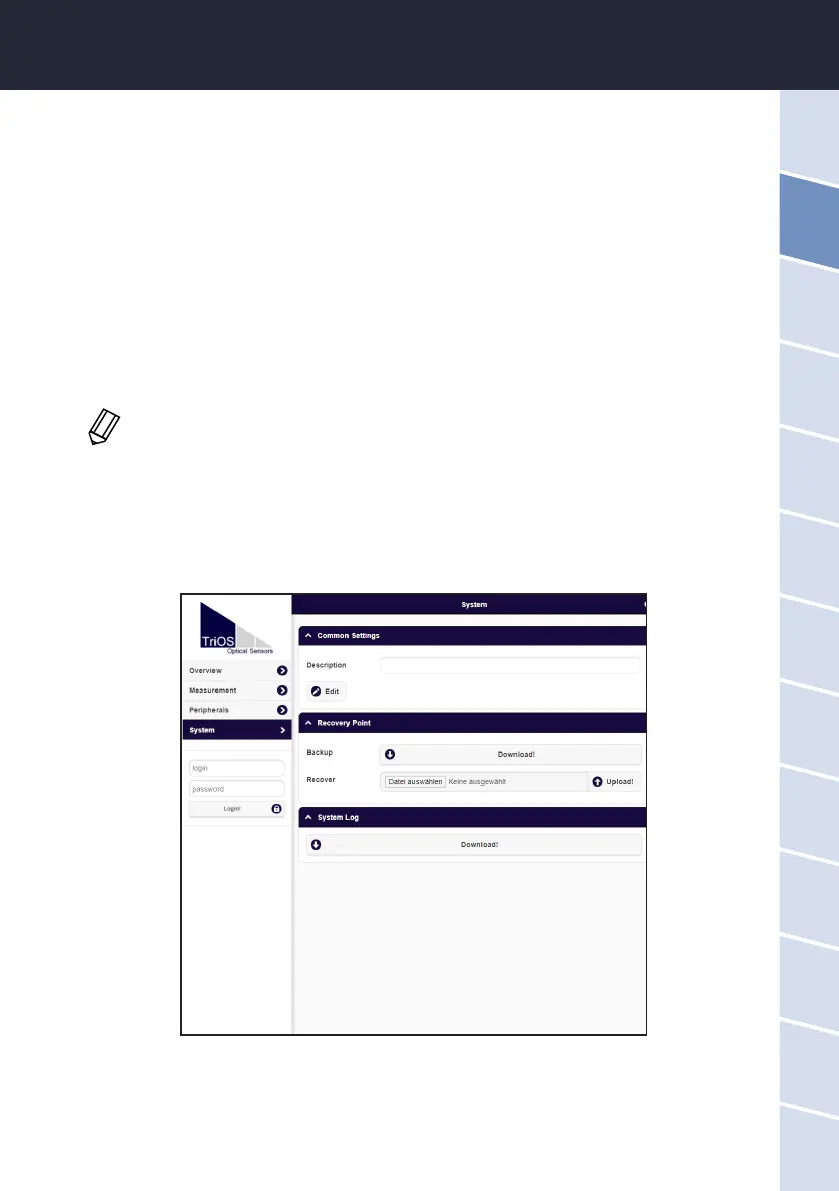
The “System” page is used to manage the sensor. On this page you can add a comment under "Description". In
addition, a restore point can be created or uploaded (see chapter 6.2.2) and the system log le can be export-
ed. The sensor no longer has integrated RTC (real time clock) time buering, which is why the date is reset to
01.01.1998 each time it is switched on.
Service
To use the Service function, you need a login and a password. You will receive this when you participate in a
TriOS training session.
Important: Modied values must be saved by clicking on the “Save” button for them to be
used for subsequent measurements.


 To Next Page