28 D01-051en202111 Manual TriBox3
Advanced
Use
Malfunction &
Maintenance
Commis-
sioning
Introduction
General
Information
FAQTechnical Data Warranty
Customer
Service
Contact
Keyword
Index
AccessoriesUse
Use // TriBox3
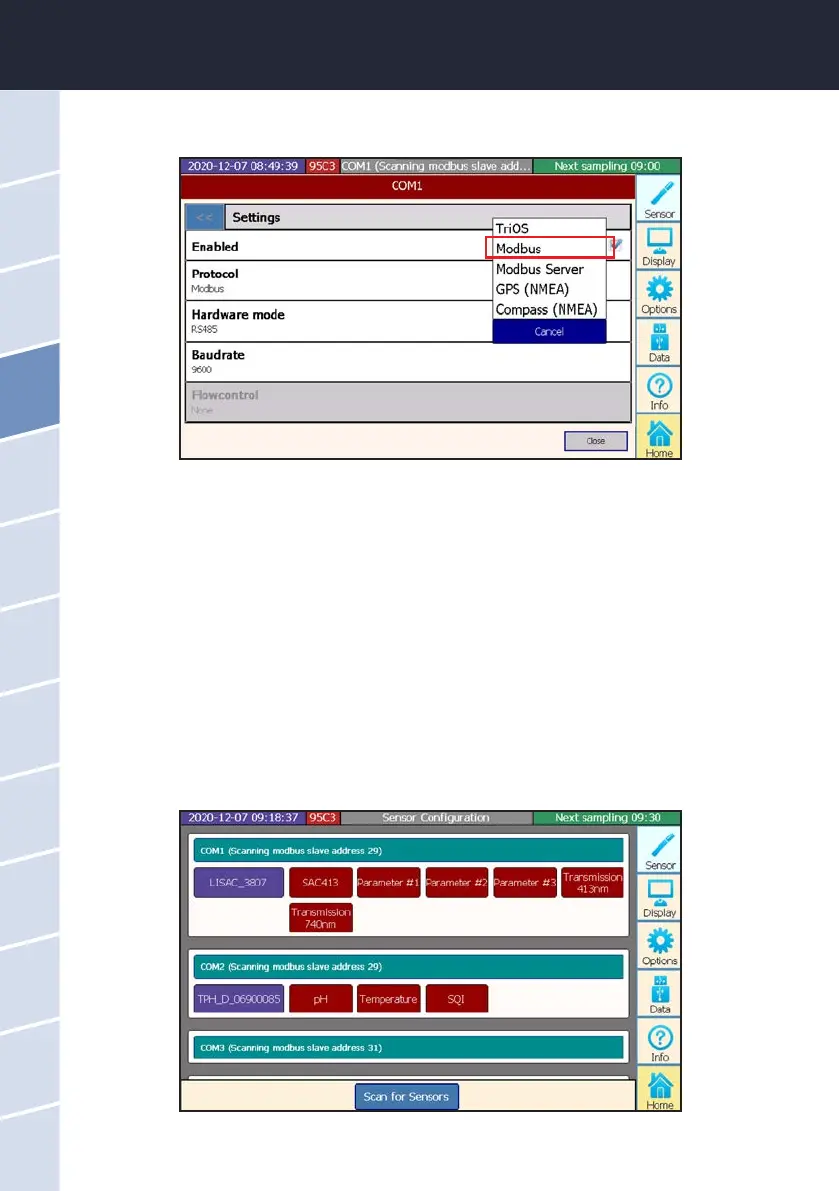
The settings menu opens by clicking on the COM port button.
Standard settings of the COM ports for all Modbus-capable sensors:
Protocol: Modbus
Hardware mode: RS-485
Baud rate: 9600
Flow control: None (setting locked when using Modbus protocol)
Parity: None
Data bits: 8
Stop bits: 1
If the sensor is correctly recognized after being connected, it appears in the overview of the COM ports, as
shown in this example diagram:



 To Next Page