29D01-051en202111 Manual TriBox3
Advanced
Use
Malfunction &
Maintenance
Commis-
sioning
Introduction
General
Information
FAQ Technical DataWarranty
Customer
Service
Contact
Keyword
Index
Accessories Use
TriBox3 // Use
Clicking the “Sample” button immediately triggers a measurement by the corresponding
sensor.
“Reset” resets the sensor.
The next measured value in the data log can be marked by clicking the “Mark” button.
Clicking “Calibrate” starts the calibration wizard. More information can be found in chapter
4.4.
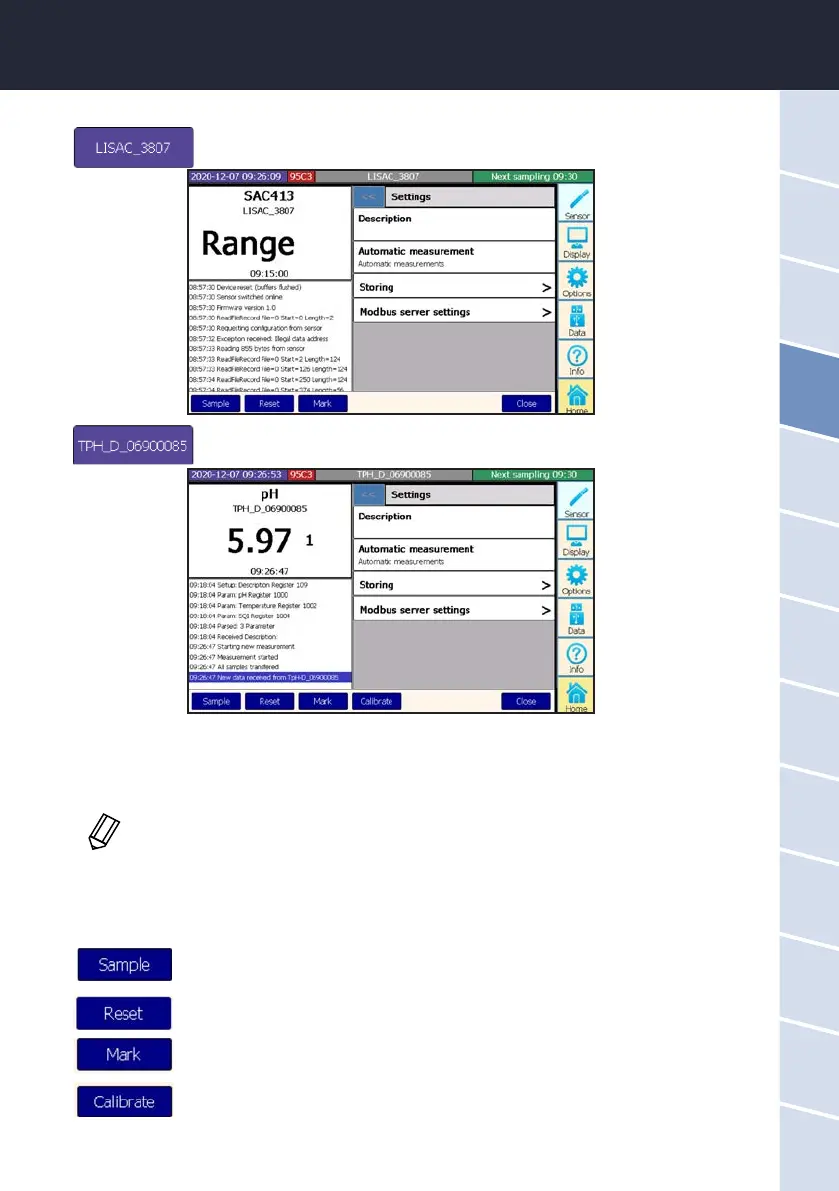
When the sensor button is pressed, a screen opens like the one in the following
example:
In this screen, the current measured value can be seen at the top left and the log protocol of the sensor below
that. On the right side, a description of the measurement site can be entered and automatic measurement can
be activated or deactivated. Some sensors are equipped with the option “fastest possible”, whereby the sensor
triggers a measurement as often as possible.
The menu item “Storing” is dealt with in chapter 5.1, and the “Modbus Server Settings” can be found in chapter
5.4. Further information can be found in the corresponding sensor manual if necessary. Please contact TriOS
Support if any other questions come up.
The automatic measurements must be activated for the sensor to take measurements.



 To Next Page