79D01-051en202111 Manual TriBox3
Use
Advanced
Use
Malfunction &
Maintenance
Commis-
sioning
Introduction
General
Information
Technical DataWarranty
Customer
Service
Contact
Keyword
Index
AccessoriesFAQ
TriBox3 // FAQ
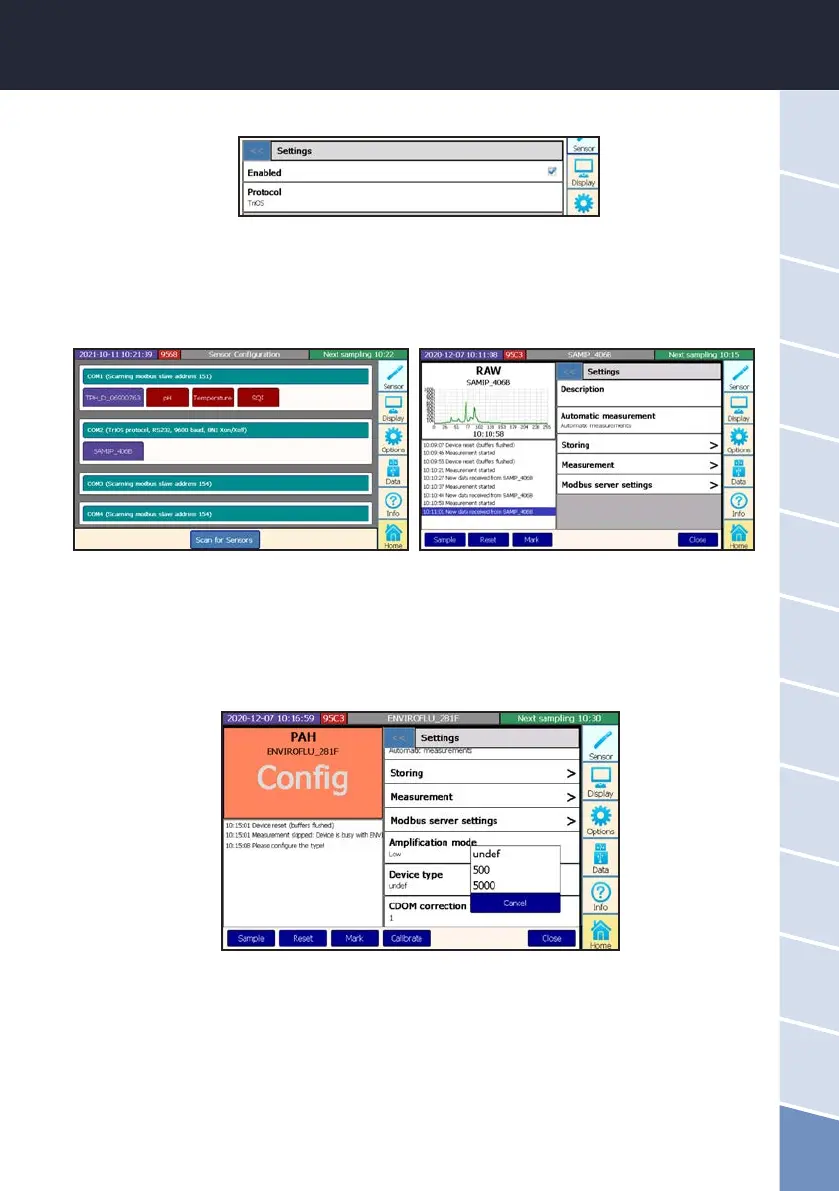
Click on “Protocol” and select the TriOS data protocol.
Now go back to the “Sensor” menu by clicking on the “Close” button (bottom right).
Connect your sensor to the TriBox3 and click on the “Scan for Sensors” button (bottom centre). All con-
nected sensors are now displayed.
To change the sensor settings, click on the button corresponding to the sensor.
3. How do I connect an enviroFlu sensor?
Connect the sensor cable to the TriBox3. Now click on the corresponding COM port in the Sensor menu
item and select the TriOS data protocol as described in the previous question. Tap on the sensor eld to
set the corresponding measuring channel of your sensor under “Device type”.
4. How can I switch the enviroFlu to the sensitive / high-resolution channel?
Touch the sensor button and then select the sensitivity “high” or “low” under “Gain Mode”.
The adaptation can also be carried out via Modbus by an entry in register 102.



 To Next Page