80 D01-051en202111 Manual TriBox3
Use
Advanced
Use
Malfunction &
Maintenance
Commis-
sioning
Introduction
General
Information
Technical Data Warranty
Customer
Service
Contact
Keyword
Index
Accessories FAQ
FAQ // TriBox3
5. How to get Modbus addresses and registers from the TriBox3?
The TriBox3 can output Modbus TCP/IP via its Ethernet connection port or Modbus RTU via its COM ports. The
following steps explain how to get the ModbusStatus.txt le from the TriBox3.
Step 1
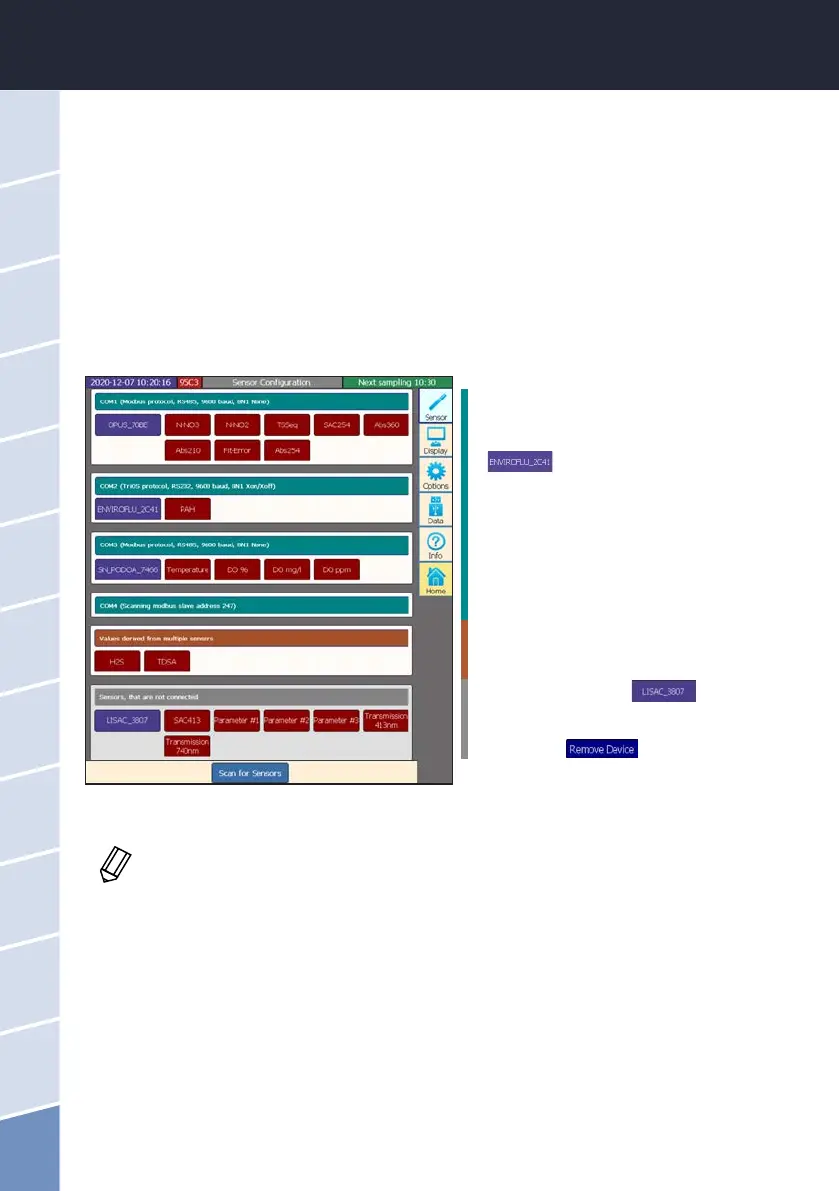
To obtain the complete Modbus mapping, all required sensors must be connected to the TriBox3 and displayed
with the corresponding parameters in the “Sensor” menu.
These are the currently connected sensors
which are ready for measurement.
If the slave ID of the sensor is to be changed,
this can be done under the Sensor button:
.
The sensor menu opens. Now select “Mod-
bus server settings” (on the right). Here the
slave ID can be adjusted if necessary.
These parameters are calculated internally.
They also appear in the ModbusStatus.txt.
Non-connected sensors should be removed:
1. Press sensor button
.
(Sensor menu opens)
2. Press the
button and conrm.
If all unconnected sensors have been removed or the slave IDs have been adjusted, the Tri-
Box3 must be restarted (otherwise the ModbusStatus.txt will be longer than necessary).



 To Next Page