CHAPTER 4C: ESCALATE
9
OPERATION
ADVANCED CONSOLE FUNCTIONS (continued):
Utilities Menu - B-Vision Setup (continued):
3. Plug headphones into the headphone jack on the console and wear them for the remaining steps.
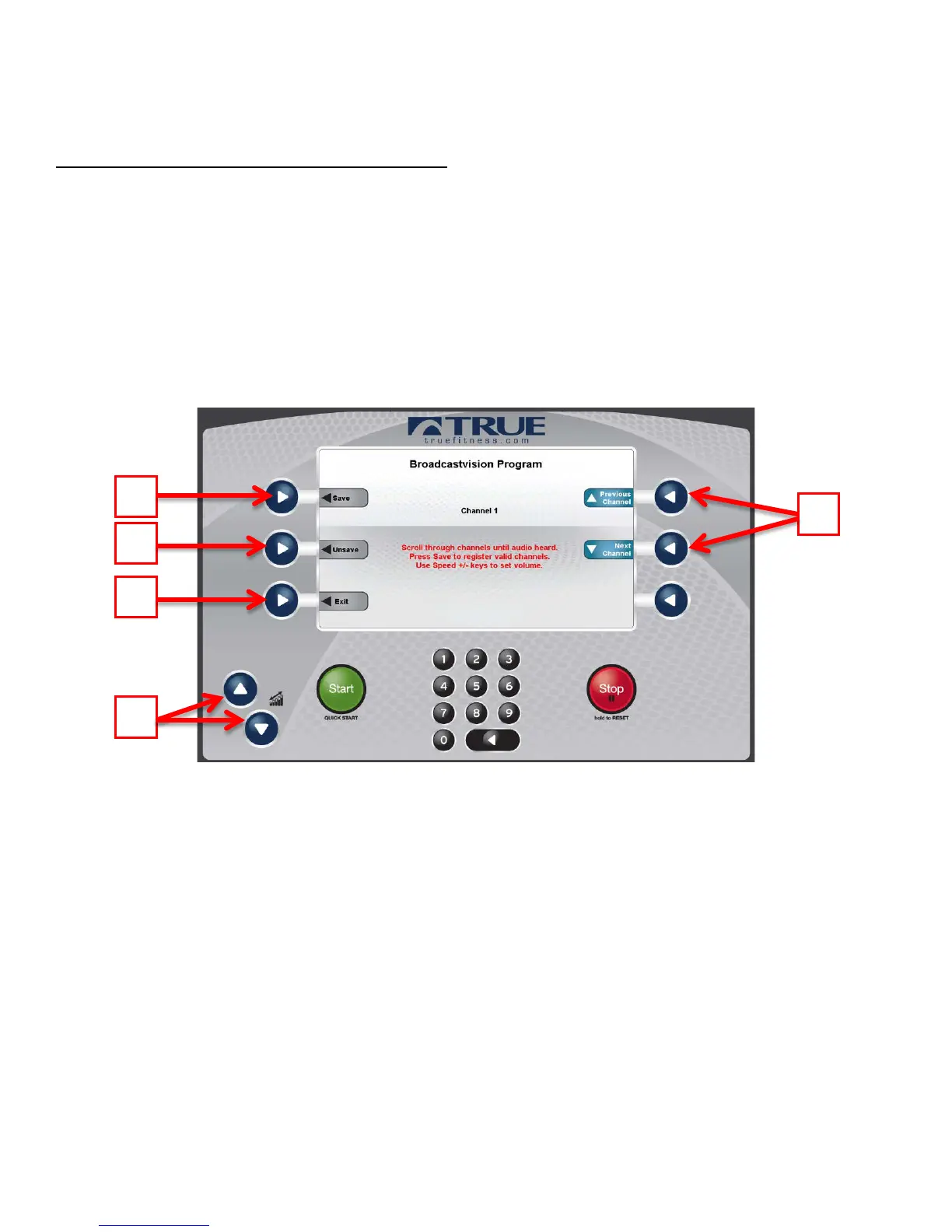
4. Use the Channel Selection Buttons (D) to scroll through the available channels.
5. When audio is clearly heard on a channel, push the Save Selection Button (E) to save the channel.
NOTE: The order in which the channels are saved determines the order that they are displayed in standard user mode.
6. Repeat steps 4 and 5 for each additional audio source.
7. If a channel needs to be removed, use the Channel Selection Buttons (D) to scroll to the channel and press the Unsave
Selection button (F)
8. Once all desired channels are saved, press the Exit Selection Button (G) to exit the BV-Setup.
* During the channel setup, the + and – Workload Keys (H) can be used to adjust the volume level.
Truefitness.com / 800.426.6570 / 636.272.7100 106



 To Next Page