CHAPTER 4A: ESCALATE
9
OPERATION
Truefitness.com / 800.426.6570 / 636.272.7100 30
CONSOLE NAVIGATION (continued):
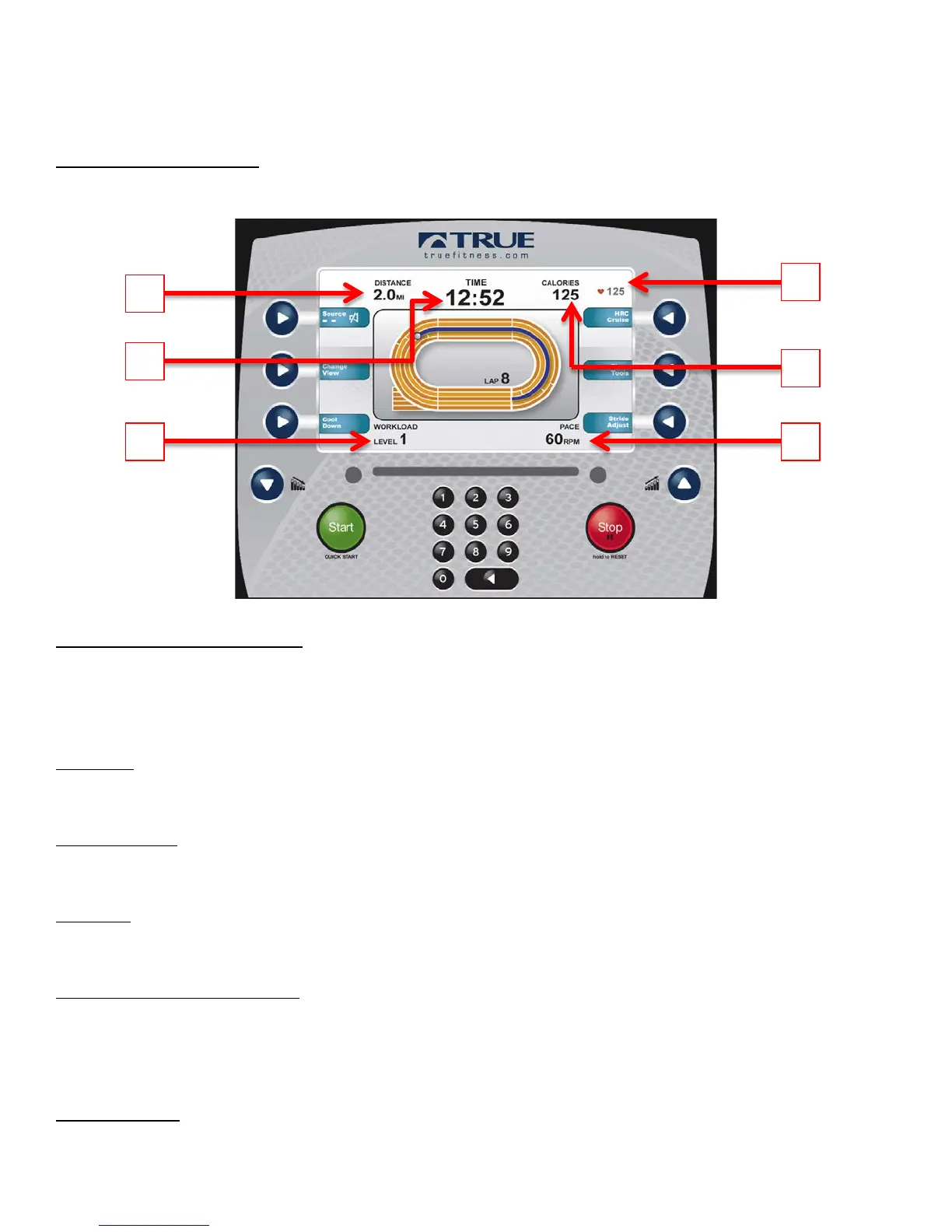
Workout Data Screens:
During any workout a Workout Data Screen will be displayed to give the user a comprehensive visual overview of their
current workout data.
A) Custom Data Display #1:
By Default, this display will show the distance for the current workout. Users can also choose custom data points to be
seen in this display.
*See Workout Data Screen Controls; E) Show Tools section below.
B) Time:
Displays the time elapsed for the current workout.
C) Workload:
Shows the current workload level.
D) Pace:
Displays the current pace of a workout.
E) Custom Data Display #2:
By Default, this display will show the calorie count for the current workout. Users can also choose custom data points to
be seen in this display.
*See Workout Data Screen Controls; E) Show Tools section below.
F) Heart Rate:
Shows the user’s heart rate in a digital beats per minute (bpm) readout.



 To Next Page