110 of 171
Truetness.com / 800.426.6570 / 636.272.7100
CHAPTER 4B: ESCALATE
15
OPERATION
ADVANCED CONSOLE FUNCTIONS:
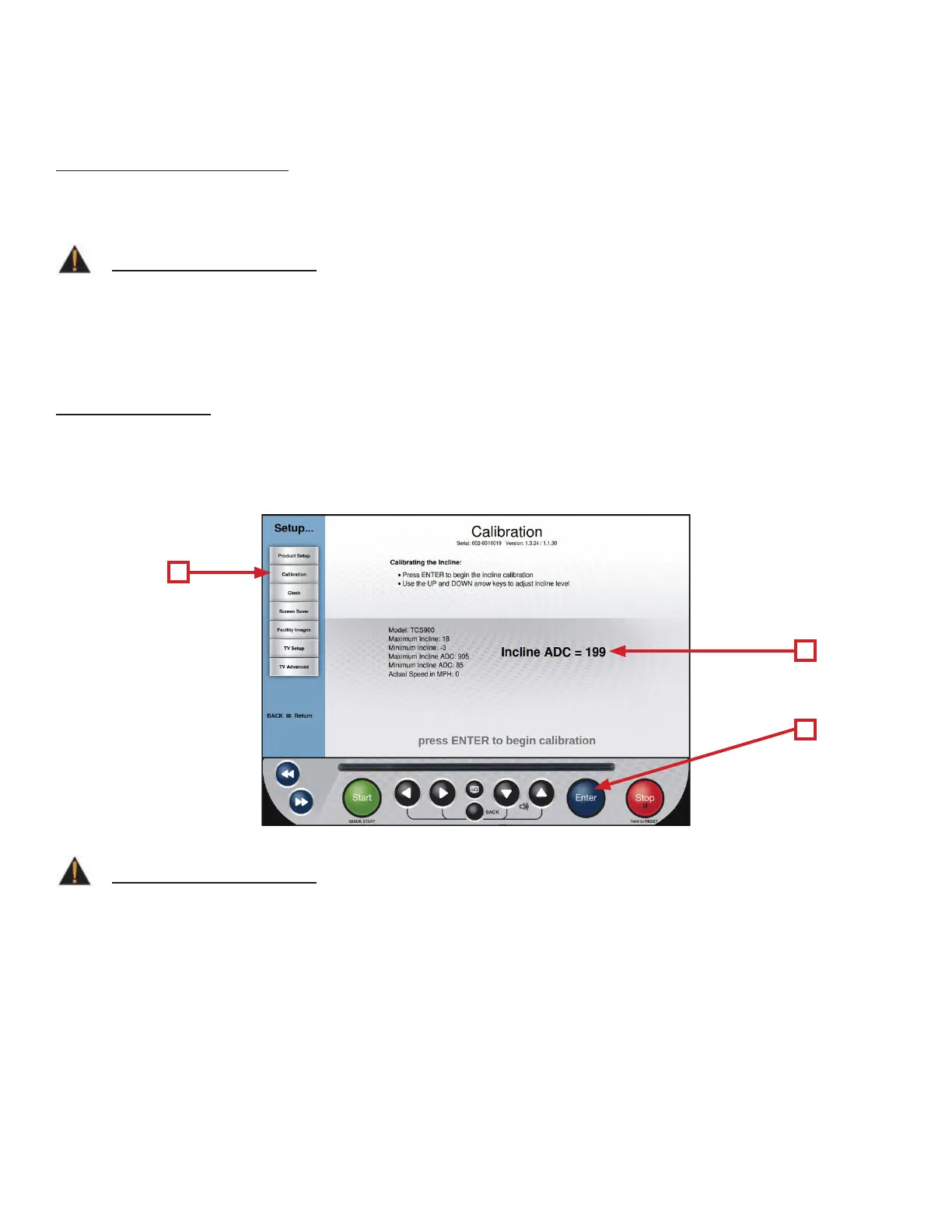
Setup Menu - Calibration:
Calibration will conduct a basic test of the drive and incline systems to ensure that they are operating as intended.
Calibration may also be used by technicians to troubleshoot system faults.
WARNING:
is process will take full control of the treadmill and can be dangerous if caution is not taken.
• Calibration can take up to two minutes to complete.
• Do not stand on the treadmill during the calibration procedure.
• Verify that the machine is free of all parts and tools.
• Keep children and animals at a safe distance.
WARNING:
e Potentiometer Value (C) should only be adjusted by a trained service professional. Any adjustment made to
the Potentiometer Value may result in unexpected errors or damage to the incline system.
Calibration Steps:
• From the Main Menu, press the Setup button.
• From the Setup Menu, select Calibration (A).
• Press the Enter Button (B) to begin calibration.
• When complete, the console will display “Calibration Successful”.
C
A
B



 To Next Page