Truetness.com / 800.426.6570 / 636.272.7100 111 of 171
CHAPTER 4B: ESCALATE
15
OPERATION
ADVANCED CONSOLE FUNCTIONS:
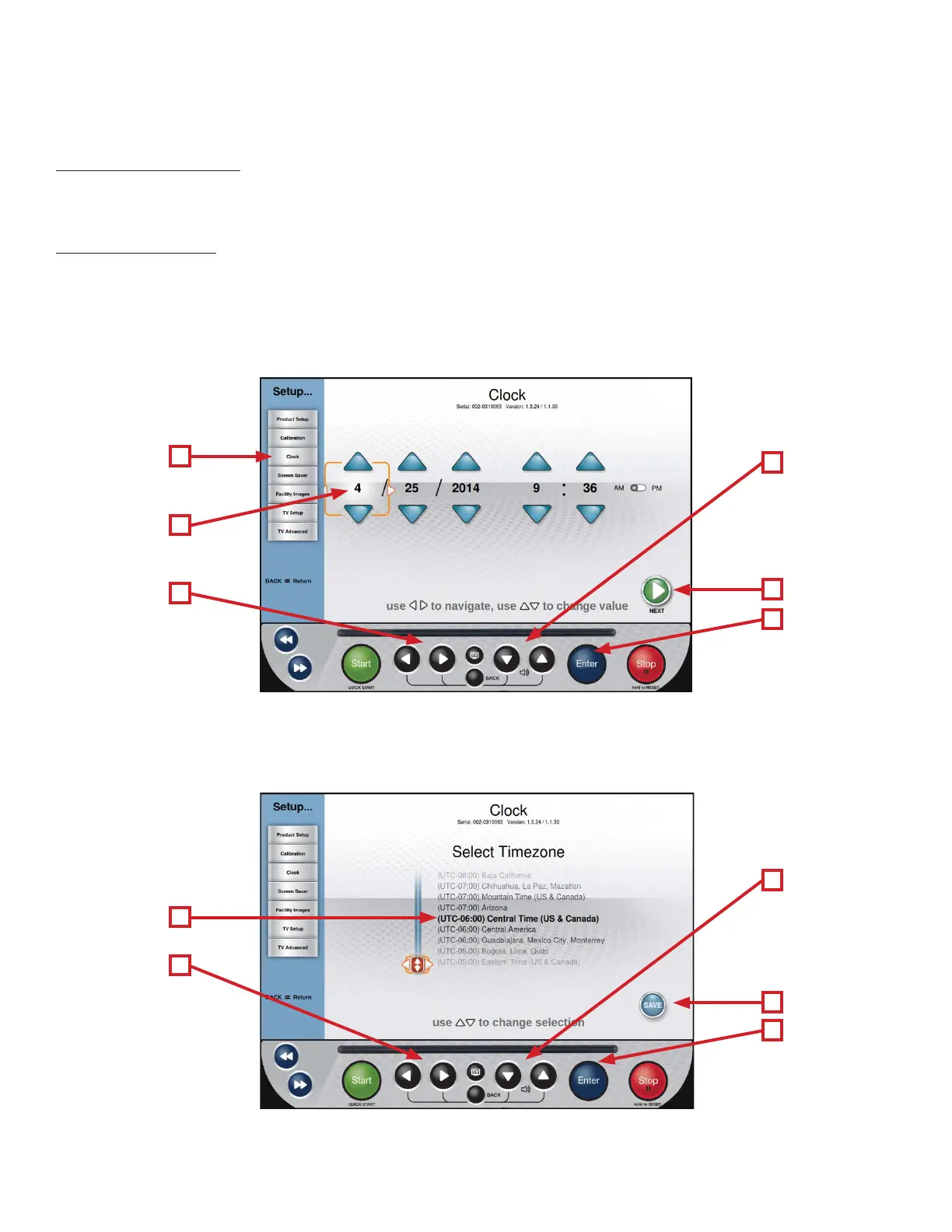
Setup Menu - Clock:
Correctly setting up the clock will ensure that all workout data that is exported by a user will be correctly labeled. Correct
time is also important for troubleshooting purposes when viewing the system’s fault log.
Setting the Clock:
• From the Main Menu, select the Setup menu.
• From the Setup Menu, select Clock (A).
• Use the Le/Right Selection Buttons (B) to select the desired value (C).
• Use the Up/Down Selection Buttons (D) to adjust the value to the desired setting.
• Once the correct time and date are entered, select Next (E) and press Enter (F).
• Use the Up/Down Selection Buttons (G) to scroll through the list of time zones until the correct time zone is shown in
bold (H).
• Use the Right Selection Button (I) to highlight Save (J) and press Enter (K).
E
J
K
F
D
G
A
H
I
B
C



 To Next Page