112 of 171
Truetness.com / 800.426.6570 / 636.272.7100
CHAPTER 4B: ESCALATE
15
OPERATION
ADVANCED CONSOLE FUNCTIONS:
Setup Menu - Screen Saver:
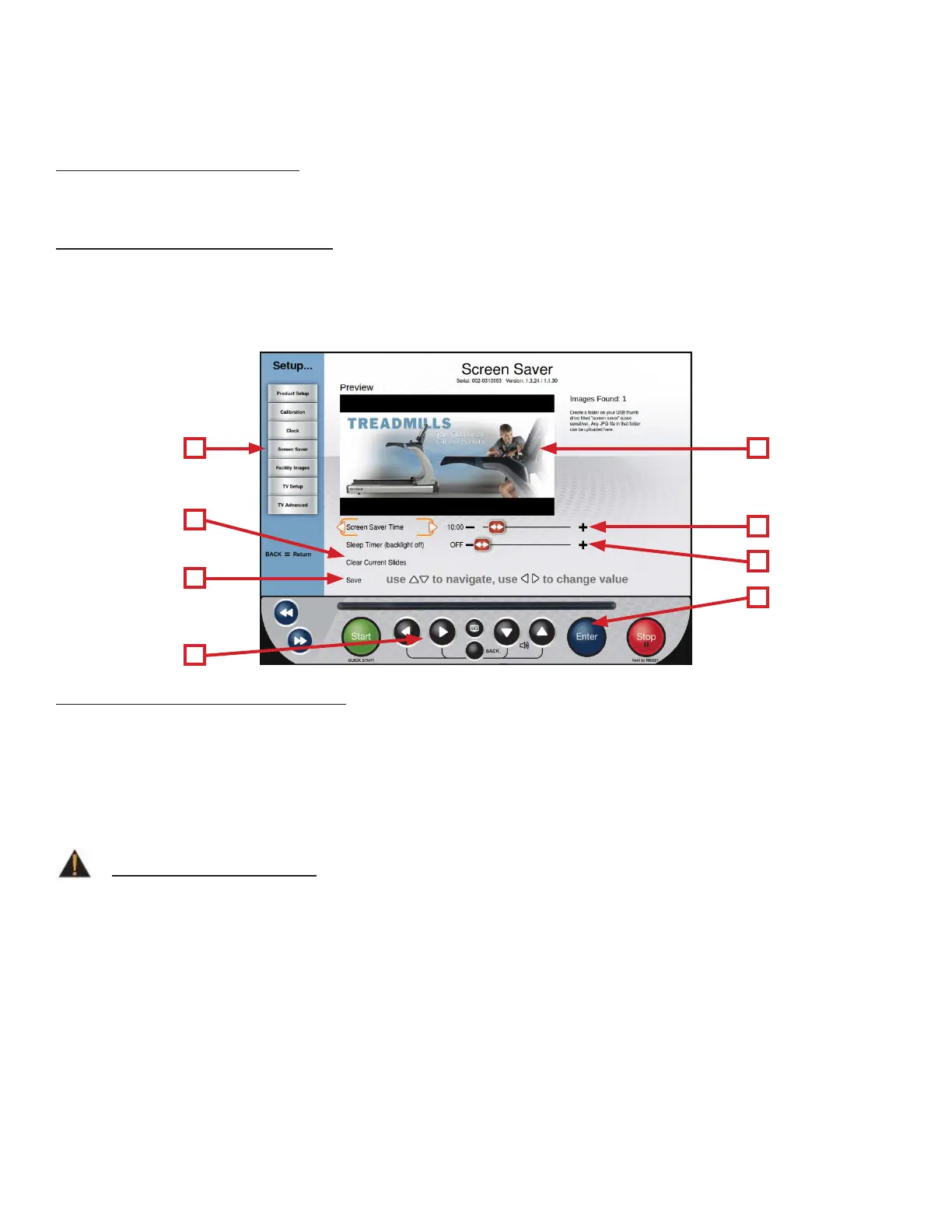
Users can load JPG images to be used by the console as a custom screen saver. In order to be uploaded to the console,
images will need to be placed on a USB drive in a folder named “screen saver” (case sensitive).
Importing Screen Saver Images:
• Select Screen Saver (A) from the Setup Menu and press Enter (B).
• Insert the USB drive that contains the images into the console’s USB port.
• Verify the images in the preview window (C)
• Select Save (D) and press Enter (B) to save the images to the console.
Additional Screen Saver Options:
• Custom Screen Saver images can be deleted by selecting Clear Current Slides (E) and pressing Enter (B).
• e amount of time the console must be idle before the screen saver engages can be adjusted by selecting Screen Saver
Time (F) and using the Le/Right Navigation buttons (G) to select the desired time.
• e Sleep timer is a function that will turn o the console’s back light aer a period of time to save energy. e amount
of time the console must be idle before going to sleep can be adjusted by selecting the Sleep Timer (H) and using the
Le/Right Selection Buttons to select the desired time.
A C
F
B
H
D
G
E
WARNING:
Setting the Screen Saver time to zero will disable the screen saver. Disabling the screen saver is not recommended!
Doing so may cause damage to the screen and void the manufacturer warranty.



 To Next Page