88 of 171
Truetness.com / 800.426.6570 / 636.272.7100
CHAPTER 4A: TRANSCEND OPERATION
ADVANCED CONSOLE FUNCTIONS:
Setup Menu-TV Setup (continued):
IPTV is an internet protocol that allows live TV signal to be sent over a computer network. e Transcend console is
capable of displaying IPTV content, but many IPTV providers require the use of a proprietary set-top box.
IPTV Setup Steps:
• Complete the Network Setup on page 57.
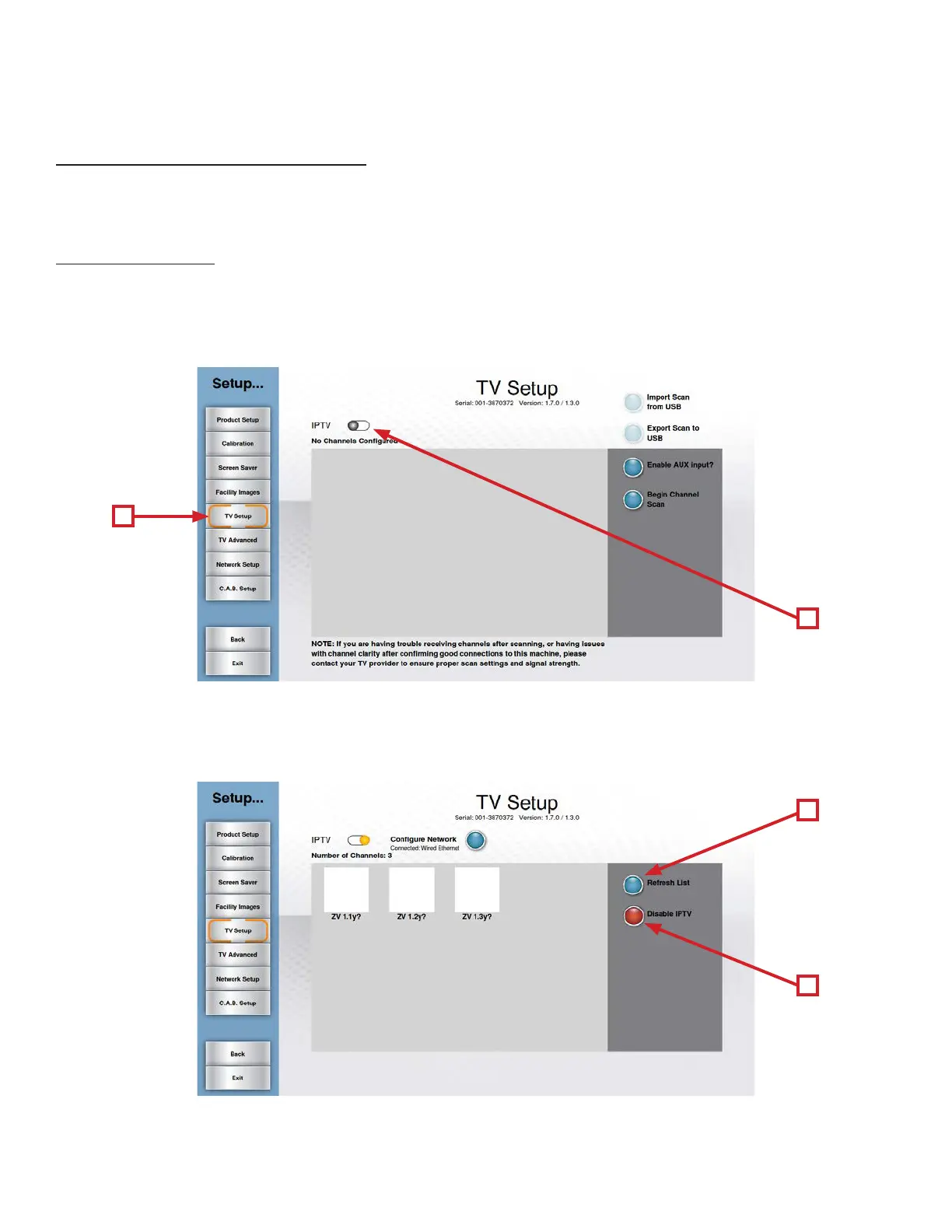
• From the Setup Menu, Touch TV Setup (A).
• Touch the IPTV Slider Button (B) to enable IPTV and the console will automatically search for IPTV channels.
*If desired, the AUX inputs can be enabled by touching the “Enable AUX Input?” button.
A
C
D
B
• Once the Console has nished searching, a list of available channels will be displayed.
• To refresh the channel listing, touch the Refresh List Button (C).
• To disable IPTV, simply touch the Disable IPTV Button (D).



 To Next Page