Truetness.com / 800.426.6570 / 636.272.7100 89 of 171
CHAPTER 4A: TRANSCEND OPERATION
ADVANCED CONSOLE FUNCTIONS:
Setup Menu-TV Setup (continued):
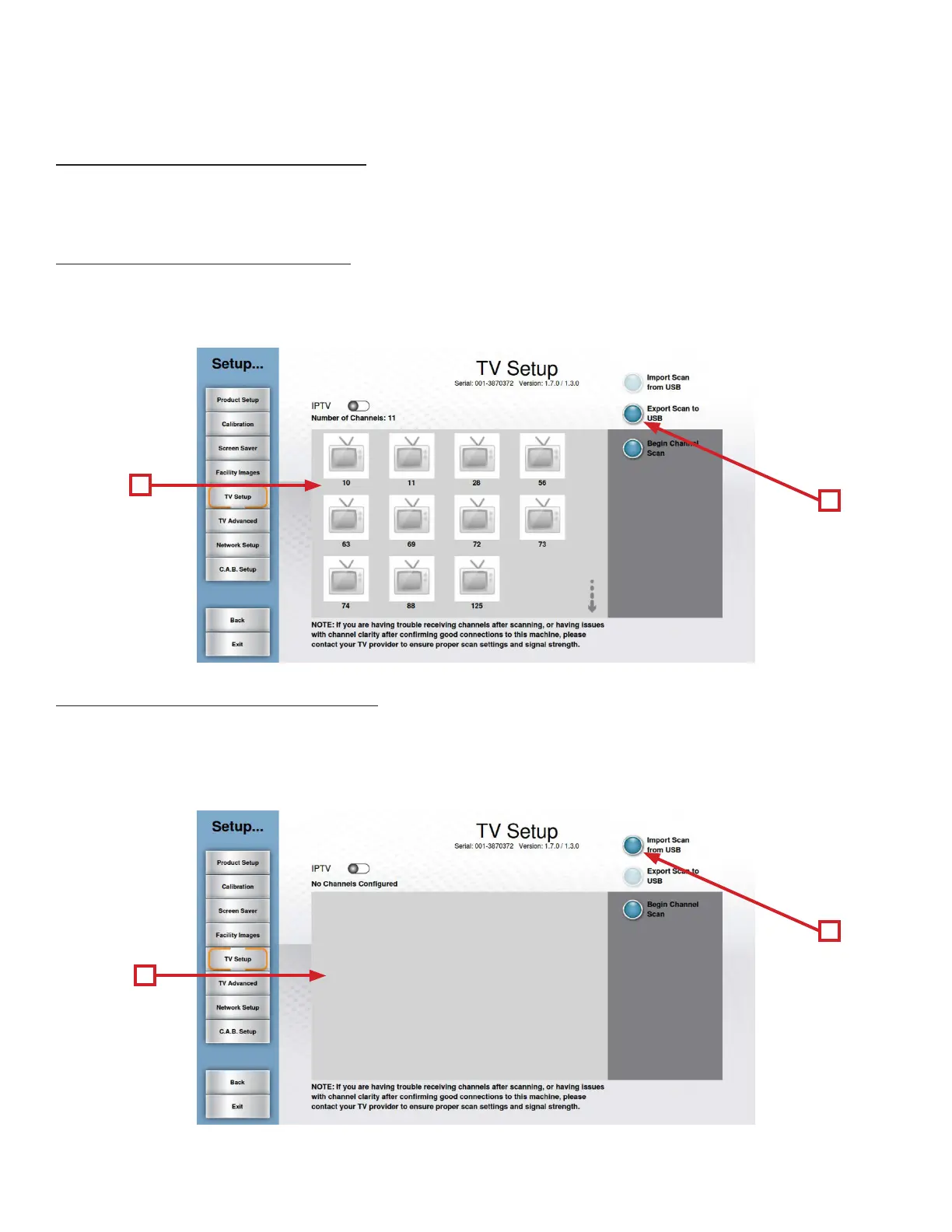
Users can save time when setting up multiple units or maintain a back-up of their TV Setup Data by exporting it to a USB
drive.
Exporting TV Setup Data to USB:
• Complete the TV Setup process.
• Insert a blank USB drive into the console’s USB port.
• When all desired channels are listed in the Channel List (A), touch the Export Scan to USB Button (B)
Importing TV Setup Data from USB:
• Navigate to the TV Setup screen.
• Insert the prepared USB stick into the console’s USB Port.
• Touch Import Scan from USB (A).
• Once the import process is complete, verify that all channels are listed in the channel list (B).
B
A
A
B



 To Next Page