Truetness.com / 800.426.6570 / 636.272.7100 91 of 171
CHAPTER 4A: TRANSCEND OPERATION
ADVANCED CONSOLE FUNCTIONS:
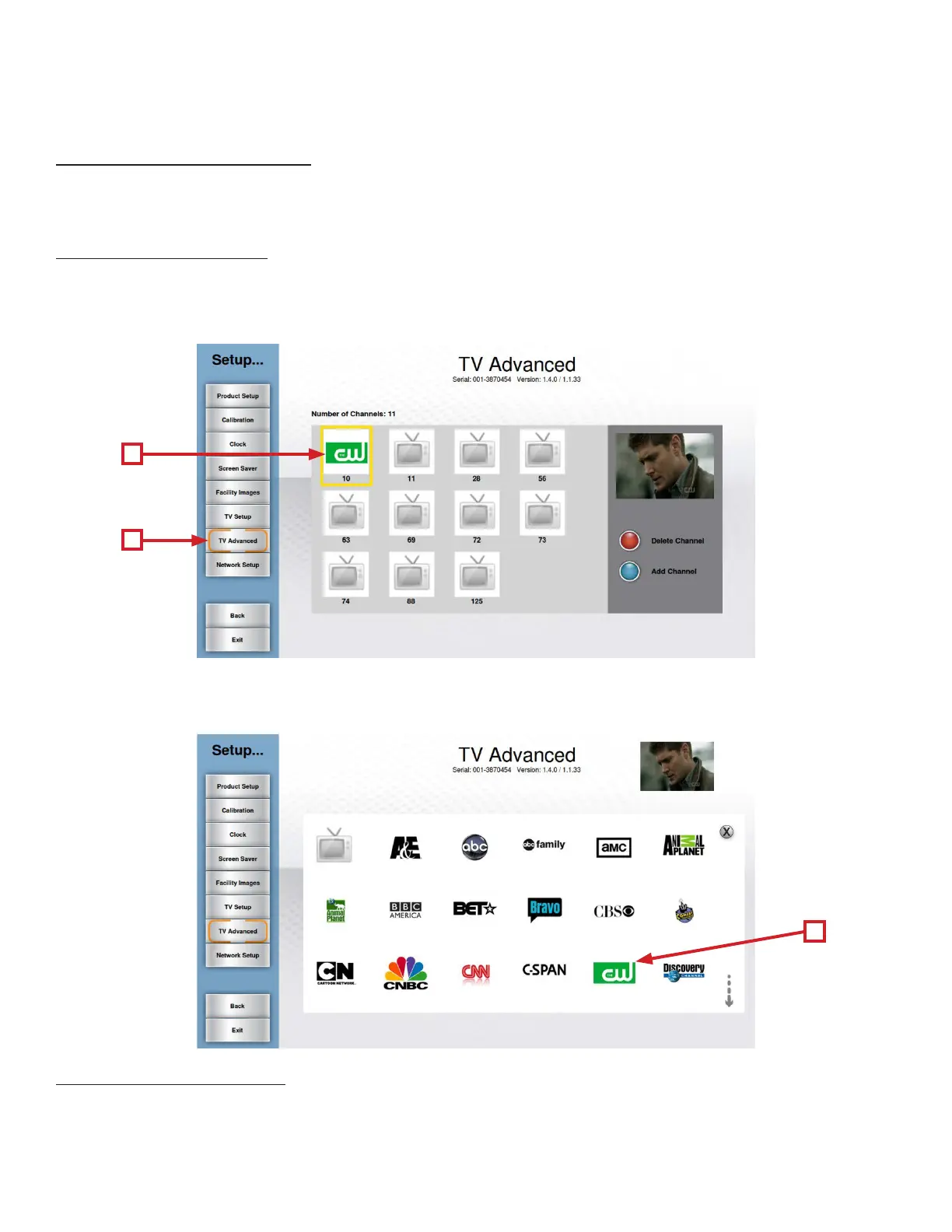
Setup Menu - TV Advanced:
Using Channel logos allows users to quickly identify and select their favorite TV channels with minimal interruption to
their workout.
Adding Channel Logos:
• Navigate to the TV Advanced Screen (A).
• Touch the desired channel in the Channel List (B) to select it.
• Touch the channel again to enter the logo screen.
Setup Menu-C.A.B. Setup:
is console is compatible with the Broadcast Vision CAB System. ese options should remain inactive
unless the system has been purchased through Broadcast Vision. Please refer to the instructions that
accompanied the CAB system for setup instructions.
• Touch the logo (C) that corresponds to the selected channel.
• Repeat these steps for each channel for which a logo is available.
B
A
C



 To Next Page