92 of 171
Truetness.com / 800.426.6570 / 636.272.7100
CHAPTER 4A: TRANSCEND OPERATION
ADVANCED CONSOLE FUNCTIONS:
Setup Menu - Network Setup:
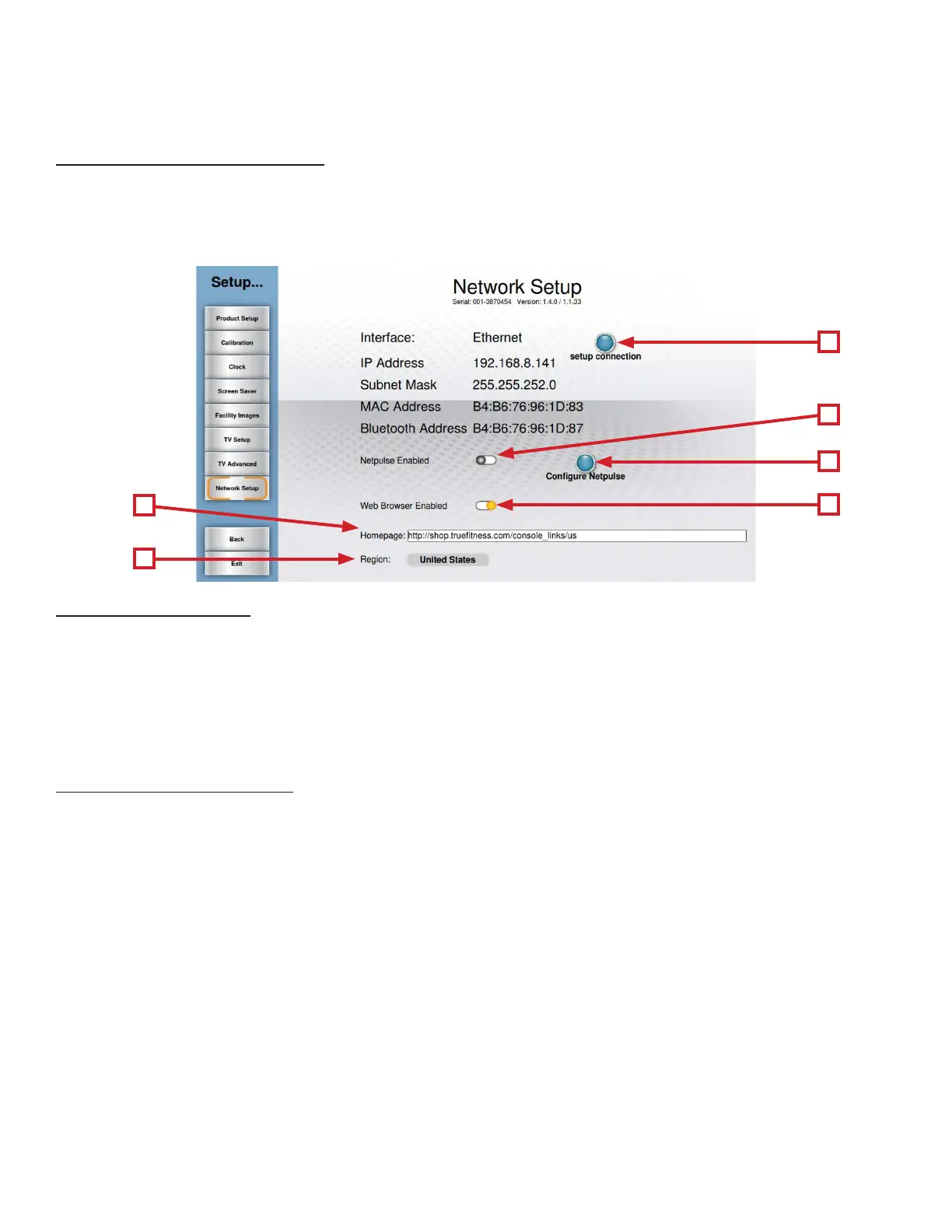
e Network Setup screen displays the current network information for the console. is screen also allows users to setup
wired or wireless internet connection, enable web browsing, and allows for Netpulse® conguration (in a Netpulse® enabled
environment). To connect to a network, simply touch the Setup Connection button (A) and select the desired network
from the list (and enter the password if necessary) and then press connect.
Conguring Netpulse:
• Touch the Netpulse Enabled Slider button (B) to enable it.
• Touch the Congure Netpulse Button (C)
• On the screen that follows, touch the Test Network button.
• Once the screen displays the message “All network tests passed”, select the Install button.
• e screen will then display the message “Installation was successful”.
• Touch the Back button to return to the Network Setup screen.
Enabling the Web Browser:
• Touch the Web browser Enabled Slider (D) to enable it.
• Accept the Internet Service Agreement.
• Select a homepage by touching the Homepage Address Bar (E) and typing the web address of the desired page and
pressing Enter to conrm the page.
• Ensure that the correct Region (F) is displayed.
A
F
E
C
D
B



 To Next Page