16
34020-01385 · 00 · 07/2022
EN
Operation Truma CP plus
6.7 Selecting the energy type
The energy supply for the heater can be adjusted to
suit the available energy types (parking area, camp site,
while driving)�
The “Select energy type” menu is displayed only if a
heater with electric heating elements is connected, for
example Combi E CPplus ready�
Depending on the ambient temperature, electrical heat-
ing power alone might not be sufficient to reach the
specified room temperature� Switch to mixed or gas
mode to increase the heating power�
The specified room temperature is reached quickest in
mixed mode�
Use the rotary push button to select in the menu
line�
Press the rotary push button to go to the setting
level�
Select desired energy type with rotary push button�
Press the rotary push button to confirm the value�
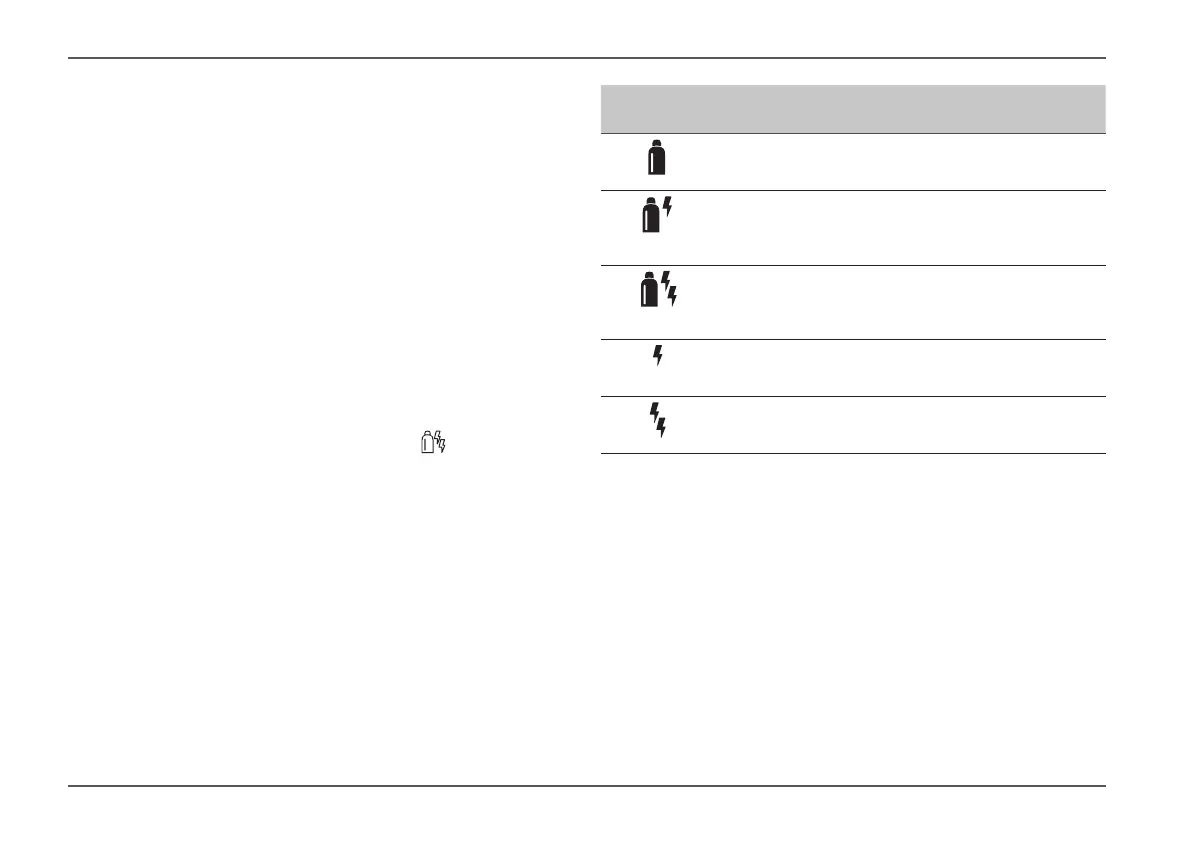
Symbol Operating
mode
Energy type
GAS /
DIESEL
Gas
/ Diesel
MIX 1 Mixed mode
Electric (900 W) + Gas /
Diesel
MIX 2 Mixed mode
Electric (1800 W) + Gas /
Diesel
EL 1 Electric (900 W)
EL 2 Electric (1800 W)
When the heater is switched on (room temperature,
hot water level active), the status line shows the energy
type selected in the previous heating procedure� The
factory setting is gas / diesel�
Special features in mixed mode
•
Interruption of the power supply 230 V: The heating
system switches automatically to gas and diesel
mode� When the 230 V power supply is restored, the
heating automatically switches back to mixed mode�








 To Next Page