27
TTL Air curtain systems - control and automation panel type Touch
9. Displays and general operating settings (cont.)
9.2.7 Menue 7 - clock / timer
OK
Cancel
switching time 2
switching time 3
switching time 4
switching time 1
1 2 3 4 5 6 7 8 9 10
1
2
start:
10:00
finish:
20:00
/Info/timer/Monday/switching time 1
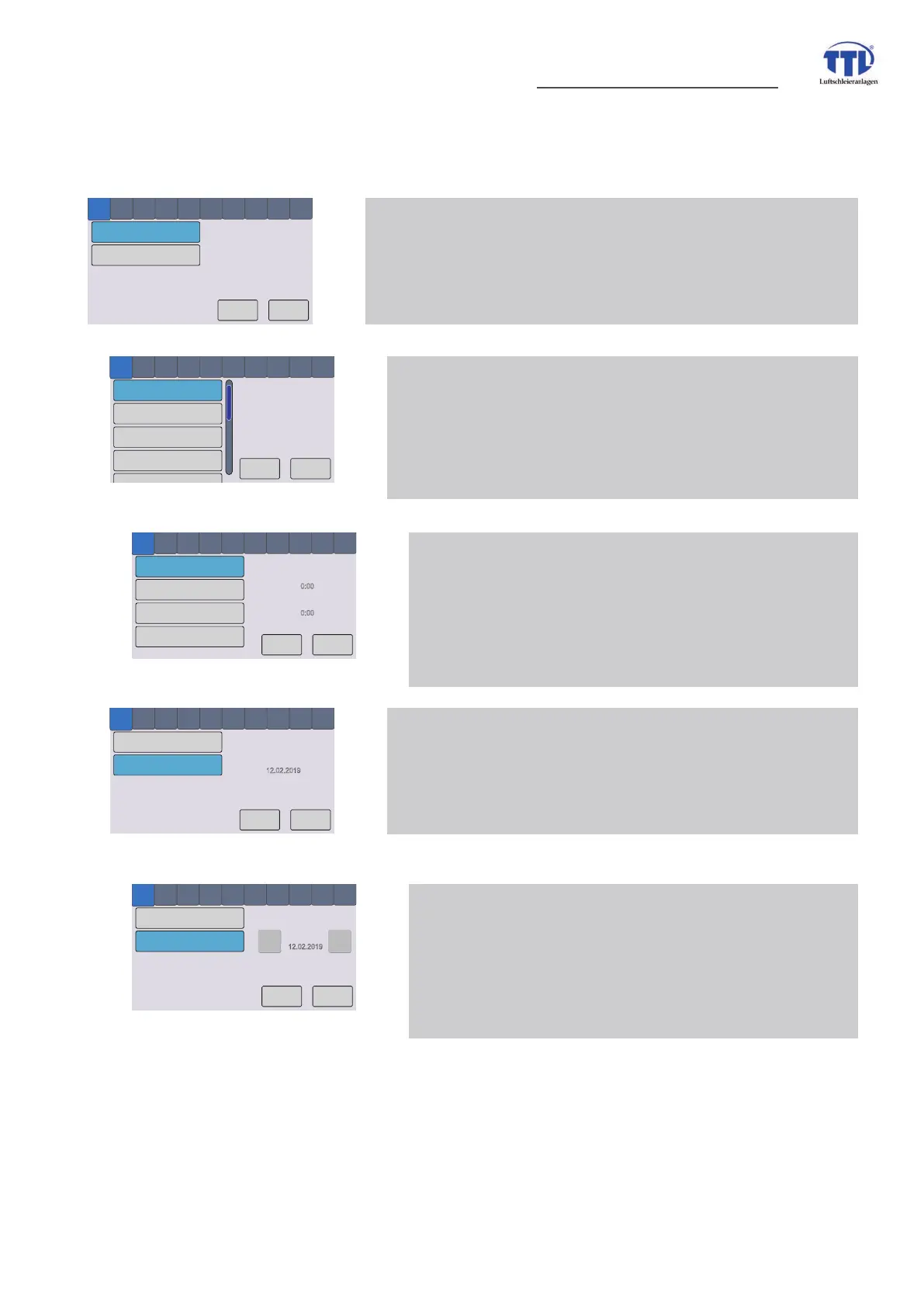
7 Clock / timer menue 1 - time - submenue weekdays
weekly programm
selction of wek day for following setting of switching times,
impact to operating modes -only AUTOMATIC mode
or HAND mode and AUTOMATIC mode
7 Clock / timer menue 1 - submenue 2. level - switch. times
set switching times
WRXFKLQJÀHOGVRUZLOOVHWWLPH
counter runs though according to touching time
slower or faster,
VZLWFKLQJWKURXJKKRXUPLQXWHVHFRQGE\2.WRXFKÀHOG
OK
Cancel
Thuesday
Wednesday
Thursday
Monday
1 2 3 4 5 6 7 8 9 10
1
2
/clock/timer/weekdays
OK
Cancel
date
clock
1 2 3 4 5 6 7 8 9 10
1
2
todays date:
12.02.2019
1519791735
/clock/timer/time/date
7 Clock / timer menue 2 - date
set date
setting of date for switching times (no system date)
impact to operating modes -only AUTOMATIC mode
or HAND mode and AUTOMATIC mode
OK
Cancel
date
clock
1 2 3 4 5 6 7 8 9 10
1
2
set date:
12.02.2019
1519791747
/clock/timer/time/date
-
+
7 Clock / timer menue 2 - submenue set date
set date
WRXFKLQJÀHOGVRUZLOOVHWGDWH
counter runs though according to touching date
slower or faster,
VZLWFKLQJWKURXJKGD\PRQWK\HDUE\2.WRXFKÀHOG
7 Clock / timer menue 1 - time
timer
selection of switching times by weekday
and switching time/day
OK
Cancel
date
clock
1 2 3 4 5 6 7 8 9 10
1
2
/clock/timer


 To Next Page