55
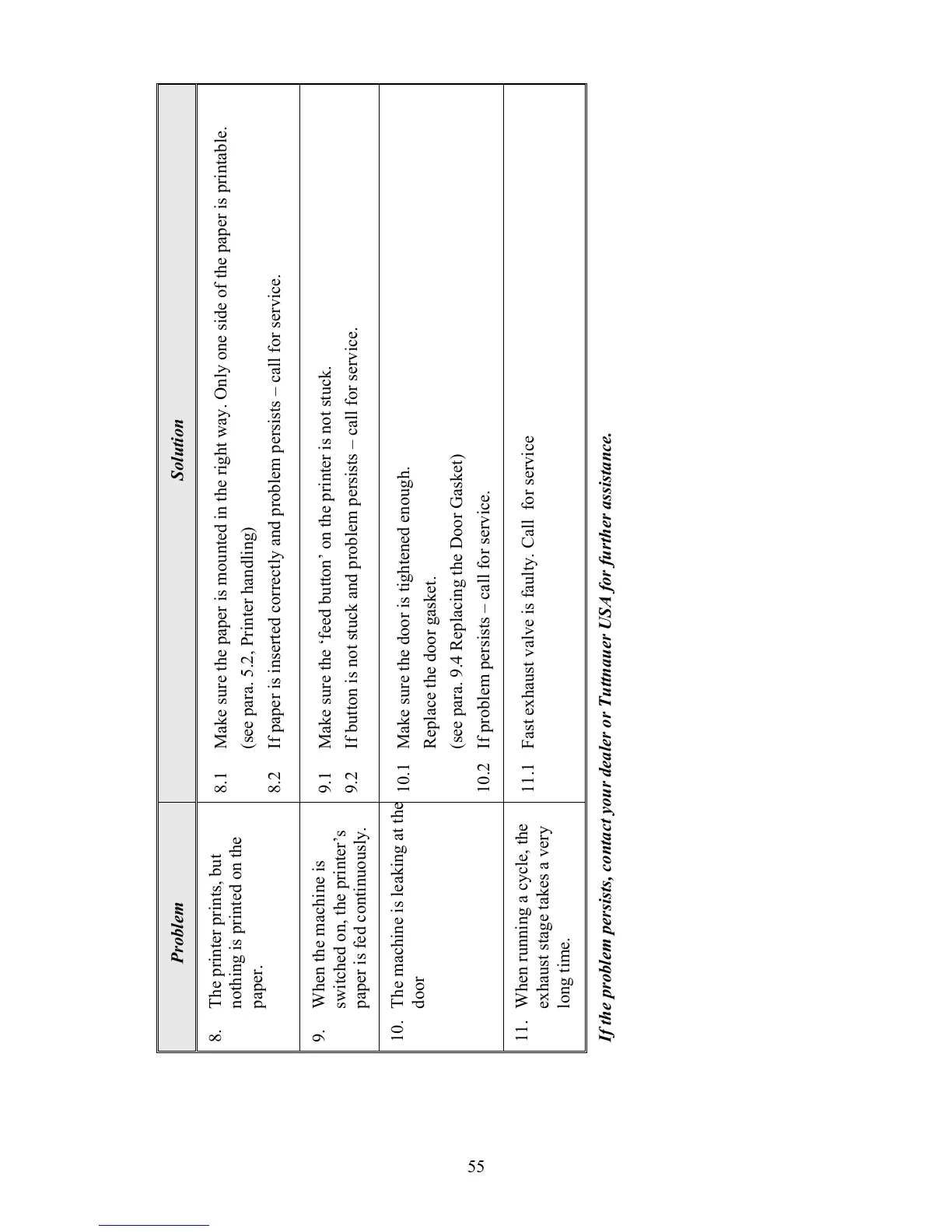
Solution
8.1 Make sure the paper is mounted in the right way. Only one side of the paper is printable.
(see para. 5.2, Printer handling)
8.2 If paper is inserted correctly and problem persists – call for service.
9.1 Make sure the ‘feed button’ on the printer is not stuck.
9.2 If button is not stuck and problem persists – call for service.
10.1 Make sure the door is tightened enough.
Replace the door gasket.
(see para. 9.4 Replacing the Door Gasket)
10.2 If problem persists – call for service.
11.1 Fast exhaust valve is faulty. Call for service
Problem
8. The printer prints, but
nothing is printed on the
paper.
9. When the machine is
switched on, the printer’s
paper is fed continuously.
10. The machine is leaking at the
door
11. When running a cycle, the
exhaust stage takes a very
long time.
If the problem persists, contact your dealer or Tuttnauer USA for further assistance.





 To Next Page