(Navigaon Arrows):
Navigates the on-screen menus and adjusts the system sengs to your
preference.
EXIT:
Clears all on-screen displays and returns to TV viewing.
MENU:
Brings up the main menu to the screen.
TV:
Switches to TV source.
CCD:
Closed Caponed buon. Only works with TV input.
ZOOM:
Switches the picture size between wide cinema, normal & zoom.
FAV:
To use favorites mode, use the TV ears remote.
FAV +:
To use favorites mode, use the TV ears remote.
FAV -:
To use favorites mode, use the TV ears remote.
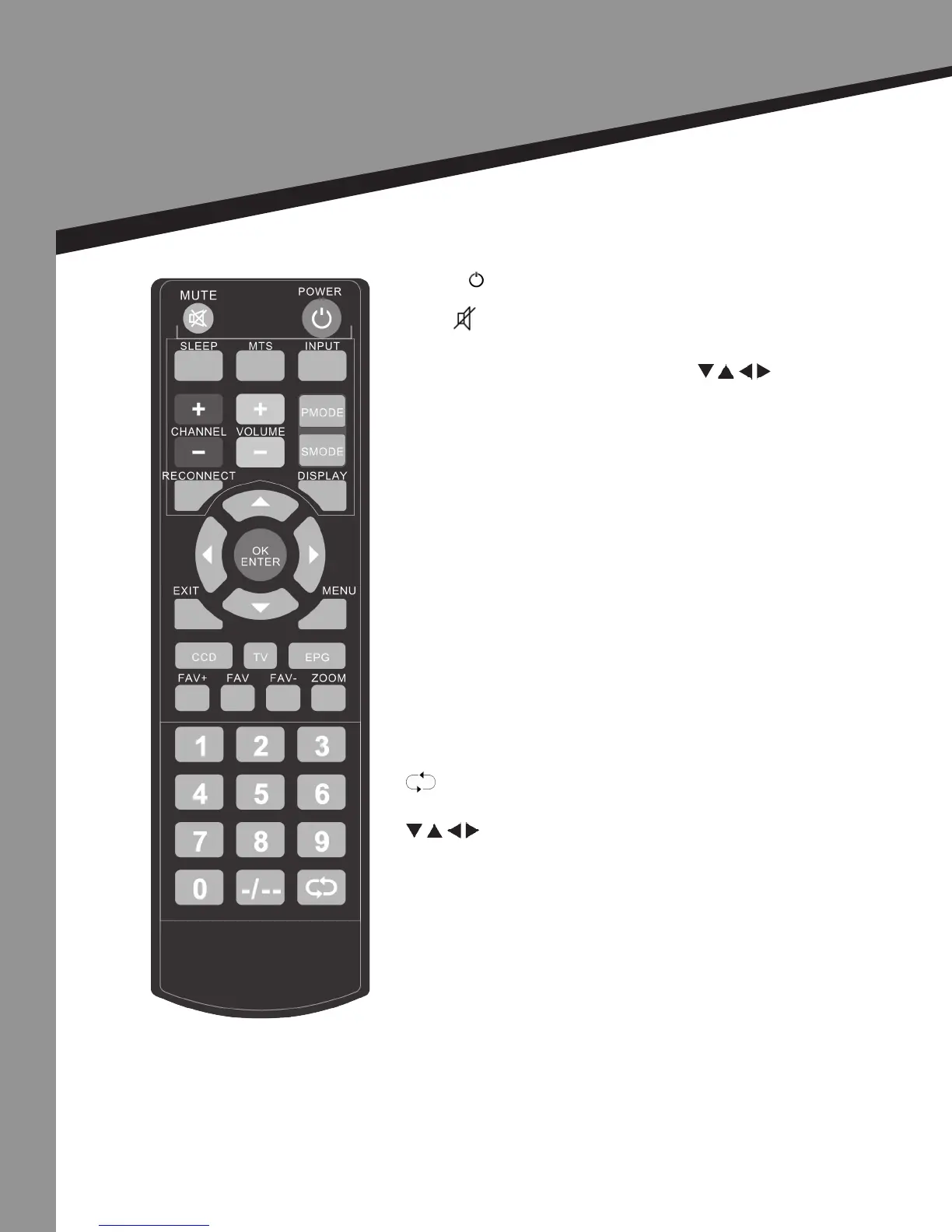
1 | Remote Control instrucons in TV mode
POWER ( ):
Turns TV on when in standby mode. Returns TV to standby mode when on.
MUTE ( ):
Turns sound on and o.
INPUT:
Allows user to cycle through input source. Use to
scroll to preferred source & press ENTER.
MTS:
Audio selecon
SLEEP:
Select amount of me unl TV shuts o automacally.
CHANNEL +/-:
Changes channels up or down.
VOLUME +/-:
Turns the volume up or down.
PMODE:
Cycles through available picture modes
(Bright, user, standard, & vivid).
SMODE:
Cycles through dierent sound sengs
(User, standard, movie, music, news).
DISPLAY:
Displays the source and channels informaon.
NUMBER BUTTONS:
Select a channel or enter a password.
-/--:
Use a separate digital main and sub channels.
:
Last buon returns you to the previous channel viewed.
9
Remote Control
Instrucons in TV mode


 To Next Page