RF IN
S-VIDE O
HDMI1
PC AUDIO
VGA(PC )
Y2
Y1
Pr2
Pr1
VIDEO
Pb2
Pb1
L
HDMI2
Y-L2 Y-R2
Y-L1 Y-R1
R
AC
L
R
AUDIO O UT
Device
(DVD/VCR, Cable/Satellite Box, etc...)
HDMI OUT
17
| Component Connecon
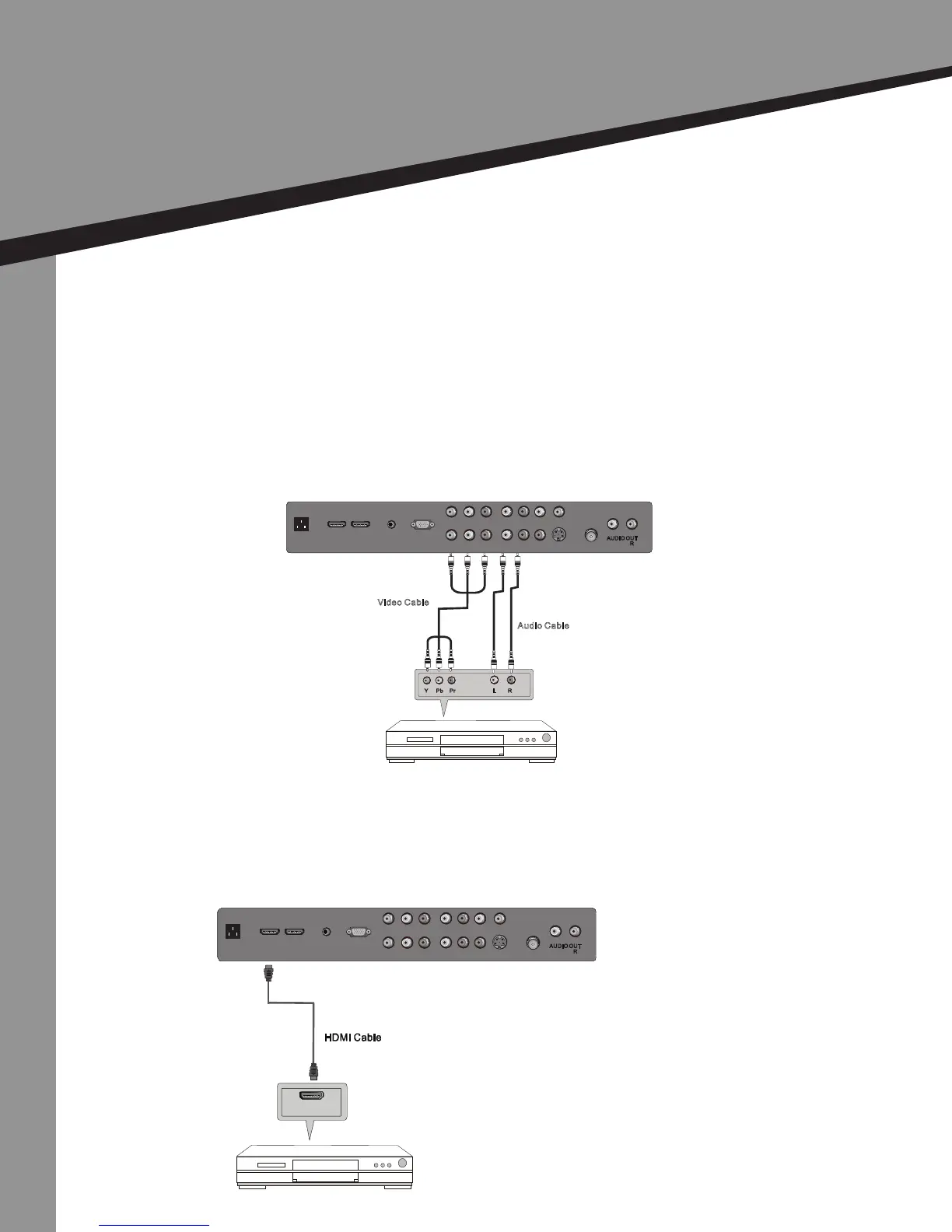
1. Connect the component cables (green, blue, & red) to the video ports (Y, Pb & Pr)
on the device.
2. Connect the audio cables (white & red) to the le and right audio jacks of the
device.
3. Connect the component cable to the ports labeled Y, Pb, & Pr (1 or 2) on the back
of the TV.
4. Connect the audio cables to the ports TV labeled L & R on the back of the TV.
5. In the source list, select Component (1 or 2).
| HDMI Connecon
1. Connect the HDMI cable to the HDMI ports on the device.
2. Connect the HDMI cable to the ports labeled HDMI (1 or 2) on the back of the TV.
3. In the source list, select HDMI (1 or 2).
Video Cable
Audio Cable
Y Pb Pr
L
R
RF IN
S-VIDEO
HDMI1
PC AUDIO
VGA(PC)
Y2
Y1
Pr2
Pr1
VIDEO
Pb2
Pb1
L
HDMI2
Y-L2 Y- R2
Y-L1 Y- R1
R
AC
L
R
AUDIO OUT
Device
(DVD/VCR, Cable/Satellite Box, etc...)
TV Back
TV Back
Installaon
TV Installaon


 To Next Page