23
OSD Adjustment
Channel Opons
3 | Channel Opons
( Only available with input source set to TV)
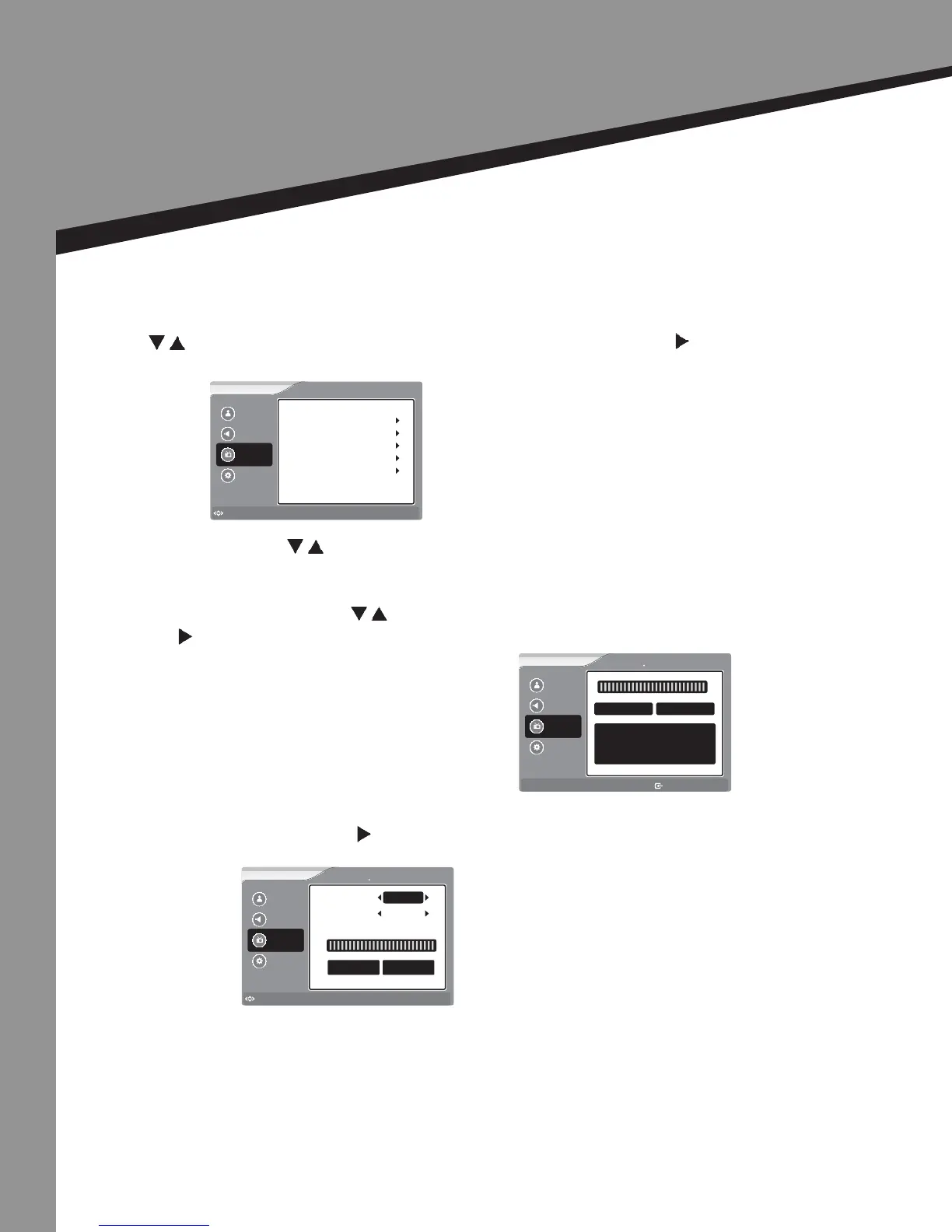
Press to select the item you would like to adjust, then press ENTER or to select that item.
• Tuning Band – Press to select your turning band.
If you select Air, the range of channels is 2-69.
If you select Cable, the range of channels is 1-135.
• Auto Channel Search – Press to select this item, then
press to enter the Auto Channel Scan Program.
• Manual Add Channel – Press to enter the Manual Add Channel.
Picture
Sound
Channel
Settings
to Move
to Select
Enter
Menu
to Exit
Auto Channel Search
Channel Labels
Tuning Band Cable
Channel
Manual Add Channel
Manual Channel Set
Favorite Channels
Picture
Sound
Channel
Settings
Menu
to Exit
Channel Auto Channel Search
0%
Analog 0
Digital 0
Picture
Sound
Channel
Settings
to Move
to Select
Enter
Menu
to Exit
Channel Manual Add Channel
Channels Type
Signal Level
Physical CH
Now 0 Peak 24
2
Digital


 To Next Page