27
OSD Adjustment
Seng Opons
Intelligence Level -
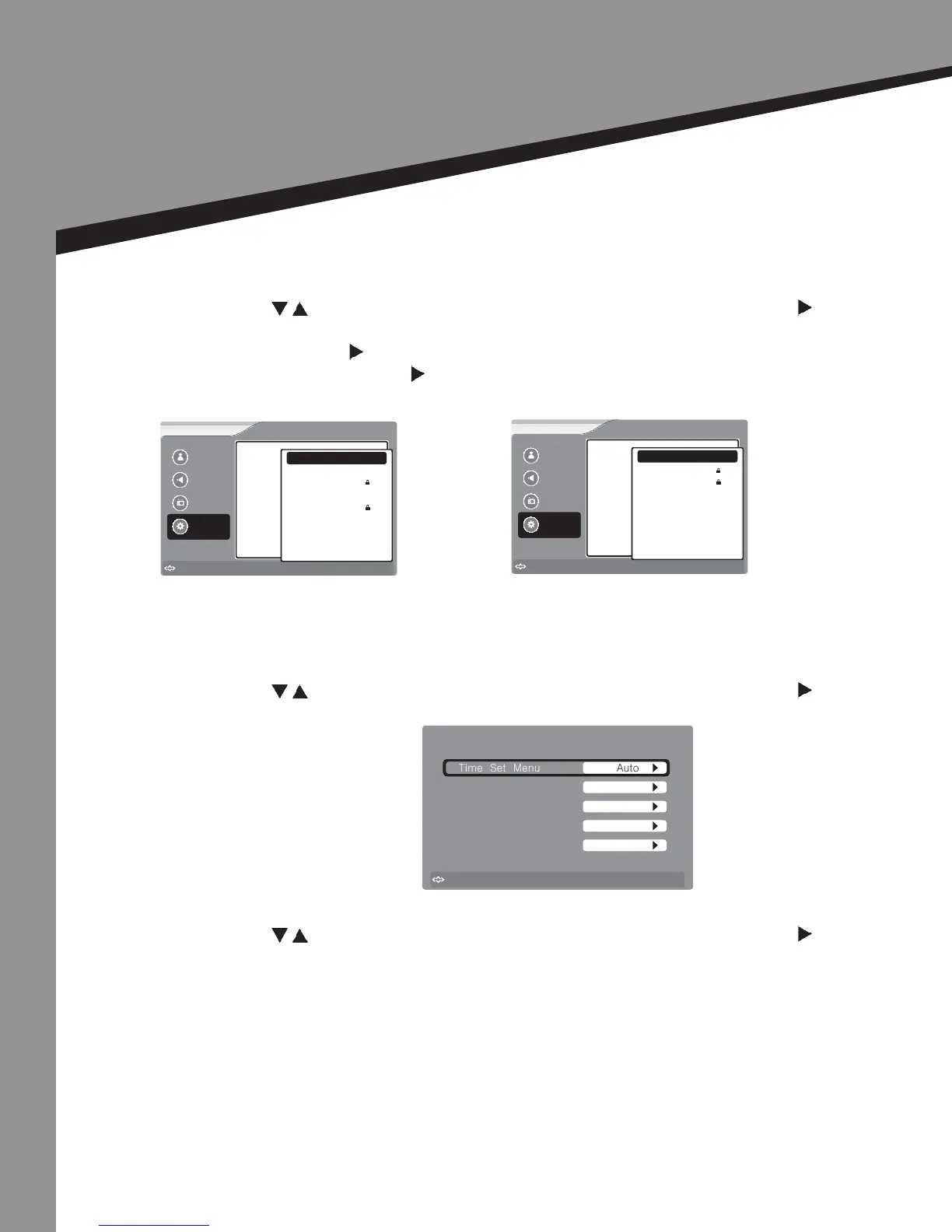
• Press to select the item you would like to adjust, then press ENTER or to select
that item.
• Press ENTER or to set the current channel to lock. If the current channel is already
locked, press ENTER or again to unlock.
Picture
Sound
Channel
Settings
to Move
to Select
Enter
Menu
to Exit
RRT5
Intelligence Level
Erotic level 20CHARS
Humor Level
VL
LL
NL
HL
VH
TEST-MAX
Picture
Sound
Channel
Settings
to Move
to Select
Enter
Menu
to Exit
RRT5
Intelligence Level
Erotic level 20CHARS
Humor Level
Low
Medium
++High++
to Move
to Select
Enter
Menu
to Exit
Time Set Menu
Time
Date
Year
Central
2009
Feb-12
0:28
Time Set Menu
Time Zone
Auto
Time Set |
(You should set the Time Set Mode to “Manual” rst if you want to change the value of the Time
Zone / Year / Date / Time)
• Press to select the item you would like to adjust, then press ENTER or to select
that item.
Time Zone -
• Press to select the item you would like to adjust, then press ENTER or to select
that item.


 To Next Page