25
OSD Adjustments
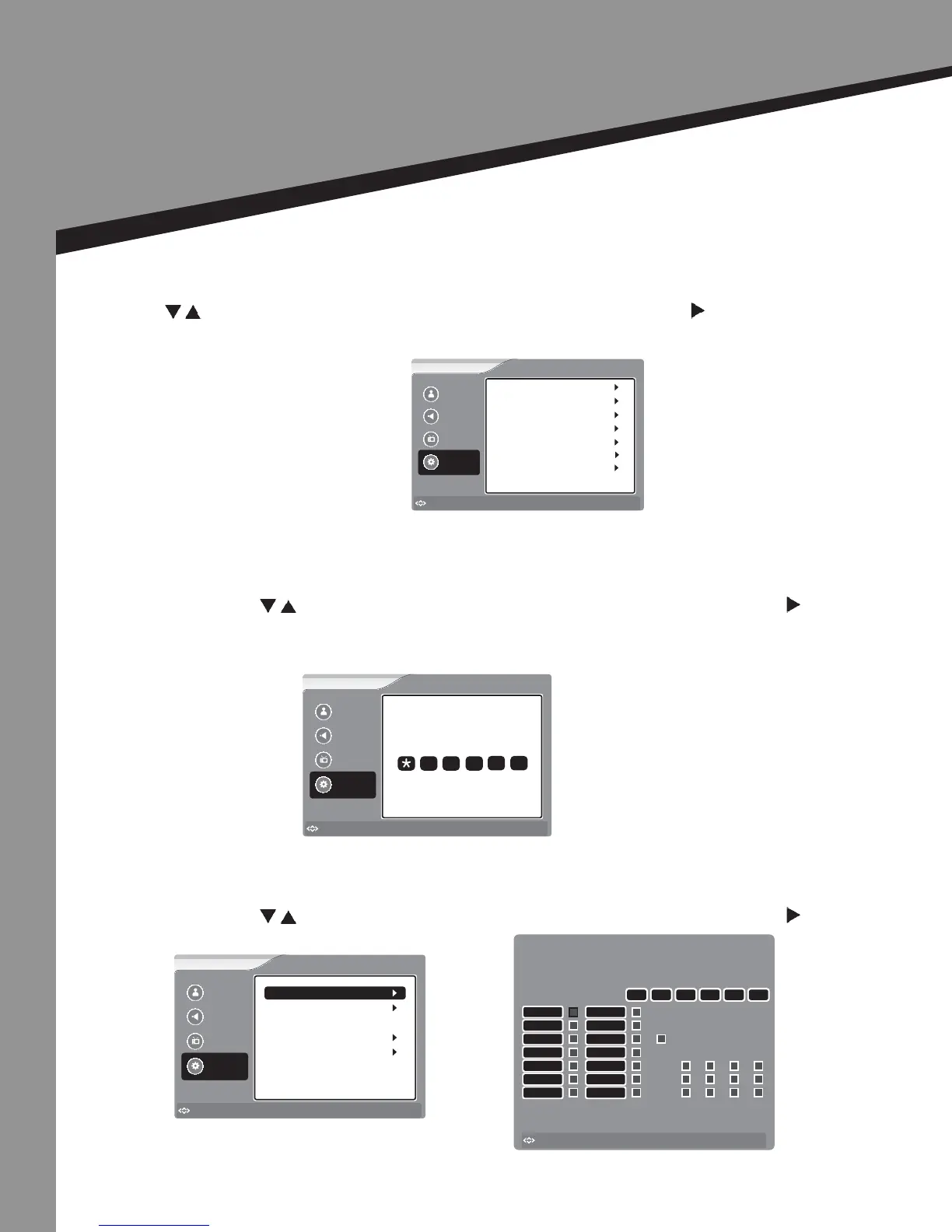
Seng Opons
Parental Control |
• Press to select the item you would like to adjust, then press ENTER or to select
that item.
• Enter the Parental Control Password (The default password is “0000”) and then press
ENTER.
US Rangs -
• Press to select the item you would like to adjust, then press ENTER or to select
that item.
Picture
Sound
Channel
Settings
to Move
to Select
Enter
Menu
to Exit
Enter Password
Parental Controls Menu
Picture
Sound
Channel
Settings
to Move
to Select
Enter
Menu
to Exit
Parental Controls
Canadian Ratings
Advanced Rating
Advanced Parental Lock
US Ratings
On
Password Set
to Move
to Select
Enter
Menu
to Exit
US Rating Menu
MPAA
TV Rating
All
NONE
FV
L
S
V
D
NONE
TV-Y
G
PG
PG-13
R
X
NC-17
TV-MA
TV-14
TV-PG
TV-G
TV-Y7
4 | Seng Opons
Press to select the item you would like to adjust, then press ENTER or to select that item.
Picture
Sound
Channel
Settings
to Move
to Select
Enter
Menu
to Exit
Time Set
Closed Caption
Input Labels
Menu Setting
Parental Control Menu
Settings
Reset
TV EARS


 To Next Page