Installing The Flight Baery
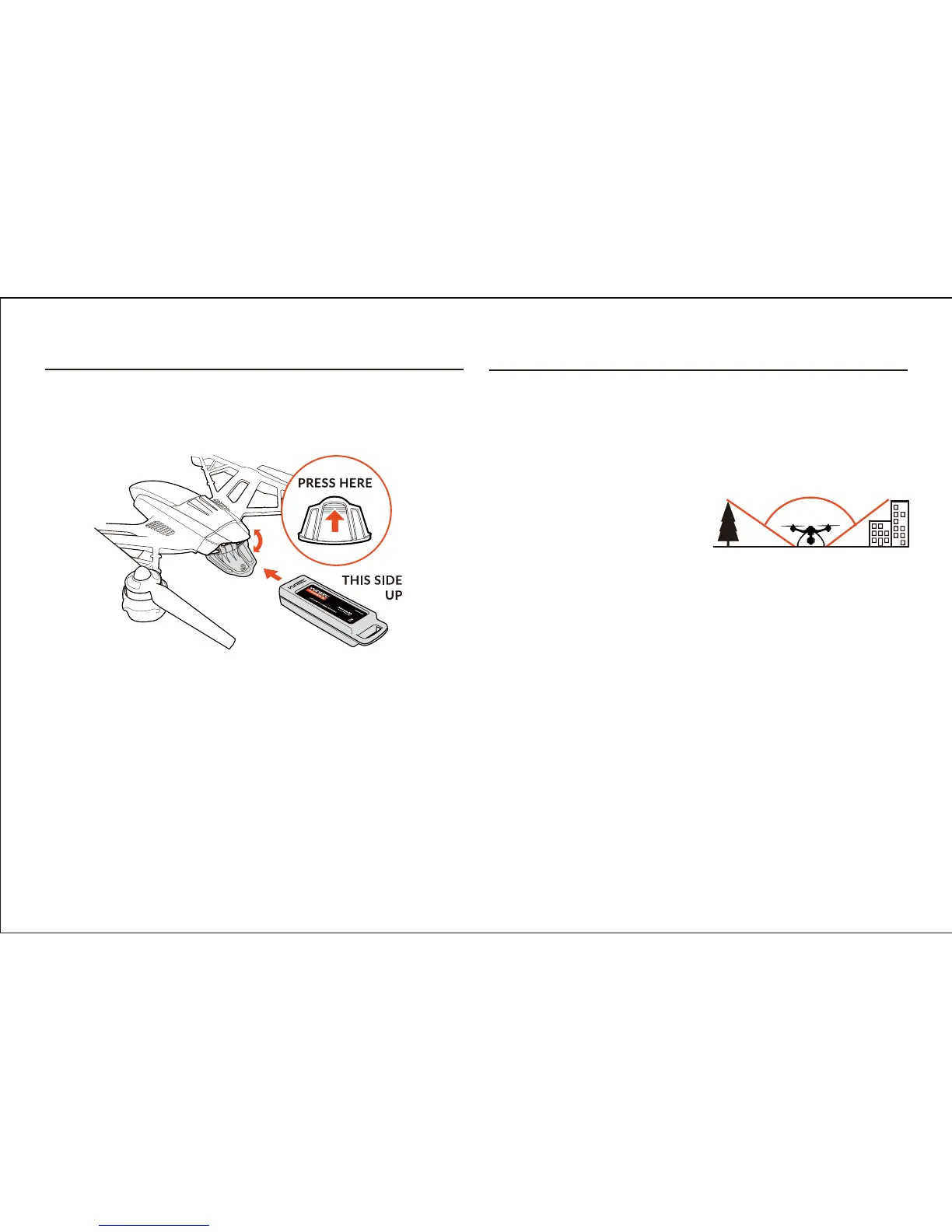
Aer the flight baery has been fully charged it’s ready to be installed in
TYPHOON:
IMPORTANT NOTE: Keep TYPHOON level relave to the ground when
installing the baery.
STEP 1) Push the area at the top of the baery door to release the
latch/lock, and then open the door.
STEP 2) With the side of the baery cartridge that has the ‘UP’ arrow
marking oriented upward, hold the handle and slide the baery into the
baery compartment unl you feel the connector make a posive connec-
on.
NOTE: If you do not install the baery in the correct orientaon it will not
be possible to make a posive connecon.
STEP 3) Close the baery door by pushing the area at the top to engage the
latch/lock.
NOTE: If the door will not close because it’s coming into contact with the
handle on the baery cartridge, the baery is not inserted far enough to
engage the connector properly.
GPS Funconality
TYPHOON requires a suitable GPS signal/lock in order to start the motors
and to be flown. This means it should only be operated outdoors in open
areas that are free from people, vehicles and other obstrucons. And in
order to acquire a suitable GPS signal/lock it’s crical that the GPS antenna
installed in the top of TYPHOON always have a clear view of the sky (100°
minimum clearance required).
WARNING: Do NOT aempt to fly
near or between tall buildings/ob-
strucons, near or under dense
vegetaon, structures or indoors. Do
NOT aempt to fly TYPHOON with GPS enabled indoors or in any
locaon known to have poor GPS coverage. And do NOT disable/turn off
GPS unless you’re able to properly control TYPHOON in Angle (Pilot)
Mode without GPS assistance and accept ALL responsibility and liability for
crashes or ‘fly aways’.
If TYPHOON loses GPS signal/lock while flying it can only be flown in
Angle (Pilot) Mode. Smart Mode and Home Mode, along with their
corresponding features, will no longer work. And the Main LED Status
Indicator will flash purple and the Below Motor LED Status Indicators will
flash three (3) mes per second then will stay off for one (1) second when
TYPHOON loses GPS signal/lock (or if GPS has been disabled/turned off).
If the GPS signal/lock is reacquired (aer receiving 5–10 seconds of
suitable GPS signal), Smart Mode and Home Mode will work again.
WARNING: Loss of GPS signal/lock may result in a crash or even a ‘fly
away’.
100˚
21


 To Next Page