TROUBLESHOOTING
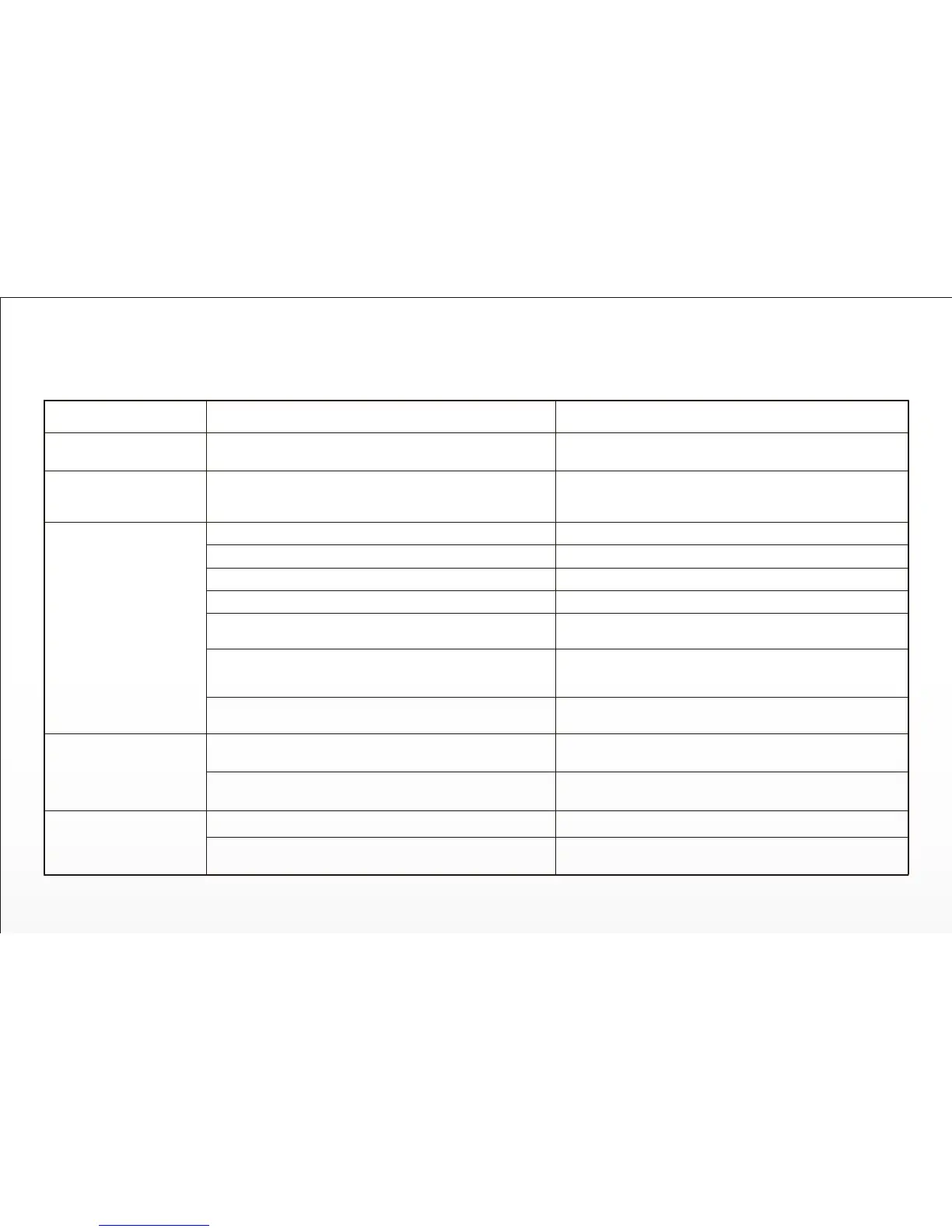
ISSUE
TYPHOON will not inialize
Flight baery will not
charge (red LED on
charger glows solid red).
TYPHOON GPS will not
lock (ST10+ indicates
GPS Disabled)
TYPHOON GPS has
reduced precision
TYPHOON GPS funcons
not operang properly
POSSIBLE CAUSE
TYPHOON was moved during inializaon.
TYPHOON flight baery needs to be replaced.
Overcast, thick clouds blocking GPS recepon.
Solar flares in progress.
TYPHOON is indoors.
Objects blocking 100 degrees of clear view of the sky.
(Possibly underneath a metallic or glass cover, inside a
vehicle, near tall buildings, etc...)
Video transmier nearby, such as an aermarket video
downlink system.
Raised threat level by the U.S. government.
The GPS module is possibly damaged.
The compass has been exposed to a magnet.
The GPS module is possibly damaged.
GPS lock has not been acquired.
SOLUTION
Turn TYPHOON off then back on again, and ensure it does
not move during the inializaon process.
Replace TYPHOON flight baery.
Wait for lighter cloud cover or disable GPS*.
Wait for disturbance to subside or disable GPS*.
Move TYPHOON outside or disable GPS*.
Disable GPS. Flying indoors/disabling GPS NOT Recommended.
Move TYPHOON to a clear and open area.
Reposion or remove the video transmier.
Wait for the threat level to be reduced or disable GPS*.
Replace the GPS module.
Move TYPHOON away from the magnec source.
If problem persists, calibrate compass.
Replace the GPS module.
Ensure GPS antenna has clear view of sky and GPS lock has
been acquired.
33


 To Next Page