32
IMPORTANT NOTE: You can choose to record video at 48, 50 (PAL) or 60
(NTSC) frames per second by tapping the corresponding buon near the
upper le-hand corner on main screen of the APP. Keep in mind that the
delay in the live video stream will be lowest at 48 and 50 as compared to
60 frames per second.
QUICK TIP: There’s an adjustable counterbalance located on the rear of
the CGO2+. This counterbalance has been adjusted at the factory to
provide the best balance and performance overall so typically it should
NOT need to be adjusted. However, if you find that the CGO2+ is making
any ‘buzzing’ sounds while powered on, carefully twist the counterbalance
in or out unl the sound stops in order to achieve the best balance, perfor-
mance and photo/video quality.
Pitch Follow Funcon for CGO2+ on SteadyGrip
Pitch Follow funcon allows the gimbal camera to track SteadyGrip in pitch
direcon.
To Enter Pitch Follow:
1) Power on SteadyGrip, wait unl gimbal inializaon completes.
2) Tilt SteadyGrip 90° to the le or right side, hold it for about 3 seconds.
3) The green Gimbal LED Status Indicator on top will blink from once per
second to 4 mes per second when enter Pitch Follow.
Note: When SteadyGrip is in Pitch Follow feature, the gimbal camera tracks
SteadyGrip in pitch direcon, and the gimbal pitch control roller wheel on
SteadyGrip is disabled.
To Exit Pitch Follow:
Repeat the above procedures to exit Pitch Follow.
Note: If Pitch Follow funcon cannot be acvated by the above operaons,
please visit www. yuneec.com to download the latest firmware.
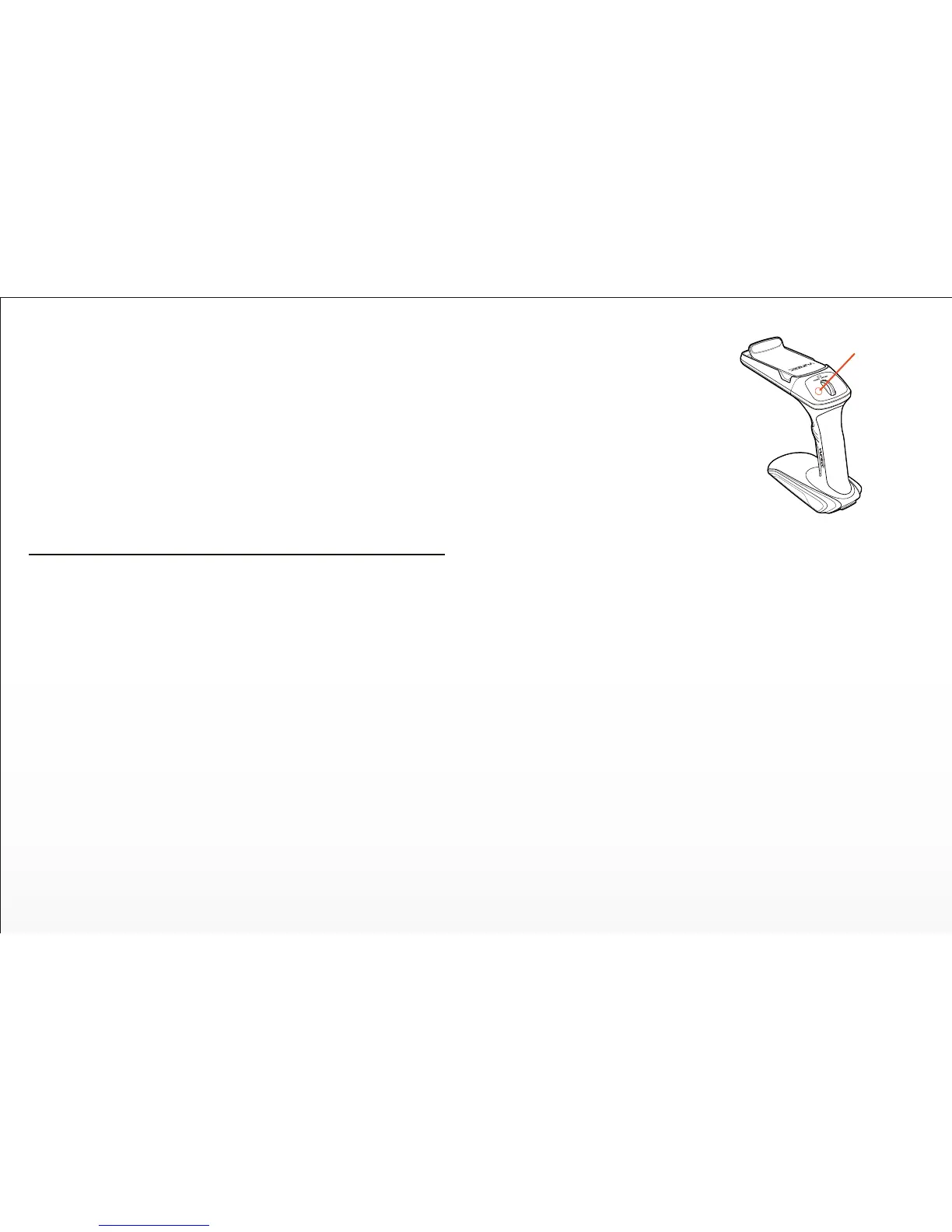
If you have updated SteadyGrip in hand,
which features an extra ‘Pitch Follow’
buon and 8 baeries, then please fefer to
the following instrucons:
To Enter Pitch Follow:
Press Pitch Follow Buon on the top of the
SteadyGrip to enter Pitch Follow Funcon.
The green Gimbal LED Status Indicator on
top will blink from once per second to 4
mes per second when enter Pitch Follow.
NOTE:
1) The default status of SteadyGrip is normal status without Pitch Follow.
2) When SteadyGrip is in Pitch Follow status, the gimbal camera tracks Steady-
Grip in pitch direcon, and the gimbal pitch control roller wheel on SteadyGrip
is disabled.
To Exit Pitch Follow:
Press Pitch Follow Buon to exit this funcon.
Pitch Follow Buon


 To Next Page