C099-F9P - User Guide
UBX-18055649 - R02 Using the C099-F9P Page 15 of 48
• An FTDI USB bridge to ZED-F9P UART1 and ODIN-W2 UART COM ports.
• Dedicated connection to the ZED-F9P USB port.
FTDI USB bridge
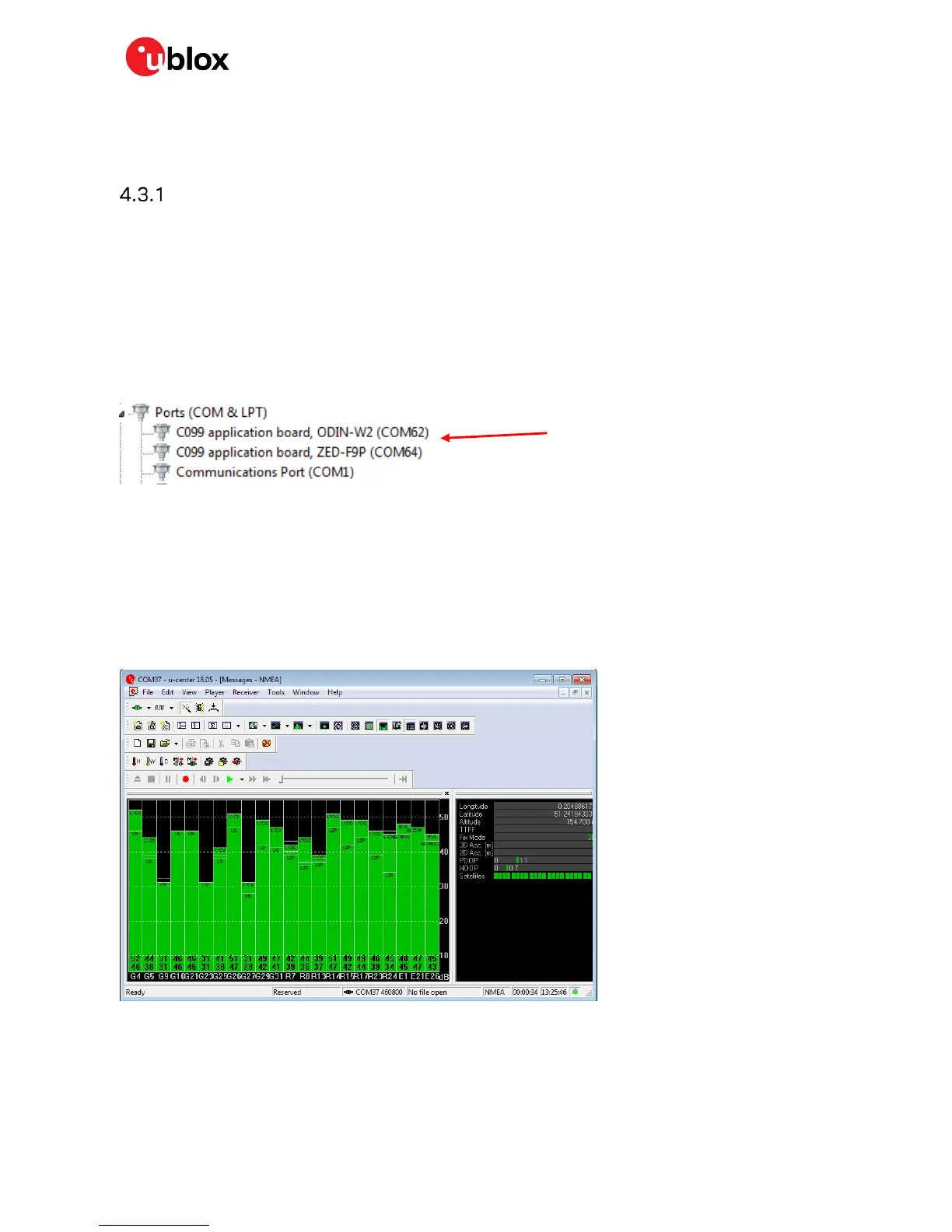
When the USB cable from the user’s PC is connected, a driver will load and set up two virtual serial
ports, as shown below in Figure 14. Additionally, a further serial VCP will be created to provide a direct
connection with the ZED-F9P USB port.
☞ Ensure that the PC is connected to the internet to load the drivers from Windows update.
The first of these is connected to the ZED-F9P serial port and should be selected with u-center. The
second serial device is for the ODIN-W2 module when using s-center. In Figure 14 the ODIN-W2
connection is the first port (COM 62) and the ZED-F9P connection is the second port (COM 64). Port
numbering can be different between individual PCs, but the same arrangement applies.
Figure 14: Windows device manager COM port view
In addition, a third VCP will be created corresponding to the ZED-F9P USB port. Windows 10 users will
see a new VCP device in the device manager window as it will load an in-built driver. With older
Windows installations a driver will be loaded via Windows update. In this case the device will be
identified as a u-blox GNSS device in the Device Manager window.
Open u-center (V18.06 or later), select the ZED-F9P serial port, and set the baud rate to 460800 to
match the ZED-F9P default UART setting. Once connected, u-center shows typical received signal
levels from multiple GNSS bands, see Figure 15 below.
Figure 15: u-center view with ZED-F9P connected
Additional UBX protocol messages can be enabled to view additional information in u-center. For
example, the following are typical messages the user can poll or enable for periodic update.
• NAV-HPPOSLLH
ZED-F9P and ODIN-W2



 To Next Page
 Loading...