C099-F9P - User Guide
UBX-18055649 - R02 Firmware updates Page 27 of 48
7 Firmware updates
This section shows how to update the GNSS and Wi-Fi/Bluetooth modules’ firmware if required.
The board is delivered with the latest versions of firmware running on the ZED-F9P and ODIN-W2
modules. However, newer versions may become available during the lifetime of the product.
7.1 ZED-F9P firmware update
This section shows how to update the firmware and re-enable the configuration settings required for
the C099.
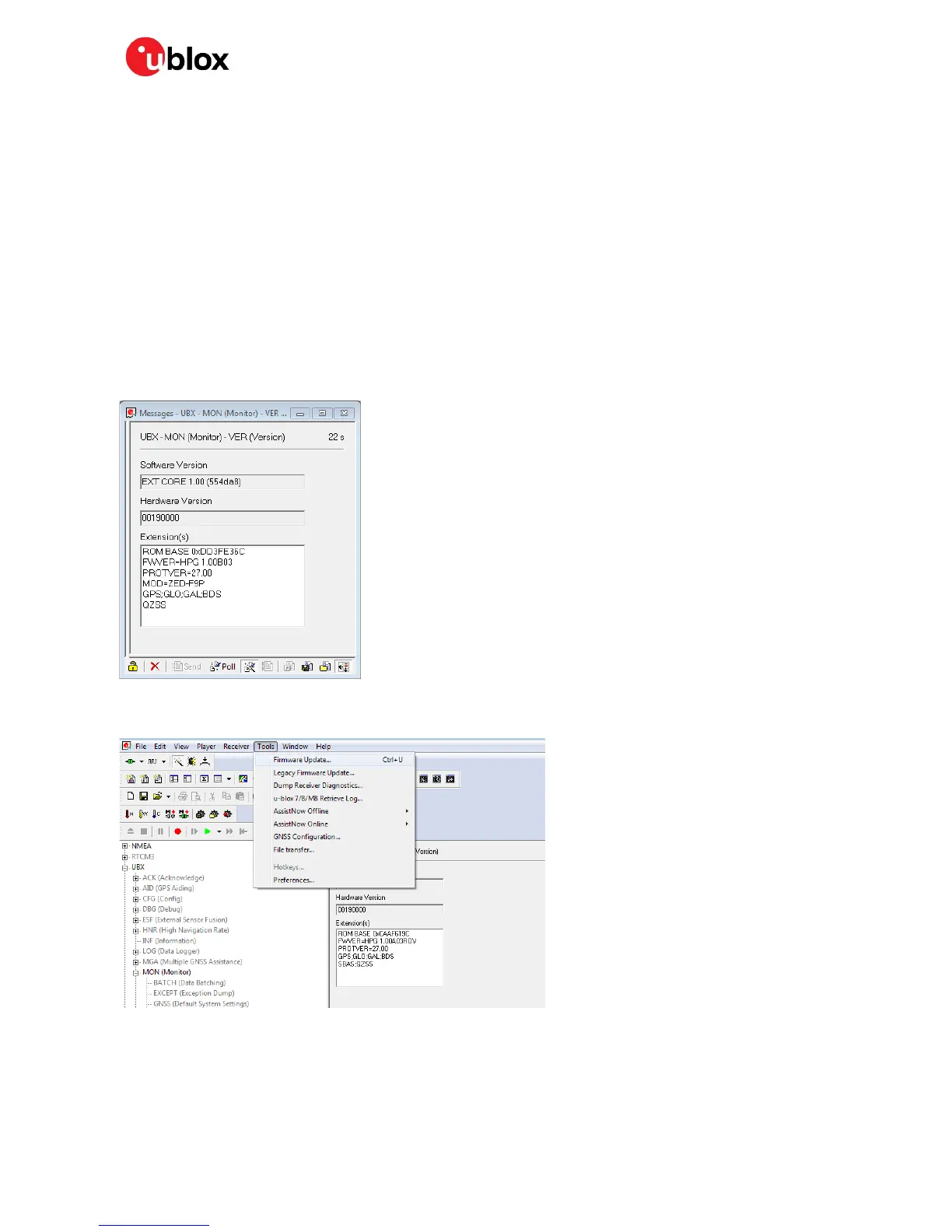
To update the ZED-F9P, connect via USB to the COM port identified as the ZED-F9P to u-center and
poll MON-VER to view the installed firmware: see Figure 14 for the Device Manger COM port view. The
shipped units will have HPG1.00 firmware or newer. To download a new firmware follow the sequence
detailed below.
Figure 38: MON-VER poll response
To begin updating the firmware, select “Tools > Firmware Update…”
Figure 39: Selecting u-center Firmware Update mode
The following firmware image update window will appear as shown below:



 To Next Page
 Loading...