8 Cocoon 1100
Cocoon 1100
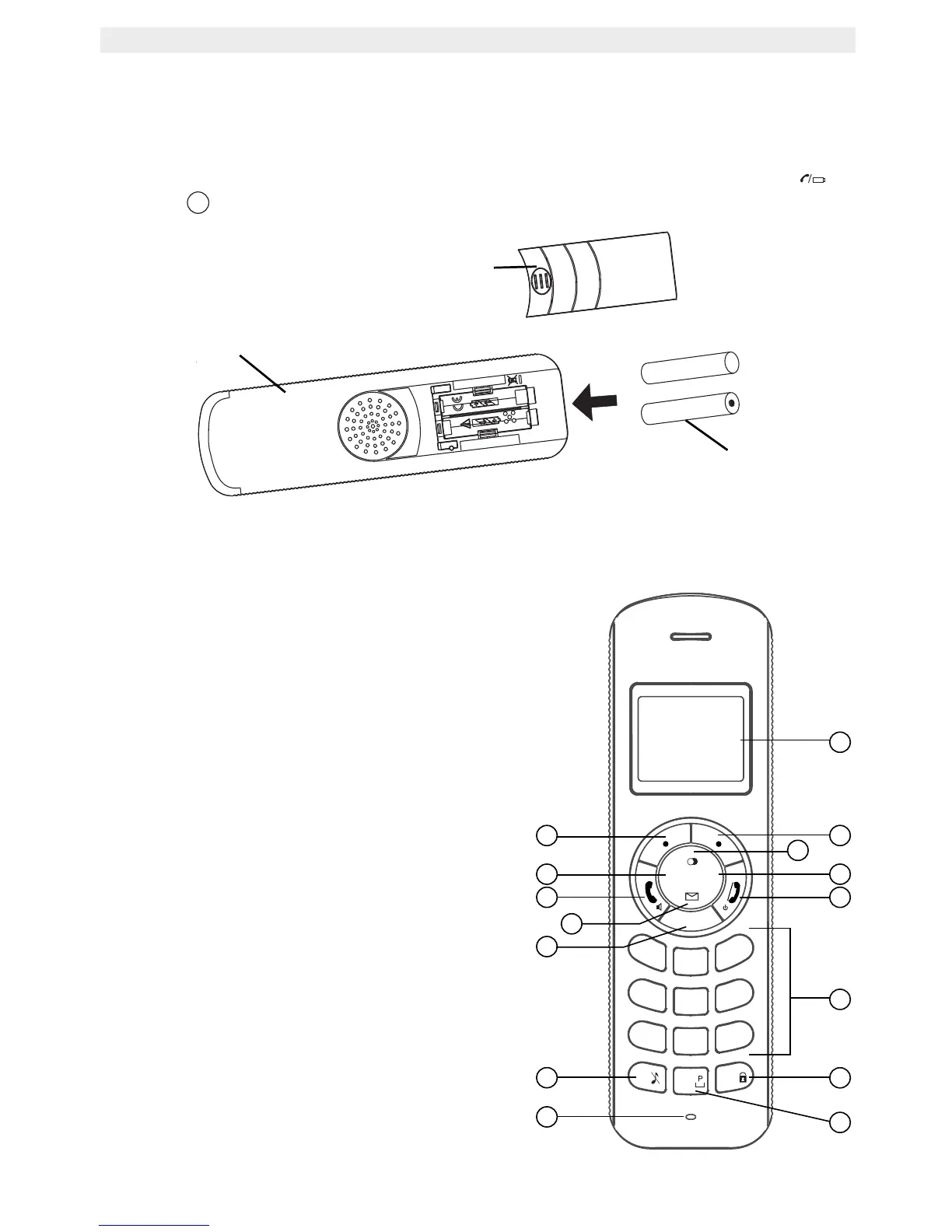
5.2 Installing the batteries
• Open the battery compartment (see below).
• Insert the batteries respecting the (+ and -) polarity.
• Close the battery compartment.
• Leave the handset on the base unit for 16 hours. The handset charging indicator
(LED)
on the base unit will light up.
6 Getting to know your telephone
6.1 Keys / LED
Handset
1. Display
2. Right Menu key
3. Up / Redial key
4. Right / Flash key
5. On Hook / OFF key
6. Alphanumeric keys
7. Keypad Lock Key
8. Pause key
9. Microphone
10. Ringer volume Off
11. OK Key
12. Down / Call Log key
13. Off Hook / ON / Handsfree key
14. Left / Internal Key INT
15. Left Menu key
16
+
-
+
-
Cocoon 1100
Rechargeable
Batteries
Back view of handset
Battery cover
OK
*
#
7
PQRS
4
GHI
2
ABC
5
JKL
8
TUV
0
3
DEF
6
MNO
9
WXYZ
1
INT
R
Cocoon 1100
▲
▲
▲
▲
1
8
3
2
5
6
7
4
9
11
15
10
12
13
14



 To Next Page