8
First steps
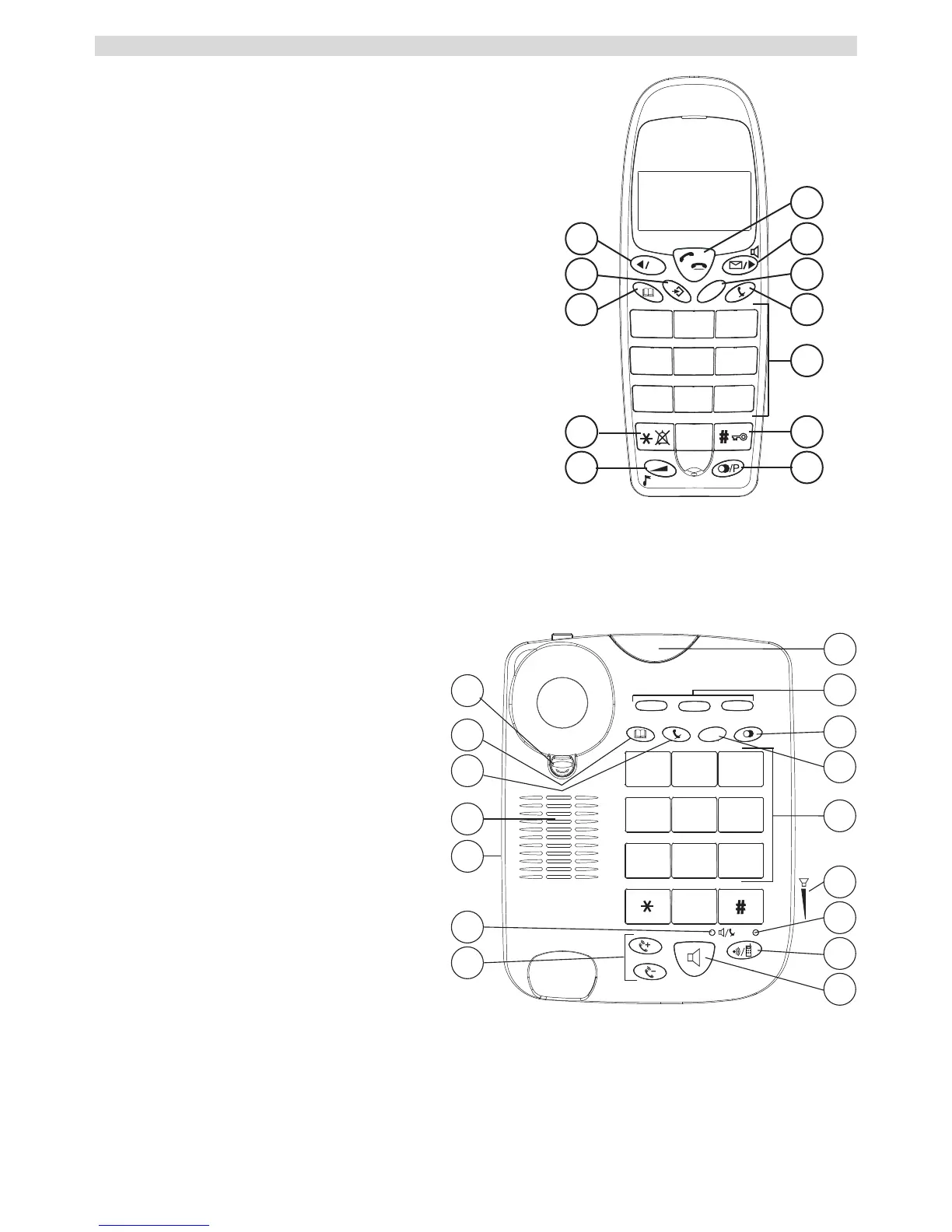
4.7 Keys / Display
Cordless handset
1. Call key
2. Call list / Handsfree / Scroll key
3. INT / Escape key
4. Mute key
5. Alphanumeric keys
6. Key lock
7. Redial / Pause key
8. Volume / Ring tone key
9. Ring tone ON/OFF key
10. Phonebook key
11. Menu/OK key
12. Flash R / Scroll key
Corded telephone
13. Red LED display on the base
station illuminates during a call /
when the cordless telephone is
in use
14. Direct memory dialling
(M1 - M2 - M3)
15. Redial / Pause key
16. Flash R key
17. Alphanumeric keys
18. Hands free volume control
19. LED: Cordless handset in use
20. Paging / Divert
21. Hands free key
22. Volume key for handset
23. LED: Hands free mode / mute
24. Ring tone volume control
25. Speaker
26. Mute key
27. Memory key
28. Cradle



 To Next Page