MiCard MultiTech4
2
3 LED and beeper behavior
The MiCard MultiTech4 reader is equipped with two LEDs and a beeper which emits
different beep tones for different statuses.
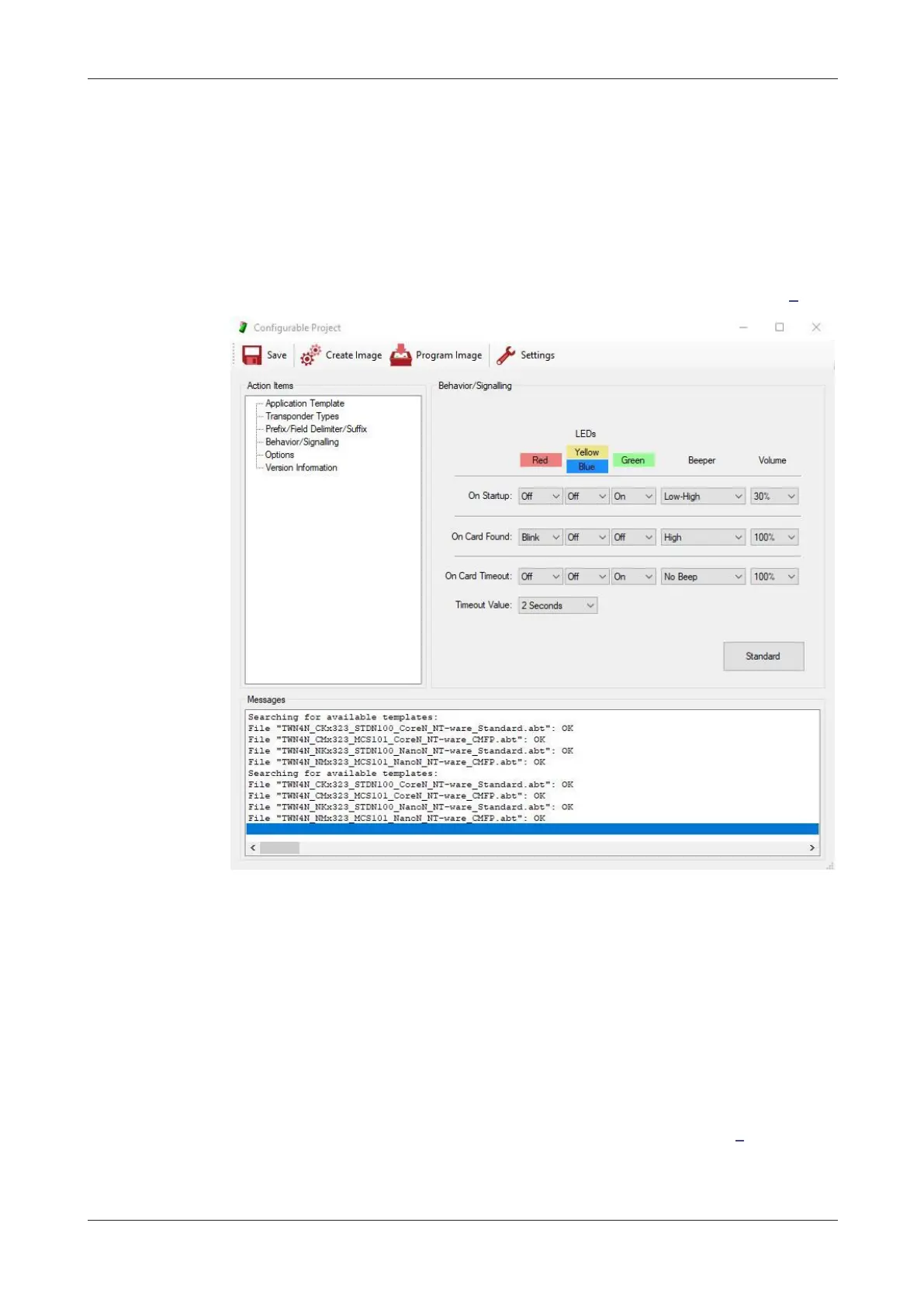
The default values are shown in the following screenshot. LEDs and beep tones are
configurable via the MiCard MultiTech4 - AppBlaster (NT-ware Edition) (on page 3).
4 Compatibility
Canon MEAP devices (V3.0.8 onwards)
Canon SFP MEAP devices (V1.0.2 onwards)
Canon CMFP devices
Note that the MiCard MultiTech4 reader must be configured for Canon CMFP
devices. To make it compatible, the reader requires a certain configuration. Please
refer to MiCard MultiTech4 - AppBlaster (NT-ware Edition) (on page 3).
Canon imageFORMULA ScanFront devices
microMIND V2 (V2.0.5 onwards)
uniFLOW


 To Next Page