UBio-X Pro2 User Guide 41
UNIONCOMMUNITY Co., Ltd.
Addr : 12F, Munjeong Daemyeong Valeon bldg, 127 Beobwon-ro Songpa-gu,
Seoul, Korea (zip code: 05836)
Tel: +82-2-6488-3000, Fax: +82-2-6488-3099,
E-Mail :sales@unioncomm.co.kr; http://www.unioncomm.co.kr
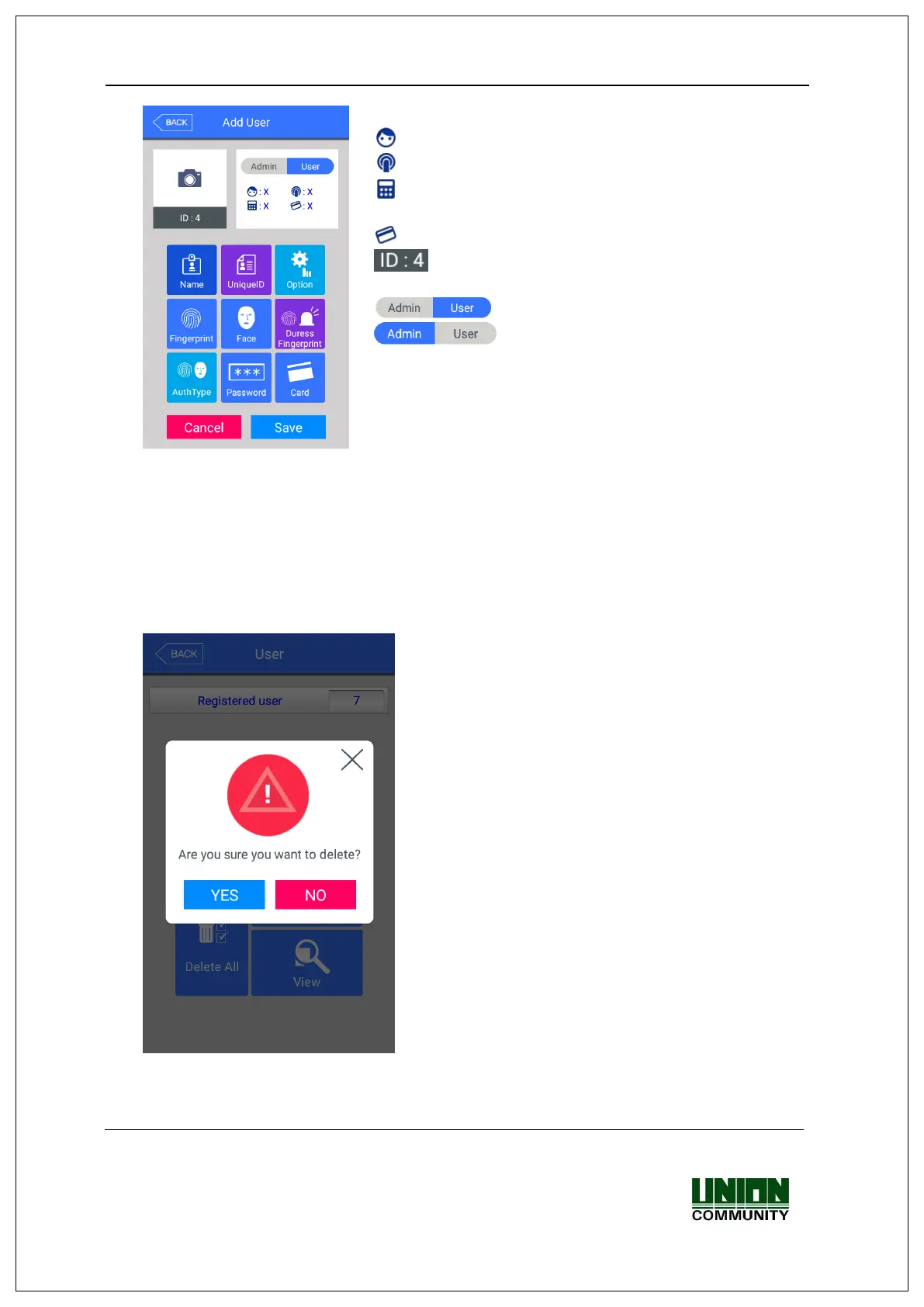
The icons at the left side means as follows.
: The number of registered faces
: The number of registered fingerprints (X,1~10)
: Existence of password registration (1: Registered / X:
Not registered)
: The number of registered cards (X,1~10)
: User ID to be registered
: User
: Administrator
If you touch the picture, you can register with re-taken
picture.
The modification method of each item is the same with the user addition, so refer to the
‘3.3.1. Add’.
3.3.4. Delete All
If you click the [User] [Delete All] in the main menu, the following window appears.
If you want to delete all the users, click [YES], and
if you want to cancel, click [NO].
※If you click [YES], the users and admin are
deleted, and the restoration is impossible
once they are deleted, so be careful.


 To Next Page
 Loading...