UBio-X Pro2 User Guide 70
UNIONCOMMUNITY Co., Ltd.
Addr : 12F, Munjeong Daemyeong Valeon bldg, 127 Beobwon-ro Songpa-gu,
Seoul, Korea (zip code: 05836)
Tel: +82-2-6488-3000, Fax: +82-2-6488-3099,
E-Mail :sales@unioncomm.co.kr; http://www.unioncomm.co.kr
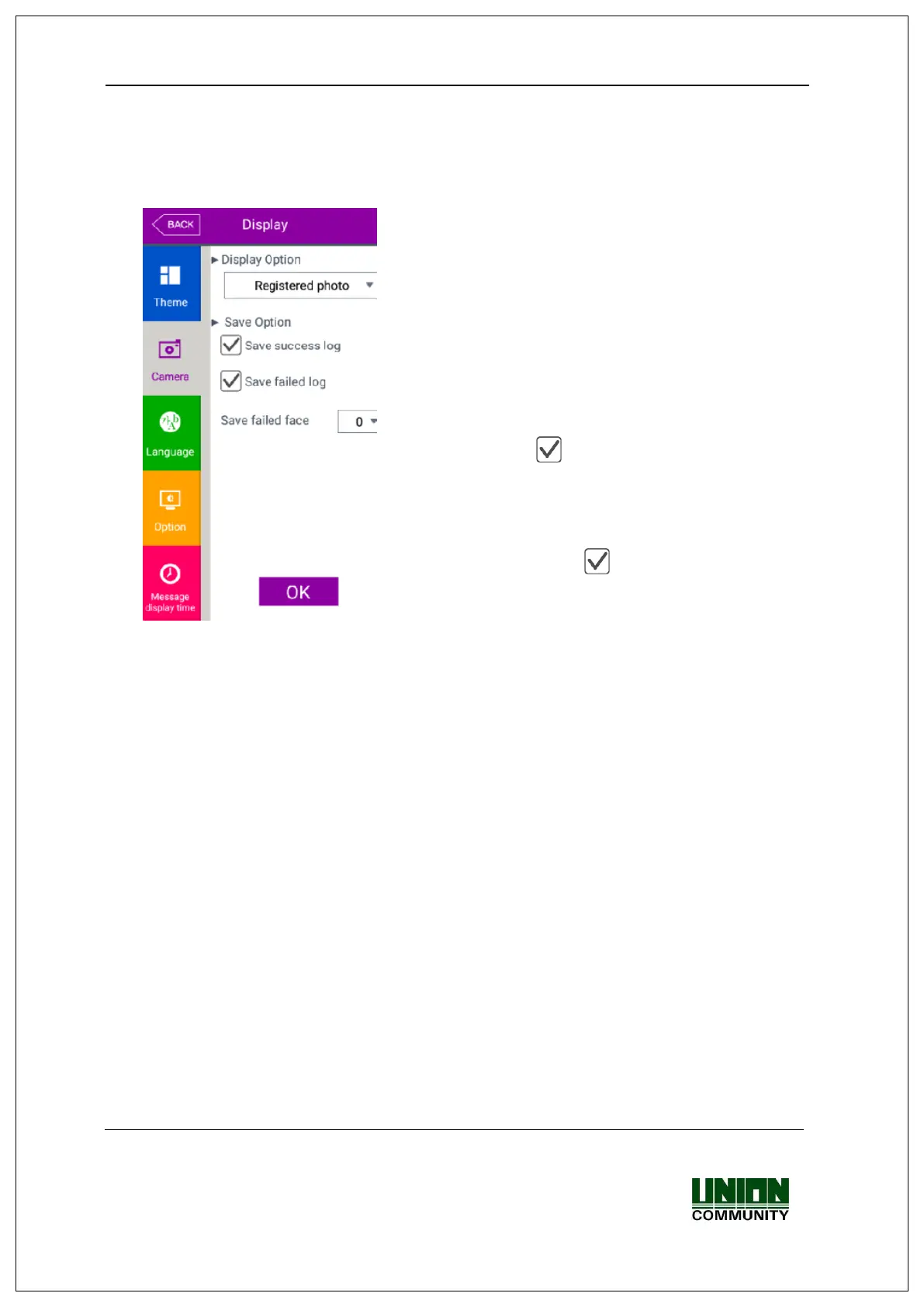
▶Basic setting: Same with the window at the left side.
▶Display Option
Select the image displayed in the message window
of authentication success
- None
- Registered photo
- Authentication method: Image stands for each
authentication method
▶Save success log
If it is checked ( ), the camera image is captured
as image log when the authentication was
successful.
▶Save failed log
When it is checked ( ), the camera image is
captured as image log when the authentication was
failed.
▶Save failed face
0: The failed log is not saved.
1~5: An unregistered user stares at the screen of
terminal for more than the set time (1~5), the failed
log is saved.


 To Next Page
 Loading...