UBio-X Pro2 User Guide 71
UNIONCOMMUNITY Co., Ltd.
Addr : 12F, Munjeong Daemyeong Valeon bldg, 127 Beobwon-ro Songpa-gu,
Seoul, Korea (zip code: 05836)
Tel: +82-2-6488-3000, Fax: +82-2-6488-3099,
E-Mail :sales@unioncomm.co.kr; http://www.unioncomm.co.kr
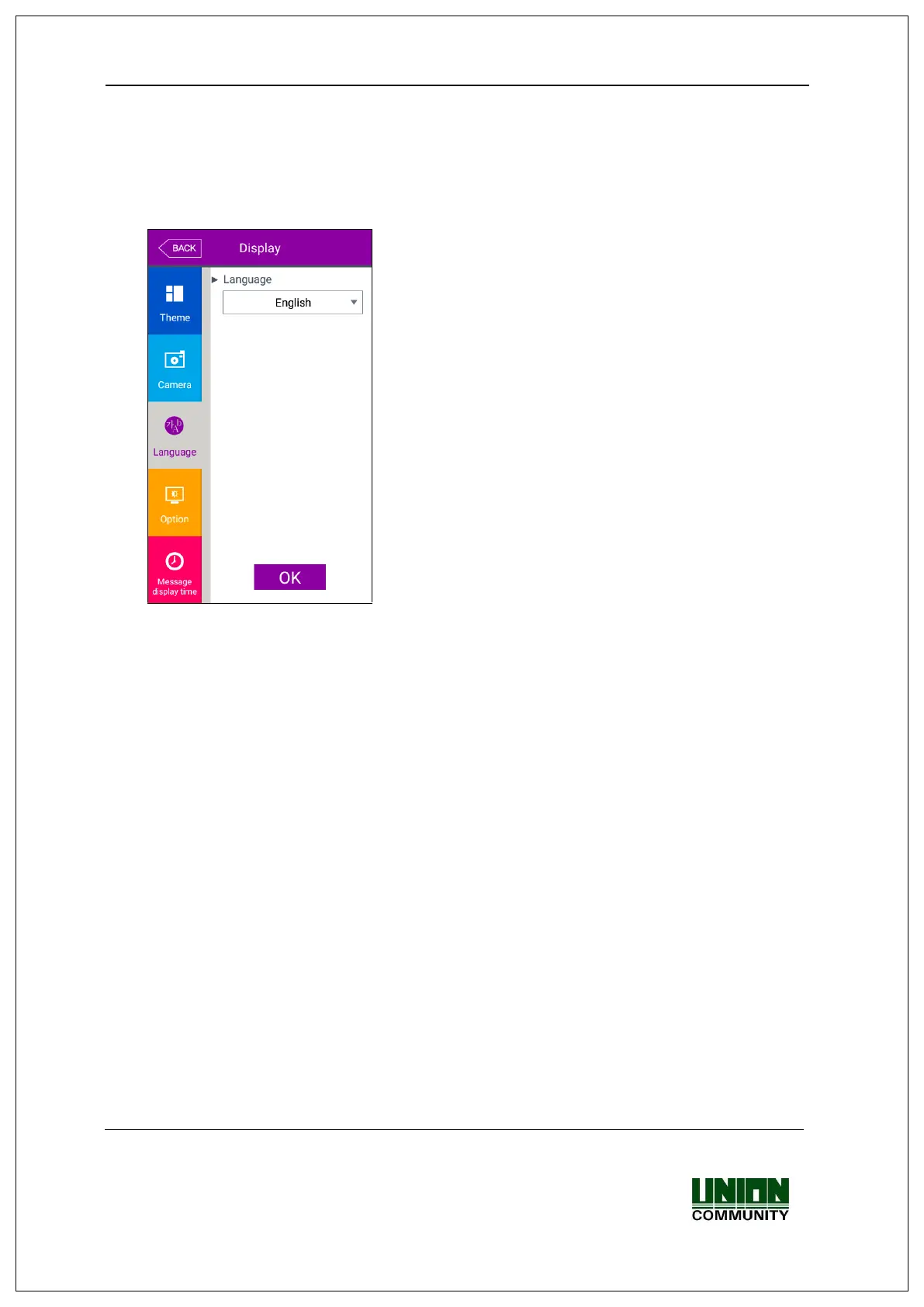
▶Basic setting: ‘English’
▶Language
If you change the language and click ‘OK’ button,
the voice message and language are changed to
the set language.
If you want to cancel and move to the upper menu,
click [BACK] button.
※ Supporting languages
English, Korean, Japanese, Portuguese,
Chinese(Traditional), French, Chinese(Simplified),
Spanish, Polish, Persian, and German


 To Next Page
 Loading...