UBio-X Pro2 User Guide 46
UNIONCOMMUNITY Co., Ltd.
Addr : 12F, Munjeong Daemyeong Valeon bldg, 127 Beobwon-ro Songpa-gu,
Seoul, Korea (zip code: 05836)
Tel: +82-2-6488-3000, Fax: +82-2-6488-3099,
E-Mail :sales@unioncomm.co.kr; http://www.unioncomm.co.kr
3.5. Application mode
3.5.1. Application
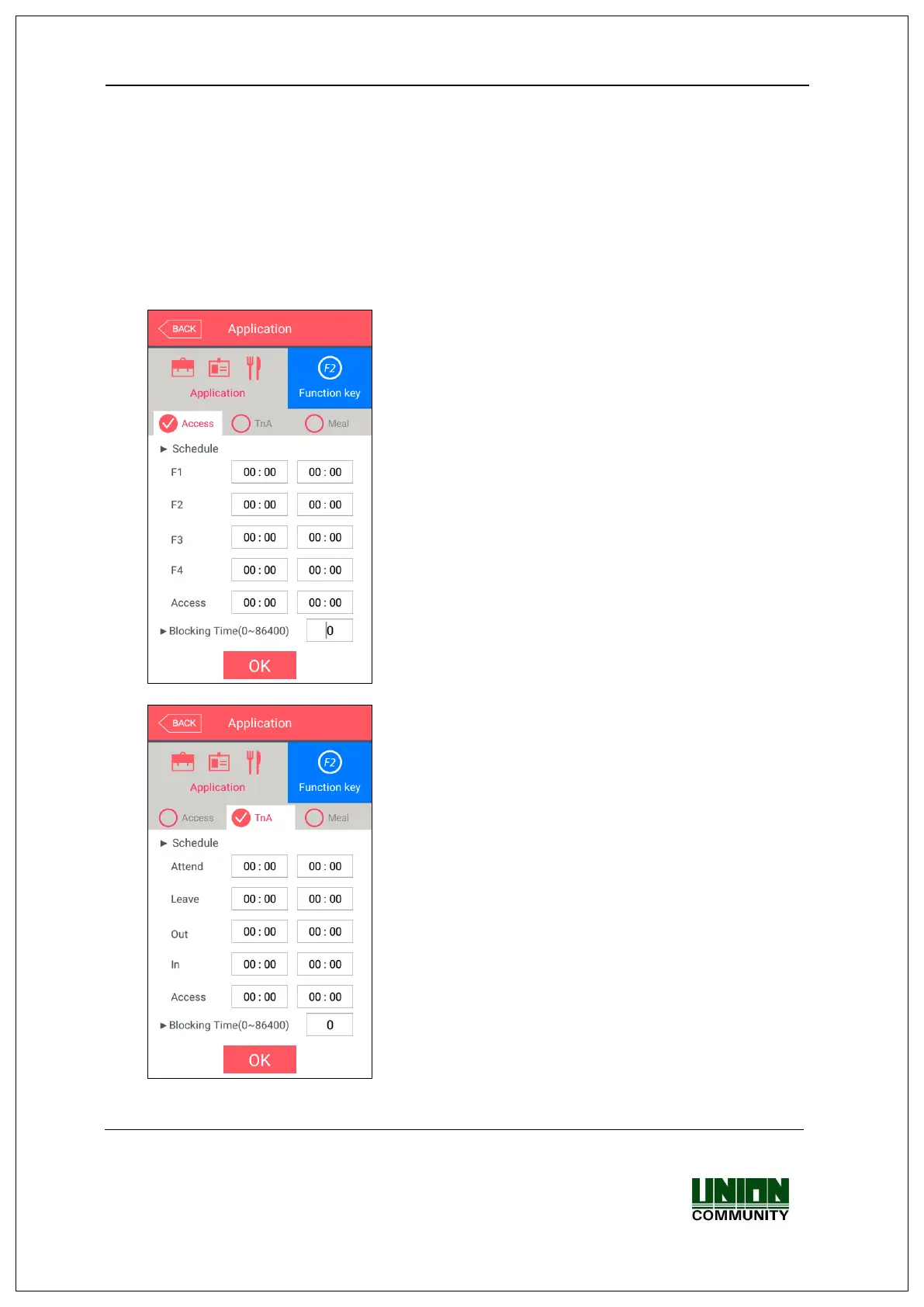
If you select the [Application] in the main menu, the following window appears.
In the application mode, you can select the [Access / TnA / Meal] according to the
purpose.
3.5.1.1. Access or TnA setting
It is the screen appearing when you select the Access.
Click [OK] button to apply the changes, and click
[BACK] button to cancel and return.
▶Basic setting : Same with the window at the left side.
It is the screen appearing when you select the [TnA].
Click the [OK] button to apply the changes, and click
[BACK] button to cancel and return.


 To Next Page
 Loading...