UBio-X Pro2 User Guide 50
UNIONCOMMUNITY Co., Ltd.
Addr : 12F, Munjeong Daemyeong Valeon bldg, 127 Beobwon-ro Songpa-gu,
Seoul, Korea (zip code: 05836)
Tel: +82-2-6488-3000, Fax: +82-2-6488-3099,
E-Mail :sales@unioncomm.co.kr; http://www.unioncomm.co.kr
3.6. System
3.6.1. System
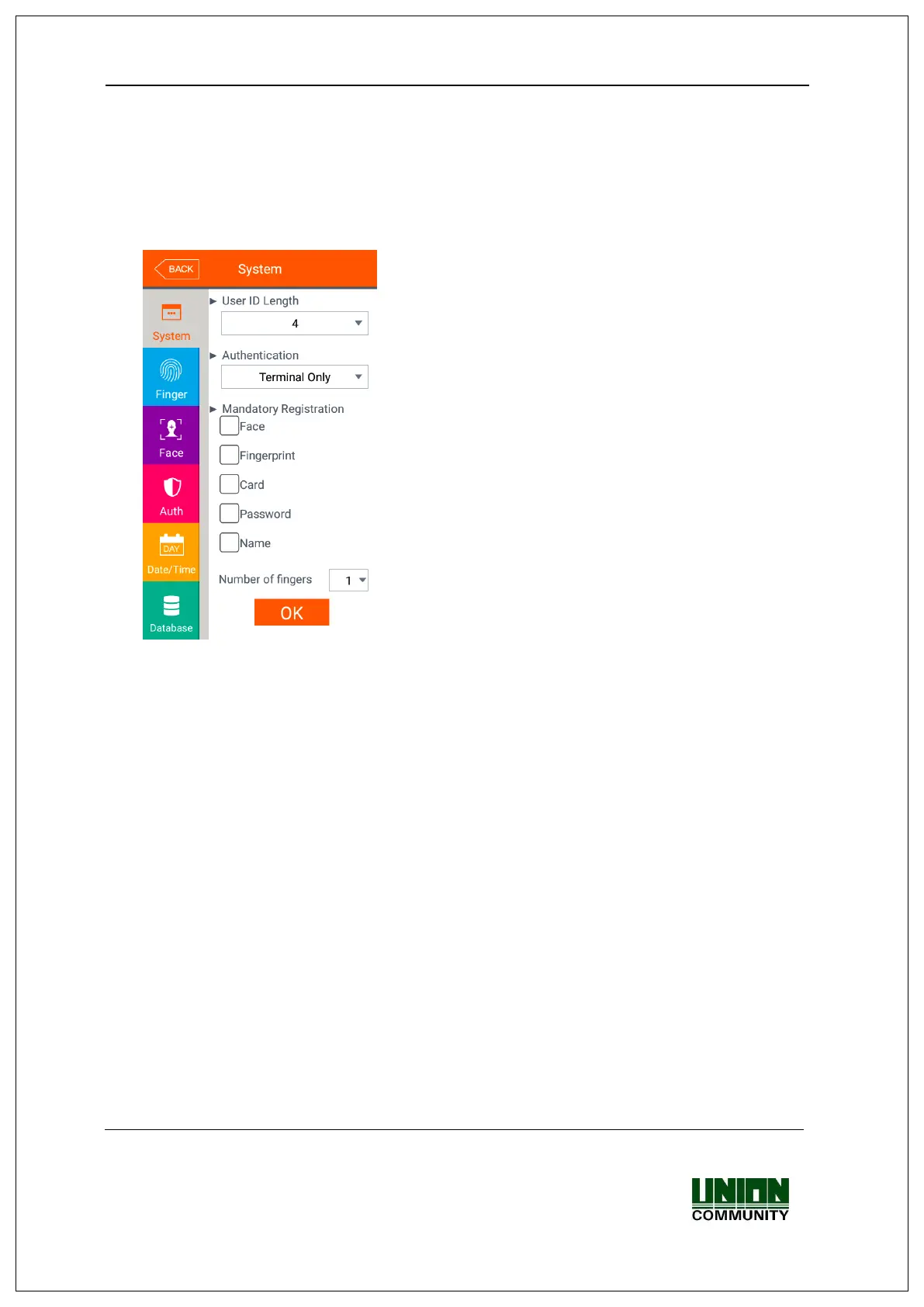
The following window appears if you select the [System] [System] in the main
menu.
▶Basic setting: Same with the window at the left side
▶User ID Length
It sets the length of the user ID, and it can be 2~8
characters and should be the same with the length
of the registered ID of the server program. If the
ID registered in the server program uses ‘000075’
as a 6 digits ID, set 6.
▶Authentication
It determines the priority of the authentication
between the terminal and network server and there
are 4 modes “Terminal Only”, “Server Only”,
“Terminal/Server”, “Server/Terminal”.
[Terminal Only]: It only authorizes the user
registered in the terminal.
[Terminal/Server]: It authorizes the user
registered in the terminal as 1:N identification but it
authorizes the user in the server as 1:1 verification.
▶Mandatory Registration
It determines the items which should be entered in the user registration, and the user
can be registered when all the checked items are entered. The number of registered
fingerprints is only valid when the [Fingerprint] is checked.
Click [OK] button to apply the set value, and click [BACK] button to cancel and return.
If you click the OK button without changing the set value, it is moved to the upper
menu directly. Click the menu button at the left side to set additionally.


 To Next Page
 Loading...