If you want to set a DNS server address, enable Use the following DNS server
addresses and IP addresses for a primary and optional secondary DNS server.
Click Next to continue.
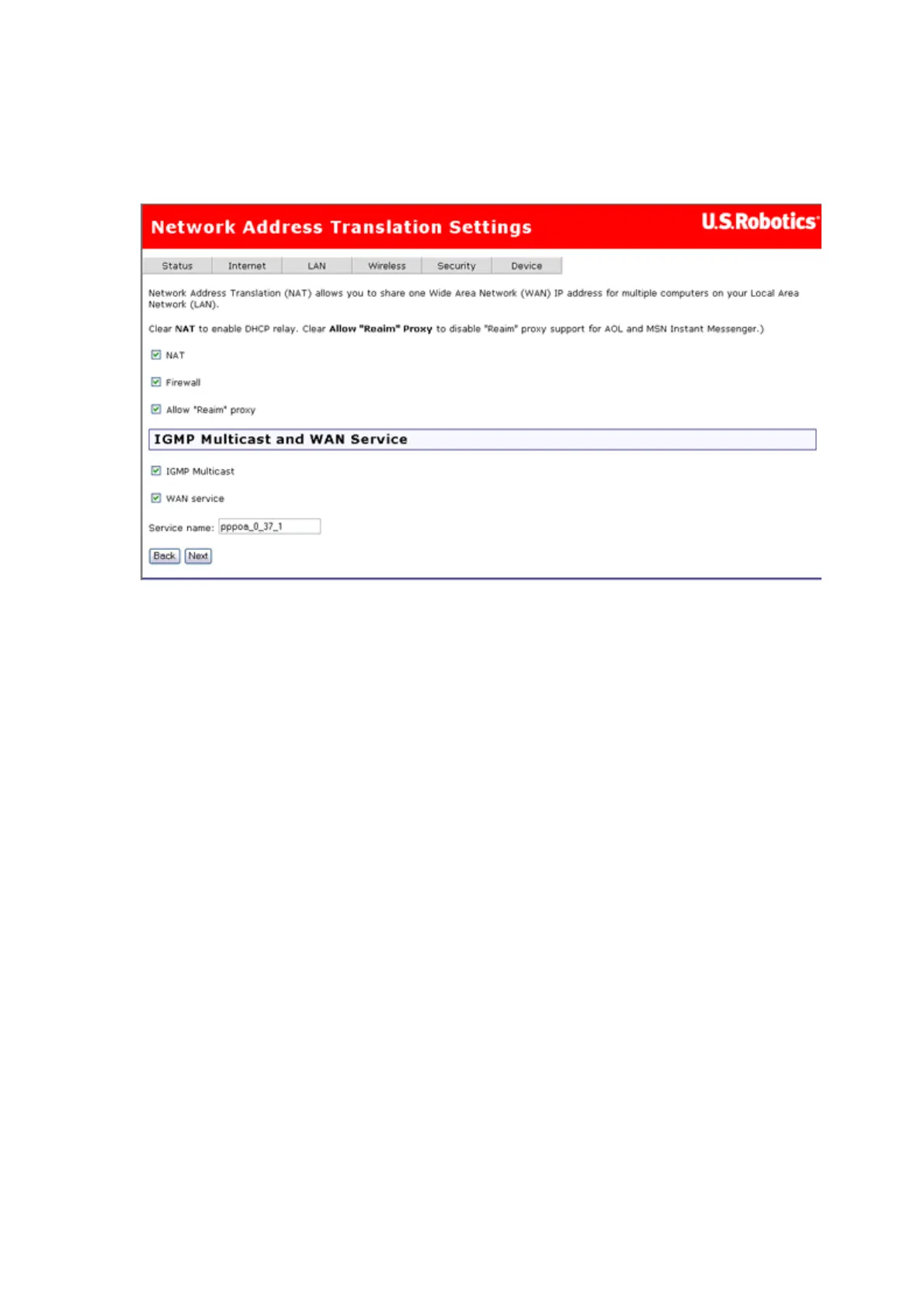
4. This page appears:
NAT checkbox: If the LAN is configured with a private IP address, you should
select this checkbox. If a private IP address is not used on the LAN side, deselect
this checkbox to free up system resources for better performance.
Firewall checkbox: If the firewall checkbox is selected, you may configure
firewall features after the system comes up from the reboot. If the firewall is not
used, de-select this checkbox to free up system resources for better
performance.
Allow "Reaim" proxy checkbox: Enable this if you want support for AOL or
MSN Instant Messenger.
You can also enable IGMP Multicast (used mostly for video streaming), enable
WAN service, and set the service name.
Click Next to continue.
5. The summary page presents the entire configuration summary. Click Apply if the
settings are correct.
第 8 頁,共 15 頁U.S. Robotics Wireless MAXg ADSL Gateway User Guide
2005/7/4file://C:\Documents%20and%20Settings\ivonne\Local%20Settings\Temp\Rar$EX05.609\wui_...



 To Next Page