41
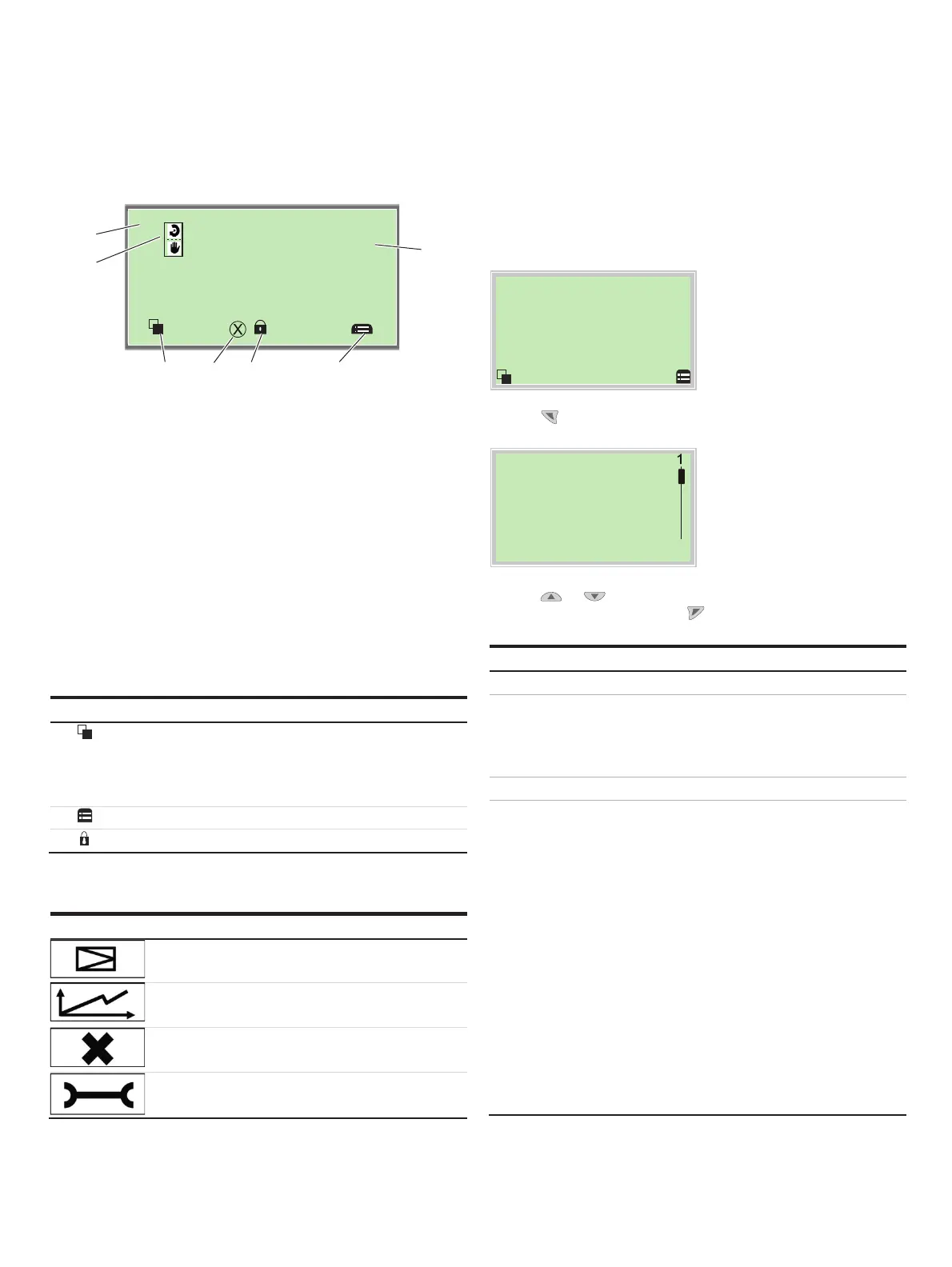
Process display
M10240-01
-
°%
POS
50.0
Position
2
1
354 3
6
1 Indication of measuring point
tagging
2 Indication of current process
values
3 Symbol indicating button
function
4 Symbol indicating
‘Parameterization protected’
5 Diagnosis notice
6 Operating mode symbol
Figure 29: Process display (example)
The pro
cess display appears on the LCD display when the device
is powered on. It shows information about the device and
current process values.
The way in which the current process values (
2) are shown can
be adjusted on the configuration level.
Description of symbols
Symbol Description
Cal
l up information level.
When Autoscroll mode is enabled, a 3symbol appears here and
the operator pages are automatically displayed one after the
other.
C
all up configuration level.
The d
evice is protected against changes in the parametrization.
Description of the message symbols
Symbol Message symbol
Universal input activated
Diagnostic message pending
Error pending
Maintenance message pending
Switching to the information level
(Operator Menu)
On the information level, the operator menu can be used to
display diagnostic information and choose which operator
pages to display.
Process dis
la
1. Use
to go to the information level.
O
erator Menu
Diagnosis
Operator Page 1
Signals View
Back Select
2.
Use
or select a submenu.
3. Confirm the selection with
.
Menu Description
... / Operator Menu
Diagnosis Displays the alarms and messages that are currently
pending and which occurred in the past. The
messages to be displayed can be selected on the
configuration level, under ‘Diagnosis’.
Operator Page 1 Switches to the process display.
Signals View Selection of submenu ‘Signals View’ (only for service
purposes).
The following signal values (plus units) can be
displayed:
• Posit
ion Pos[%]
• Posit
ion Pos[°]
• Set
point SP[%]
• Set
point SP[mA]
• Control deviation DEV [%]
• Electronic unit temperature [°C, °F, °R, K]
• Supply pressure PIN [unit]
• Pressure output 1 PY1 [unit]
• Pressure output 2 PY2 [unit]
• Differen
tial pressure DP [unit]
• Universal input value UIN [unit]



 To Next Page