EasyManua.ls Logo

VAC D500 - Configuration Parameter Overview; Easy Setup, Device Setup, Display, Controller Parameters

VAC D500
89 pages
Print Icon
To Next Page IconTo Next Page
To Previous Page IconTo Previous Page
Loading...
46
… 9 Operation
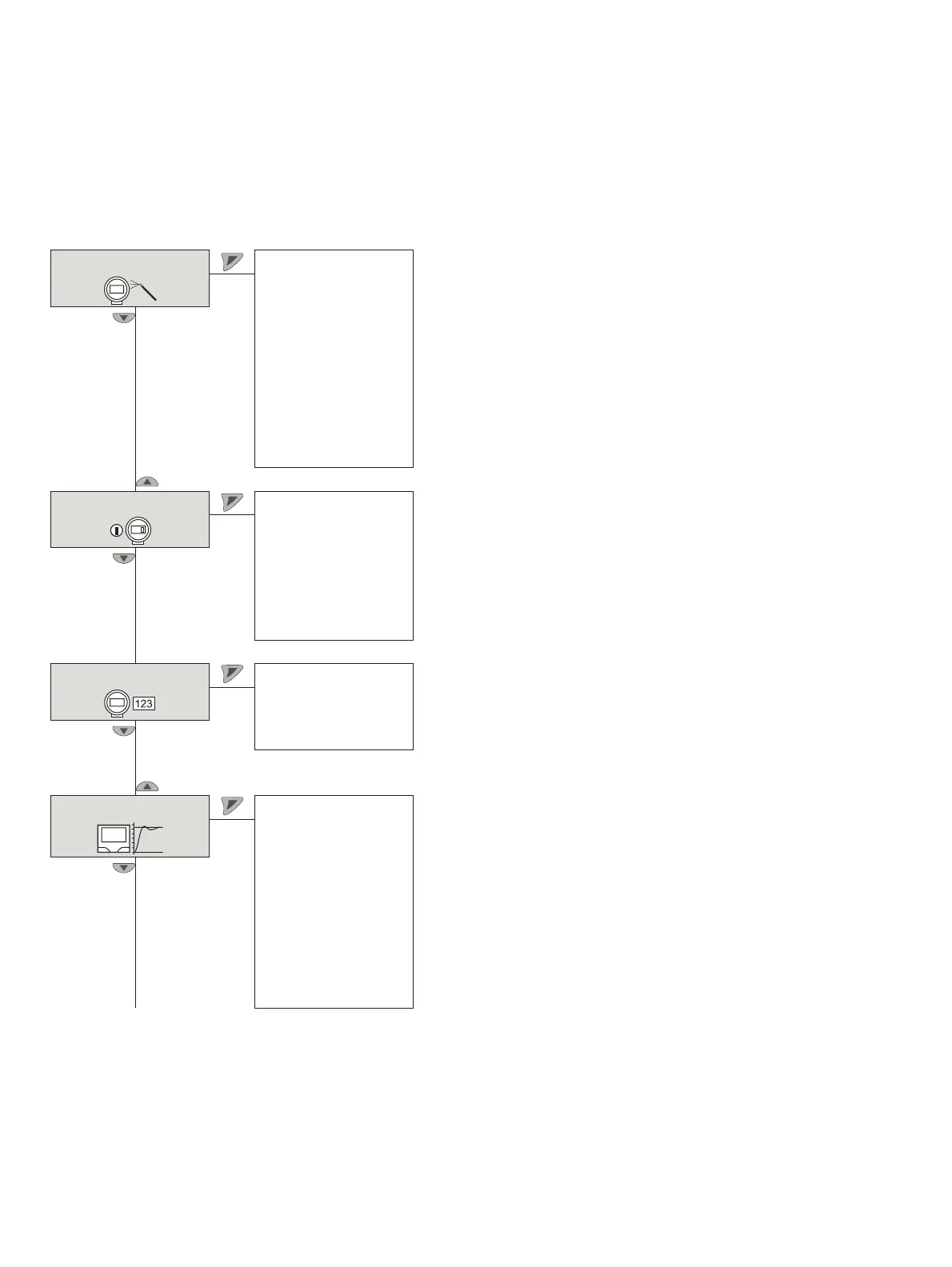
Overview of parameters on the configuration level
Note
This overview of parameters shows all the menus and parameters available on the device. Depending on the version and
configuration of the device, not all of the menus and parameters may be visible in it.
Easy Setup
1
Language
Actuator Type
Bolt Position
Vent Position
Tight Shut 0%
Control at 0%
Tight Shut 100%
Control at 100%
Autoadjust Mode
Start Autoadjust
Device Setup
2
Actuator Type
Bolt Position
Vent Position
Setpoint
Range Settings
End Stop Behav.
Recalc. Position
Display
3
Language
Engineering Units
Display Value
Contrast
Controller
4
Zone
Dead Band
DB Approach
DB Control time
KP Up
KP Down
TV Up
TV Down
Y-Offset Up
Y-Offset Down

Table of Contents

Related product manuals