7.6 USING THE KEYPAD CONTROL MENU (M3)
In the Keypad Control Menu, you can select the control place, edit the frequency reference
and change the direction of the motor.
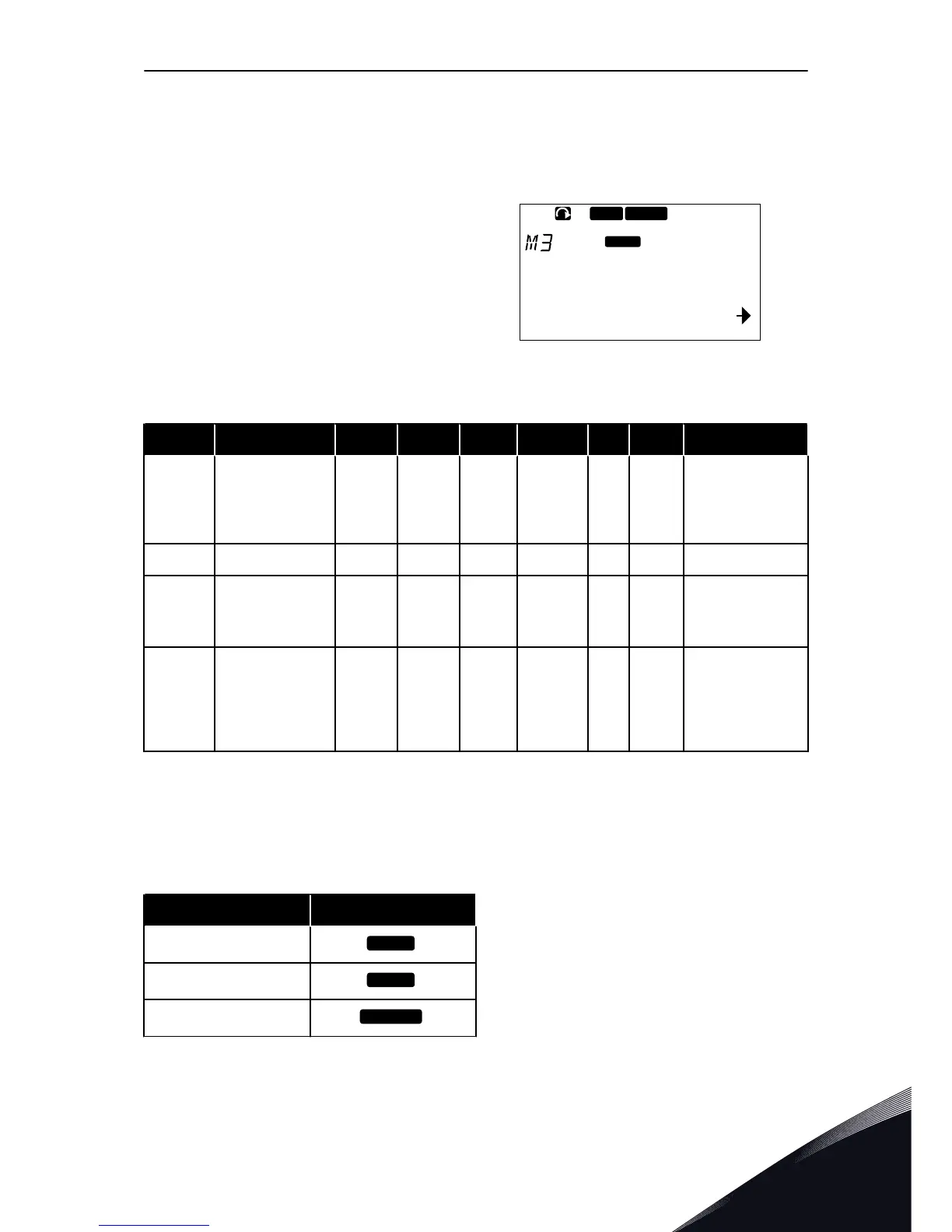
1 To find the Keypad control menu, scroll
down in the Main menu until the location
indication M3 shows on the first line of the
display.
2 To go to the Keypad control menu from the
Main menu, push the Menu button Right.
Table 41: Keypad control parameters, M3
Index Parameter Min Max Unit Default Cust ID Description
P3.1 Control place 1 3 1 125
1 = I/0 terminal
2 = Keypad
3 = Fieldbus
R3.2 Keypad reference P2.1.1 P2.1.2 Hz 0.00
P3.3
Direction (on key-
pad)
0 1 0 123
0 = Forward
1 = Reverse
R3.4 Stop button 0 1 1 114
0 = Limited func-
tion of Stop button
1 = Stop button
always enabled
7.6.1 CONTROL PLACE
You can use 3 control places to control the AC drive. For each control place, a different
symbol shows on the display:
Table 42: The symbols for the control place
The control place The symbol
I/O terminals


 To Next Page