Maintenance and cleaning Compa II series
84 Operating manual 07.15
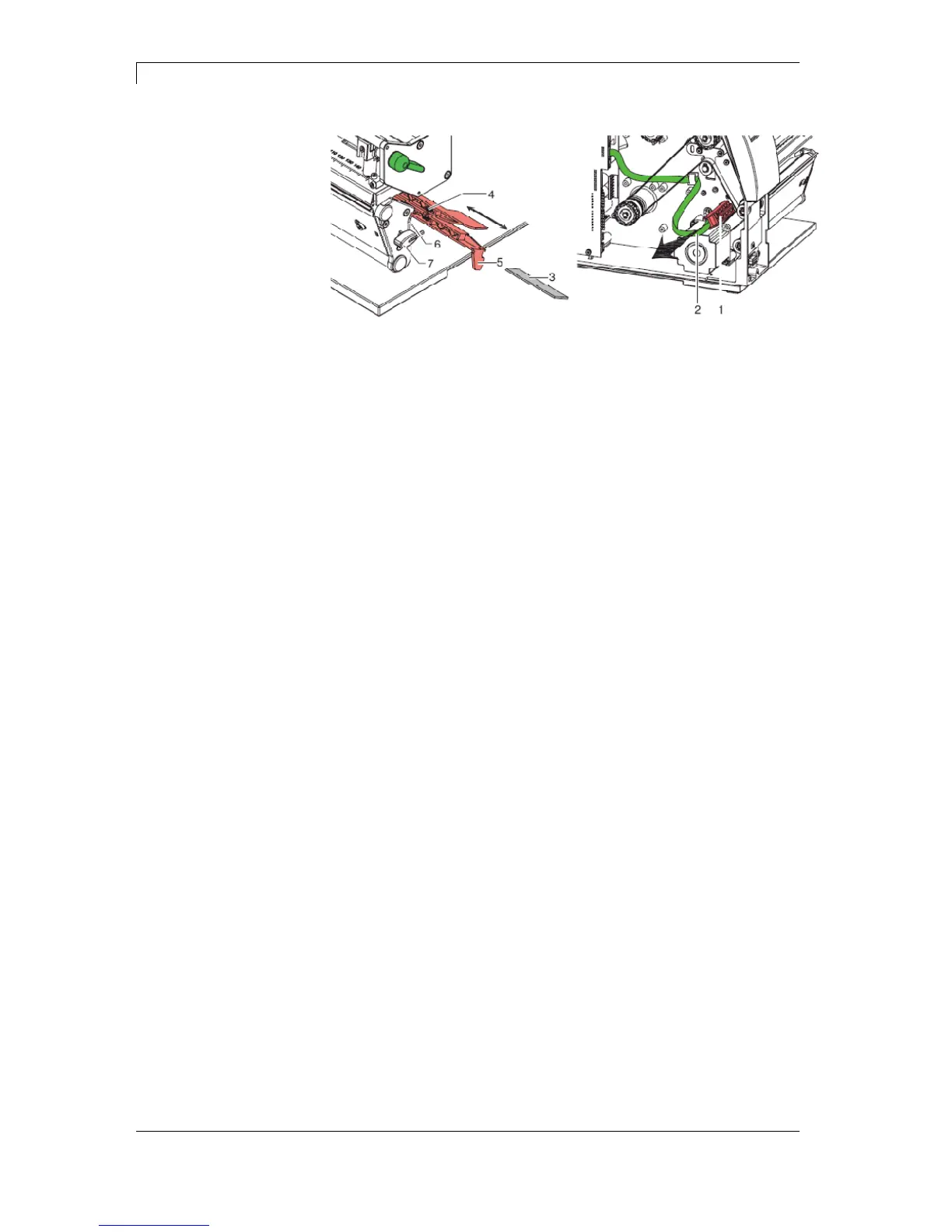
Figure 21
1. Turn lever (1) counter clockwise to lift up the printhead.
2. Remove labels and transfer ribbon from the label printer.
3. Remove hexagonal wrench (7) from its retainer and remove the
rear cover of printer.
4. Slide the label photocell assembly onto the tab (5) toward the rear
cover until it stops and unplug the cable (2) from the plug on the
rear end of the label photocell (1).
5. Press the latch (6) and slowly pull label photocell outward via the
tab (5). That way the distance plate (3) is pushed out of label
photocell guide.
6. Clean label photocell and sensor units (4) with brush or cotton
swab soaked in pure alcohol.
7. Push label photocell back via tab (5).
8. Press the latch (6) and push the distance plate (3) into the guide
of the label photocell.
9. Reload labels and transfer ribbon (see chapter 5 Loading media
on page 29).
Compa II 162 + 162 T



 To Next Page