EasyManua.ls Logo

VAT 64246-UEHC-0001 - User Manual

VAT 64246-UEHC-0001
73 pages
Print Icon
To Next Page IconTo Next Page
Loading...
Installation, Operating &
Maintenance Instructions
603685EA
Edition 2013-08-22
Control gate valve
with Logic interface
Series 642
DN 200 mm (I.D. 8")
This manual is valid for the following product ordering numbers:
64246-UEHC-0001
Configured with firmware: 642P.2E.02
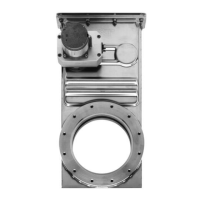
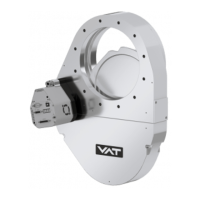
Sample picture

Table of Contents

Questions and Answers

  • J
    Jasmine RiveraSep 3, 2025
    Why is pressure not ‘0’ after ZERO on VAT Control Unit?
    • P
      Paul MurphySep 3, 2025
      If the pressure is not ‘0’ after performing ZERO on your VAT Control Unit, it could be due to: * Sensor voltage shifting. Wait until the sensor stabilizes before performing ZERO. * The system not being pumped to base pressure. OPEN VALVE and bring the chamber to base pressure before performing ZERO. * The sensor offset voltage exceeding ±1.4V. Replace the pressure gauge.
  • A
    Alexander PetersonAug 25, 2025
    Why does the VAT Control Unit display show «E 22» (fatal error - rotation angle of valve plate limited during operation)?
    • J
      Jennifer LevyAug 25, 2025
      The error «E 22» indicates that the rotation angle of the valve plate is limited during operation, possibly due to a heavily contaminated valve unit or a mechanical obstruction. Clean the valve unit or resolve the obstruction. You may also try resetting the control unit by cycling the power OFF and then ON, or by sending a reset command locally via the service port with CV/CPA/Service Box2.
  • H
    Hunter DillonDec 1, 2025
    How to resolve VAT 64246-UEHC-0001 Control Unit PRESSURE CONTROL not optimal?
    • L
      Larry TorresDec 1, 2025
      If the PRESSURE CONTROL on your VAT Control Unit is not optimal, consider these potential causes and solutions: * Ensure that the «Setup procedure» is performed completely. * Perform LEARN. Refer to «LEARN» for details. * Perform ZERO before repeating LEARN. Refer to «Setup procedure» for details. * If LEARN was interrupted, repeat it. Refer to «LEARN» for details. * Ensure stable gas flow during LEARN and repeat LEARN if necessary. Refer to «LEARN» for details. * Tune the valve for your specific application. Refer to «Tuning of control performance» for details. * Verify that the sensor range is suitable for the application; the controlled pressure should be >3% and < 98% of the sensor's full scale. * Ensure a shielded sensor cable is used to minimize noise on the sensor s...
  • C
    cwiseSep 9, 2025
    Why does VAT 64246-UEHC-0001 remote operation not work?
    • S
      steven67Sep 9, 2025
      Remote operation of the VAT Control Unit might not work because local operation via the service port is active, or the safety mode is active (check for 'D' on the display). To resolve this, switch to remote operation and ensure the motor is powered. Refer to «Electrical connection» for details.
  • H
    Hunter SullivanSep 15, 2025
    What to do if the VAT Control Unit display shows 'D 0' Motor Interlock is open?
    • G
      gabrieljosephSep 15, 2025
      If the display shows 'D 0', it means the motor interlock is open. Ensure that power is supplied to the motor. For details, refer to «Electrical connection».
  • S
    Stephanie HermanSep 6, 2025
    Why is the pressure reading wrong or negative on my VAT Control Unit?
    • P
      Paul LopezSep 6, 2025
      If the pressure reading on your VAT Control Unit is wrong or negative, check the sensor connections as described in «Electrical connection». Verify if a 2 sensor version is present at the valve controller and verify the configuration. Refer to «Setup procedure». Perform ZERO when base pressure is reached. Refer to «ZERO» for details. Also, verify the sensor supply voltage.
  • T
    tim80Aug 31, 2025
    What to do if CLOSE VALVE does not work on VAT Control Unit?
    • T
      Terry WolfAug 31, 2025
      If the CLOSE VALVE function is not working on your VAT Control Unit: * Check if safety mode is active (indicated by 'D' on the display) or if maintenance mode is active. Provide power to the motor to allow for operation. * Refer to «Electrical connection» for details. * Also, refer to the section for “Display shows «M C»” in this table.
  • K
    Kathryn DiazSep 18, 2025
    What to do if pressure is not ‘0’ after ZERO PRESSURE CONTROL on VAT Control Unit?
    • T
      Tracy WhitakerSep 18, 2025
      If the pressure is not '0' after performing ZERO PRESSURE CONTROL, it could be due to sensor voltage shifting; wait until the sensor stabilizes before performing ZERO. Ensure the system is pumped to base pressure; open the valve and bring the chamber to base pressure before performing ZERO. If the sensor offset voltage exceeds ±1.4V, replace the pressure gauge. Check if safety mode is active, indicated by a 'D' on the display, and provide power to the motor if necessary. Refer to «Electrical connection» for details if PRESSURE CONTROL is selected, indicated by a 'P' on the display. Ensure that LEARN has been performed.
  • B
    Briana JohnsonSep 12, 2025
    Why VAT Control Unit OPEN VALVE does not work?
    • C
      christopher77Sep 12, 2025
      The VAT Control Unit OPEN VALVE function may not work if the safety mode is active (check for 'D' on the display) or if the maintenance mode is active. Provide power to the motor and refer to «Electrical connection» for details. Also, refer to “Display shows «M100»” in this table.
  • K
    kmillerAug 27, 2025
    What does it mean when VAT Control Unit display shows «D 0» Motor Interlock is open?
    • D
      Denise BakerAug 27, 2025
      If the display shows «D 0», it means the Motor Interlock is open. Ensure the motor is receiving power. Refer to «Electrical connection» for details.

VAT 64246-UEHC-0001 Specifications

General IconGeneral
BrandVAT
Model64246-UEHC-0001
CategoryControl Unit
LanguageEnglish

Related product manuals