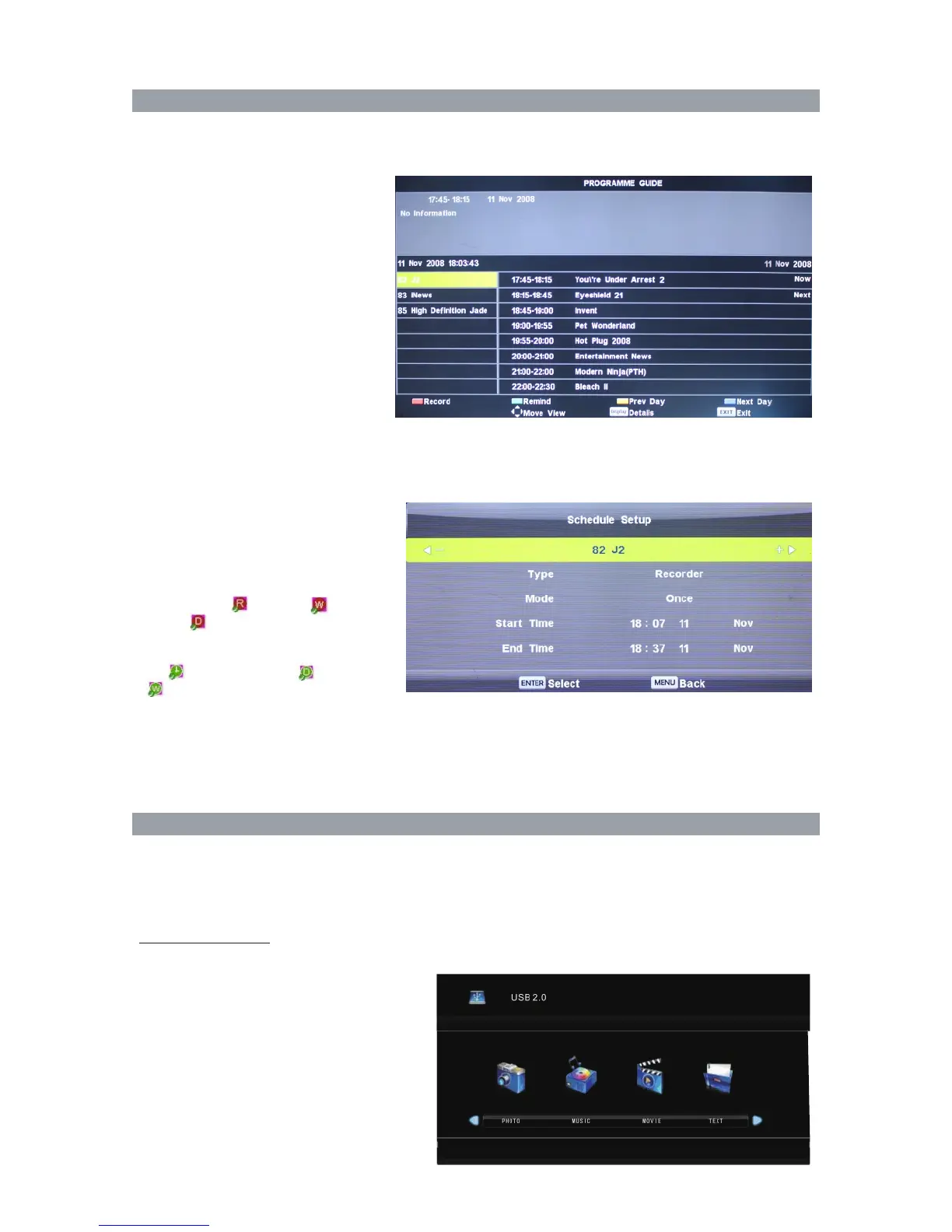
EPG ( only available in DTV mode)
Press EPG button in the DTV Mode to display electronic program guide.
Schedule setup
Press the blue button in Schedule List menu to display the recorder menu. Setting the
schedule for starting, ending and recording mode. After confirmation, programs will start
recording to USB device.
Press SOURCE button, and then use ▲ ▼ button to select DMP, press ENTER button to confirm.
Press ◀▶ button to select PHOTO, MUSIC, MOVIE, TEXT, press ENTER button to confirm.
Press ◀▶ button to select the files, press ENTER button to confirm.
NO
TE: Some USB storage devices or part of USB3.0 may not be supported or operate properly.
Media Interface:
EPG
Media Menu
The formats supported
The TV supports the following files
including movie, music, photo and text.
For PHOTO, it supports file formats
among JPEG, BMP, PNG.
For MUSIC, it supports MP3, WMA file
format.
For MOVIE, it supports MP4, MPEG, MKV,
AVI, MPG, RMVB file format.
For TEXT, it supports TXT.
NOTE: The special algorithm documents
may not be supported by the USB.
41
The display time of EPG is pre-play, and individual program will be 3-5 minutes later than EPG time because
of the breaks (for example, news or Advertisement). Please postpone 3 to 5 minutes after finish the recording
when you set recording.Please set start and end time of Monday to Friday automatically when using the
mode of Monday to Fridayin recording mode.
Press the RED button to see
the setting you have done before.
Press the GREEN button to set the
time you want to remind the
program you want to see.
Press the YELLOW button to display
previous date.
Press the BLUE button to
display next date.
Press the INFO button to display
detail information of current
program.
Note: if you connected a format hard disk
when you select to EPG page.
A> Press Red buttom to record program
and there are ( ) ONCE, ( )
DAILY, ( ) WEEKLY.
B> Press Green buttom to set the time
you want to remind program and there
are ( CLOCK) ONCE, ( ) DAILY,
( ) WEEKLY.



 To Next Page