16
5 Connecting to power supply
VEGAPOINT 21 • Transistor (NPN/PNP)
56623-EN-210210
5.2 Connecting
1 2
4
4
3
4
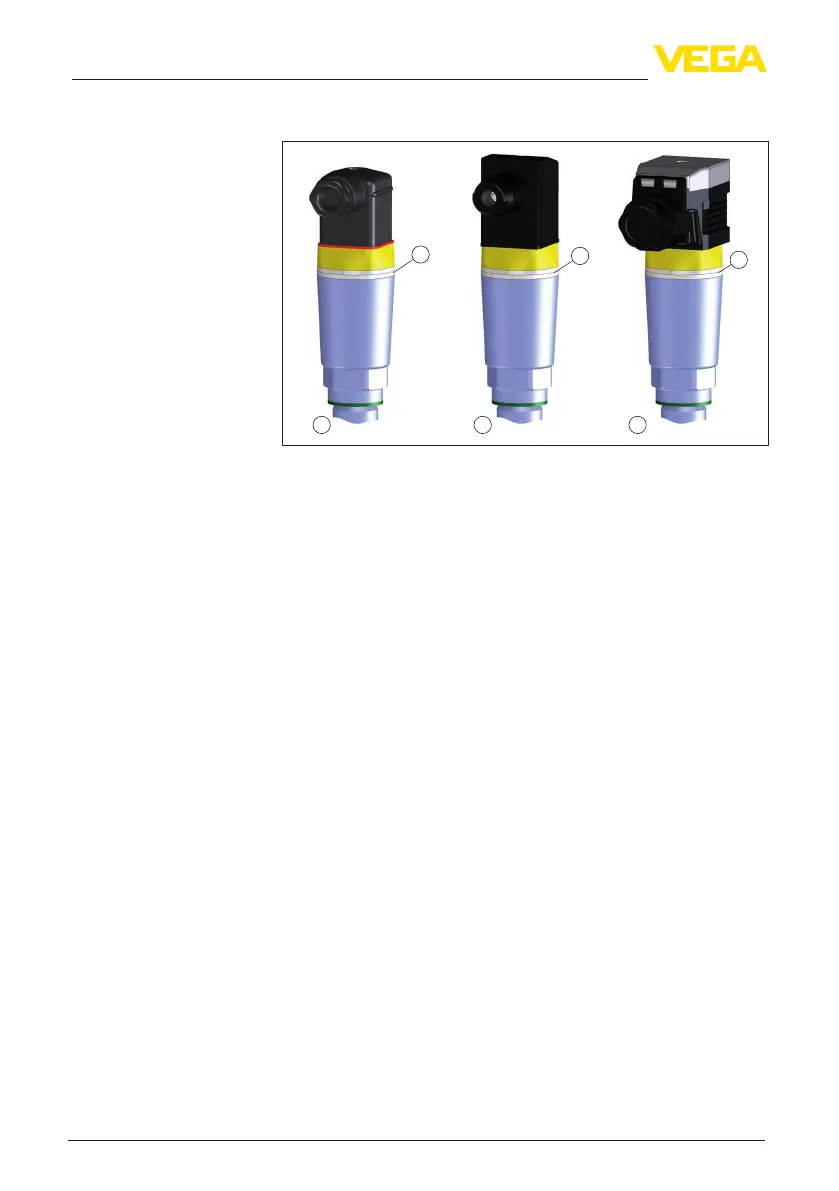
Fig. 7: Plug versions
1 Valve plug ISO 4400
2 Valve plug ISO 4400 with IDC method of termination
3 Valve plug ISO 4400 with hinged cover
4 LED illuminated ring
For this plug version, standard cable with round wire cross-section
can be used. Cable diameter 4.5 … 7 mm, protection IP65.
1. Loosen the screw on the rear of the plug connector
2. Remove the plug connector and seal from VEGAPOINT 21
3. Remove the plug insert from the plug housing
4. Remove approx. 5 cm of the cable mantle, strip approx. 1 cm
insulation from the individual wires
5. Lead the cable through the cable gland into the plug housing
6. Connect the wire ends to the screw terminals according to the
wiring plan
Instrument versions
Valve plug ISO 4400


 To Next Page